If the monitor has separate red, green, and blue inputs, use just one input for testing.
If this works we will show how to connect all three inputs if you want white.
Just noticed VGA connector has separate ground for R,G and B. Do I have to connect any of those ?
No . My dream is not to use another CRT.
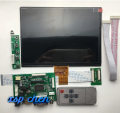
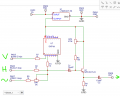
My wish is to use H, V, and video signals to feed LCD via some device like this or any otherView attachment 270195
A VGA monitor only works with a H-sync frequency of 31.5khz. If your car monitor works then the H-sync is more like 15khz to 17khz.
You will have better luck with a "TV" or the car monitor because they are built for 15750hz (depending on where you live).
Some TVs and Monitors will work with 15750 because there are/was so many things built for that frequency.
"VGA" is not "broadcast".
That is a BIG guess on my part but sure seems like your simple question is actually quite complicated.
Must be a reason people build massively complicated converters.
Certainly not for fun.
Well "just" fun.
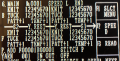
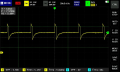
small video of problem via DIY composite mixer on car monitor. Picture noisy and unstable.
Pic below :
Another problem is that some symbols must be in bold text indicating that function is active , but you hardly can tell what is what.
For example figures 12345670 - some of them are bold others not.
Or can it be that too low panel resolution is causing that ?
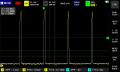
It looks like broadcast 15750hz H-sync. That is good news.
I think there are 3 levels in the video. Black/white/bold. Black=0%, white=80%, bold = too much. There is too little difference between the two top levels. I think the video is overdriving the monitor. Reducing the level so that bole=100% will cause white =50%.
Is there any reason why you can't use separate sync for the monitor?
You circuit is causing the distortion you see.
I need to get to work and do not have time right now, maybe someone can help.
One of machines was equiped that way long ago. And we keep strugling looking at that distortions for years.
I will use your instructions as soon as I can find my VGA monitor. Seems I hide it better than I thought.
My wish was to find better way for another 4 machines we have.
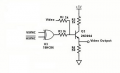
I don't know if you need to invert V-sync or not. This is a typical circuit. H-sync is inverted during V-sync. This circuit is not perfect, but it is close enough for most monitors.
Note there are no capacitors in the input and output.

 Facebook
 Google
 GitHub
 Linkedin