Ancient video signal processing question

MrChips

Joined Oct 2, 2009
34,829
Since you have access to a good oscilloscope you can monitor the HSYNC, VSYNC, and VIDEO signals (not the composite) with two or three probes.

Connect one probe to the VSYNC signal and input that signal to either the Trigger Input or one of the vertical input channels.
Trigger the oscilloscope on this signal, starting at a low sweep rate (try 10ms/DIV).

With a second probe, examine the other signals, HSYNC and VIDEO.
Use delayed sweep to scan across to a later time frame or use the horizontal adjustment.

What is the brand and model of the oscilloscope?
Does the oscilloscope have video sync option?
 

Thread Starter

kotlec

Joined Jun 26, 2022
48
My osciloscope is
FNIRSI-1013D Digital Dual Channel 100M Bandwidth 1GS Sampling Rate Mini Tablet Digital Oscilloscope
 
Last edited by a moderator:

MrChips

Joined Oct 2, 2009
34,829
My osciloscope is
FNIRSI-1013D Digital Dual Channel 100M Bandwidth 1GS Sampling Rate Mini Tablet Digital Oscilloscope
Thanks for that information.

Your FNIRSI-1013D does not have external trigger input. It has two input channels.

Input VSYNC into Channel 1 and trigger on this channel. Set the HOR scan to about 10ms/DIV (or use AUTOSET).
Show us what you have.

Next. Connect HSYNC to Channel 2 input. Set HOR scan to about 200μs/DIV (still triggering on VSYNC on Channel 1).
Show us what you have.
 

Thread Starter

kotlec

Joined Jun 26, 2022
48
Thanks for that information.

Your FNIRSI-1013D does not have external trigger input. It has two input channels.

Input VSYNC into Channel 1 and trigger on this channel. Set the HOR scan to about 10ms/DIV (or use AUTOSET).
Show us what you have.

Next. Connect HSYNC to Channel 2 input. Set HOR scan to about 200μs/DIV (still triggering on VSYNC on Channel 1).
Show us what you have.
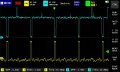
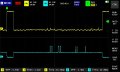
Hope this is what you told to do. Not sure though :)vid.jpg

sync.jpg
 

MrChips

Joined Oct 2, 2009
34,829
What I see is HSYNC (yellow) and COMPOSITE (blue) signals.
That is not what I asked and would have gotten around to asking for this.

Firstly, we want to see VSYNC.

What we are attempting to do is connect the three signals HSYNC, VSYNC, and VIDEO to a VGA monitor.
It would appear that you have the wrong connections. Try again with HSYNC and VSYNC correctly connected.

Remember, HSYNC is 15.7KHz and VSYNC is 50 or 60 Hz.
 

ronsimpson

Joined Oct 7, 2019
4,702
Wonderful pictures.
Look at post #72.
Your pictures show no hint of three levels of video. It may be there but hidden because of a lack of "Rt" in your little circuit.
The sync is about 2x too large, (voltage) There is a resistor in your circuit for adjusting that.
You asked why the voltage is over 1V. We don't know how your computer was built but it should have been made with "Rs"=75 ohms and the monitor has "Rt"=75 ohms. This makes a 0.5 voltage divider. Your circuit lacks a termination resistor. I think adding a resistor to ground on the input will help reduce the p-p voltage. (use 75 to 100 ohms)
1657631910815.png
Please repost your latest circuit. I want to change two resistors.
 
Last edited:

Thread Starter

kotlec

Joined Jun 26, 2022
48
What I see is HSYNC (yellow) and COMPOSITE (blue) signals.
But I connected both probes directly on mixer input. There are 6 wires ( all unshielded ) comming directly from computer.

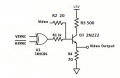
Now my circuit looks (or I thing looks) like that
1657636542413.png
 
Last edited:

MrChips

Joined Oct 2, 2009
34,829
But I connected both probes directly on mixer input. There are 6 wires ( all unshielded ) comming directly from computer.

Now my circuit looks (or I thing looks) like that
View attachment 271306
There is confusion on what exactly you are testing at the moment.
Are we testing VGA signals or composite signal?
What is your display?
What are the 6 wires you mention?
What is it that you call a computer?
 

ronsimpson

Joined Oct 7, 2019
4,702
Not VGA. Yes 15750x60 video.
The computer makes video, H, V Where the video has no sinc and is about 1 volt.
The monitor needs composite.
 

ronsimpson

Joined Oct 7, 2019
4,702
1657639731492.png
Normally all video inputs have a 75 ohm resistor to ground or the signal will be too large. Without the termination resistor R2 needs to be larger. R_termination is in parallel with R2 as far as the computer sees. So 100 ohms to ground might help.
I think R1 is incenting too much sync into the output.

Because I don't know how the computer was built, I can't know how it reacts with only R2 as a load.
 

Thread Starter

kotlec

Joined Jun 26, 2022
48
There is confusion on what exactly you are testing at the moment.
Are we testing VGA signals or composite signal?
What is your display?
What are the 6 wires you mention?
What is it that you call a computer?
I call "computer" machine board that generates video signal
https://forum.allaboutcircuits.com/attachments/videopl-jpg.270177/

Diagrams in last pictures are from computer outputs.

Display is LCD car monitor 7". Pictures was from it.

6 wires are H V Vid Gnd +12V and one that I dont know what it is, but scope can see only noise.
 

MrChips

Joined Oct 2, 2009
34,829
So we are back to testing with the LCD car monitor that requires COMPOSITE input?
And your concern is being unable to distinguish NORMAL from BOLD text?
 

Thread Starter

kotlec

Joined Jun 26, 2022
48
I dont have preference regarding VGA or composite. Monitor that I plan to purchase has both inputs.
1657645737823.png
My hope was to use VGA directly with no converter/mixer. But since that dont work, both ways are open now.

And yes problem is bold - regular text.
 

MrChips

Joined Oct 2, 2009
34,829
My hope was to use VGA directly with no converter/mixer. But since that dont work, both ways are open now.
That is what I was addressing with the oscilloscope measurements.
It does not work because you have the wrong signals connected.

Let's get back to getting the VGA to work.
 

MrChips

Joined Oct 2, 2009
34,829
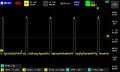
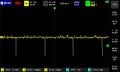
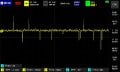
I see:
HSYNC @ 15.7kHz
VSYNC @ 43Hz

I have no idea what the VIDEO signal is showing.

Connect HSYNC and VSYNC to your VGA monitor. It ought to sync to these two.
 
Top