ADC result on LCD

Thread Starter

Shagas

Joined May 13, 2013
804
Hello ,
I've been recently trying to interface my atmega32 to a WINSTAR
WH1601A LCD display .
It works ( most of the time ) when I'm trying to send discrete characters .

Now i'm trying to send a live feed of the ADC result to the LCD and it's not working .
I'm trying to covert the result to a string and then send it.
My LCD is showing blank (no results)
Could someone see where my error in the code is? Particularly in the conversion using ITOA.

Note: I'm only linking snippets of the relevant code

Thanks in advance

Rich (BB code):
int convert()
{
	ADCSRA |= ( 1 << ADSC);
	
	while((ADCSRA & (1<< ADSC)));
	 
	
	return ADC;
	
}

void SendString(char *CString)
{
	while(*CString > 0)
	{
		SendCharacter(*CString++);
	}
	
}

And the main routine:

Rich (BB code):
int main(void)
{	
	ADMUX |= ( 1 << REFS0);
	ADCSRA |= ( 1 << ADEN) | (1 << ADPS1) | ( 1 << ADPS0);
	DDRD |= (1 << 2 ) | ( 1 << 5 ) | ( 1 << 7);
	
	_delay_ms(100);
	SendCommand(0x01); //Clear Screen 0x01 = 00000001
	_delay_ms(2);
	SendCommand(0x38);
	_delay_us(50);

	while(1)
	{
		convert();
		
		
			SendCommand(0x01);
			char adcResult[4];
			itoa(ADC , adcResult, 10);
			SendString(adcResult);
			_delay_ms(10);


	}
}
 

Thread Starter

Shagas

Joined May 13, 2013
804
Generally my SendString function doesn't really do it's job correctly .
I got that part of the code and some other snippets from newbiehack.com

I don't get how the SendString part works... but it works for the guy and it sometimes works for me .
Anyway Here is the complete code , I'd REALLY appreciate it if someone shed some light on it .

I know how almost everything in that code works ( I didn't just copy paste) . But the ones mentioned with '"apparently" I am not so sure of.

Rich (BB code):
#include <avr/io.h>
#include <util/delay.h>
#include <stdlib.h>

void Checkbusy(void);
void Enable(void);
void SendCharacter(unsigned char character);
void SendCommand(unsigned char command);
int convert(void);
void SendString(char *CString);


int main(void)
{	
	ADMUX |= ( 1 << REFS0);
	ADCSRA |= ( 1 << ADEN) | (1 << ADPS1) | ( 1 << ADPS0);
	DDRD |= (1 << 2 ) | ( 1 << 5 ) | ( 1 << 7);
	
	_delay_ms(100);
	SendCommand(0x01); //Clear Screen 0x01 = 00000001
	_delay_ms(2);      // apparently these delays are needed between commands
	SendCommand(0x38); // apparently sets the LCD in 8bit mode
	_delay_us(50);

	while(1)
	{
		convert(); // routine to start conversions of ADC and return result
		
		
		SendCommand(0x01); // clearscreen
		char adcResult[4];
		*itoa(ADC , adcResult, 10);   // converting the ADC result to a string 
		SendString(adcResult);   // SendString routine
		_delay_ms(10);


	}
}


void Checkbusy()
{	
	DDRB = 0b00000000; //Put PortB in Input (read) Mode
	PORTD &= ~(1<<2); //Turn on Command Mode (RS off)
	PORTD |= (1<<7); //Set to Read (RW on)
	while (PORTB >= 0x80); //D7 pin will be a "1" with any number above 0x80 (that's hex)
	{
		Enable(); // this is just another routine to turn the enable on and off
	}
	DDRB = 0xFF; //Set portB as output
}

void Enable()
{
	PORTD |= (1<<5); //Turn Enable on
	asm volatile ("nop"); // apparently this makes the MCU wait for 500 ns
	asm volatile ("nop");
    PORTD &= ~(1<<5); //turn off Enable 
}
void SendCommand(unsigned char command)
{
	Checkbusy();
	
	PORTB = command;
	PORTD &= ~((1<<2)|(1<<7)); //turn off RS (command mode) and RW (write mode)
	Enable();
	DDRB = 0;
}

void SendCharacter(unsigned char character)
{
	Checkbusy();
	
	PORTB = character;
	PORTD &= ~(1<<7); //turn off RW (write mode)
	PORTD |= (1<<2); //turn on RS (character display mode)
	Enable();
	DDRB = 0;
}

int convert()
{
	ADCSRA |= ( 1 << ADSC);
	
	while((ADCSRA & (1<< ADSC)));
	 
	
	return ADC;
	
}

void SendString(char *CString)
{
	while(*CString > 0)
	{
		SendCharacter(*CString++);   
	}
	
}
 

Thread Starter

Shagas

Joined May 13, 2013
804
Problem is that sometimes the LCD works ... sometimes I reprogram the MCU and it doesn't work anymore until I load a completely diffrent program.

I do have my dataports of the LCD on PORTB on which also resides the AVRISP mkii
Is it having a conflict with the LCD?
 

Thread Starter

Shagas

Joined May 13, 2013
804
The ADC value is returned after the convert(); function and put into the ITOA function.

I do not know the sprintf() function . What does it do / how can I use it?
 

mitko89

Joined Sep 20, 2012
127
What the sprintf() does is: it takes a formatted input and makes a string out of it e.g.
char mystring[20]; // this is your buffer string
sprintf(mystring,"ADC value=%d", ADCvalue); // ADCvalue is your converted value
The result of that is mystring now contains "ADC value=XXX" (your value). And then you can pass that string to your printer program, which sends the chars 1 by 1.
I also suggest you get a volatile variable to contain the result from the conversion, because the compiler may optimize it and use a copy (you don't want that to happen).
 

Thread Starter

Shagas

Joined May 13, 2013
804
Okay , thanks mitko89 , i'll try it.
Do you have any idea why My lcd is sometimes working and sometimes not?
 

mitko89

Joined Sep 20, 2012
127
I also suggest you to take a look at this playlist of lectures from James Conrad (you can see how to use the sprintf() at lecutre 5).
 

mitko89

Joined Sep 20, 2012
127
I don't think it's a conflict with the SP, but you can try moving it to another pins, also can you describe the problem further? Do you get solid boxes or noting at the LCD at all? This is happening after few writes or nothing happens at all?
 

Thread Starter

Shagas

Joined May 13, 2013
804
Thanks , i'll check out the tutorial
Well sometimes It goes solid boxes and goes away after I restart it and sometimes it doesn't .
Sometimes it just goes blank after I load in a new program.
I think there is some error in my code .
I tried copy/paste the code from
http://www.newbiehack.com/MicrocontrollersABeginnersGuideOurFirstLCDProgram.aspx

and it works now.

Can you recommend some good libraries that I can use ?
my LCD only has one row and 16 coloumns
 

Thread Starter

Shagas

Joined May 13, 2013
804
sprintf() is a special mikroC function and is consumed more flash.
Use the hex file attached below and tell me if it works on your LCD.
I attached below and schedule work.
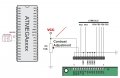
How come the R/w Is grounded ?
I'm going to need to reconfigure my LCD to 4bit
 

mitko89

Joined Sep 20, 2012
127
I suggested using sprintf(), because it is standard function and it makes doing changes and following the code easier... you are using ATMEGA32 and you are worried about flash in such project? - get real...
 

donpetru

Joined Nov 14, 2008
185
How come the R/w Is grounded ?
I'm going to need to reconfigure my LCD to 4bit
Try and test diagram posted above, together with the hex file.

Connecting the R/W pin to the Ground, the messages will be normally displayed very well, but it will not be possible to read the busy flag since it is not possible to read the display either. Is a simple solution that works well in many applications. Try this.

LATER EDIT:
mitko89
sprintf() eat pretty much flash.
For example, use sprintf twice in a little more complex software and try to write it in an ATmega8 and see that you can not do that. In addition, not all Atmel microcontrollers supports sprintf().
 

mitko89

Joined Sep 20, 2012
127
In the particular case, Shagas is using ATmega32, I have never dealt with Atmel, but sprintf() is one of the most popular functions in embedded programming, he has to get familiar with it. Writing a code that is hard to follow just to save a bit of flash... if you want to do that you can use dynamic allocation. Always keep the code as readable as possible. If you want your code to take less memory, write it in assembly. If you are using C, take advantage of the high level or it's pretty much pointless.
 

Thread Starter

Shagas

Joined May 13, 2013
804
Try and test diagram posted above, together with the hex file.

Connecting the R/W pin to the Ground, the messages will be normally displayed very well, but it will not be possible to read the busy flag since it is not possible to read the display either. Is a simple solution that works well in many applications. Try this.

LATER EDIT:
mitko89
sprintf() eat pretty much flash.
For example, use sprintf twice in a little more complex software and try to write it in an ATmega8 and see that you can not do that. In addition, not all Atmel microcontrollers supports sprintf().
Thanks i'm going to try it now .
I downloaded and configured some Library from Peter Fleury and it looks to be working .

But when a string is sent my display only displays the first 8 characters .
My display is 16 characters long x1 .
I had this problem in previous programms before .

I'm going to try your one now
 

Thread Starter

Shagas

Joined May 13, 2013
804
sprintf() is a special mikroC function and is consumed more flash.
Use the hex file attached below and tell me if it works on your LCD.
I attached below and schedule work.

I connected it , it works and displays :

"ww.techn'
It scrolls fine , but it still displays only the first 8 characters. Do you know why ?
 

donpetru

Joined Nov 14, 2008
185
Check the LCD to see if it works correctly. To test it, connect +5V and ground to the LCD , with nothing else, and see if displayed 16 black squares on display. If it displays only the first 8 characters, the LCD is compromised. I also have an LCD that
got on ebay.com.

LATER EDIT:

Display all 16 characters?
It is a URL that I made ​​to move on the screen. It is totally visible? If not, test the LCD as I said above.
 
Top