AD620 Instrumentation Amplifier Circuit w/ Microphone

Audioguru

Joined Dec 20, 2007
11,248
Hi, I'm just wondering if I can use both pins of the microphone as a differential input.
I f the mic is an electret one then since its metal case is one of the wires (ground) then it will probably act like an antenna and pickup mains hum.

An ordinary audio opamp like a TL071 amplifies an electret mic perfectly.
 

Thread Starter

tennisrulz

Joined Mar 3, 2010
20
Thank you. I did test with the ground connected to the inverting input of the differential op-amp. The results are attached in the word document (old version) for viewing. Like you said, it was mostly hum that it was picking up at this input. The op-amp gave me a gain of 6 V/V instead of 50 V/V, but better than before. I also had my microphone working in the audible frequency range, but now it was saturating at lower frequencies (around 400 Hz) for which I've attached the waveform as well. Here are the microphone specs. It's an electret condenser microphone.
Supply Voltage: 1 to 10 Vdc
Nominal supply: 4.5 Vdc (I'm using 3 V)
Current drain (max) 0.3 mA
SNR: 60 dB (min)
sensitivity: -64 +/- 2dB
output impedance 1kohm

Also, is it better to get a low noise amplifier than do the differential input (with microphone lead as one of the inputs)?

Thanks in advance.
 

Attachments

Audioguru

Joined Dec 20, 2007
11,248
Millions of preamplifiers work perfectly when a low noise opamp is used with an electret mic.
You posted photos of distorted waveforms but you did not post the schematics of the circuits that caused the distortion. If you post the schematics then we can help you fix them.
 

Audioguru

Joined Dec 20, 2007
11,248
I think the distortion is caused by the useless 741 opamp.
It does nothing in your circuit except cause noise and distortion. It has no voltage gain.
R11 also does nothing in your circuit.

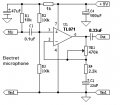
My mic preamp uses a low noise TL071 opamp.
 

Attachments

Thread Starter

tennisrulz

Joined Mar 3, 2010
20
I ordered the TL op-amp but in the meanwhile, I was wondering how to properly bias an electret mic. I followed the circuit schematic with the resistor value 2.2k and a large capacitor. But, I'm not able to get the signal across the specified frequency range. I'm testing the circuit with an audio op-amp hooked up to a speaker whose sound is detected by the electret mic. I'm using a WM64PNT electret mic and the links to its datasheet are provided below if you need it.

http://octopart.com/wm-64pnt-panasonic-154658
http://parts.digikey.com/1/parts/839-microphone-omni-6x2-2mm-w-cap-wm-64pnt.html

Thanks!
 

Audioguru

Joined Dec 20, 2007
11,248
My mic preamp circuit shows 9V being filtered with a 1k resistor and a 47uF capacitor then the filtered DC feeding about 0.5mA though a 10k resistor to the electret mic.
A 2.2k resistor might feed a voltage too high to the mic and its value is low so it loads down the output level from the mic.

Your sound source is from a speaker. The speaker, its enclosure and its surroundings affect its frequency response.
I measure a speaker laying on its back pointing straght up outside in a field with the mic hanging directly above it. I use pink noise not sine waves.
 

Thread Starter

tennisrulz

Joined Mar 3, 2010
20
the output of my electret mic is still clipping over a wide range of frequencies when tested. I used the circuit you gave me and tested it at the output of the capacitor and it still clips. I'm not sure what's causing it. I've changed the breadboard...used different microphones and even different biasing circuits. this is the spec sheet for the microphone I'm using

http://search.digikey.com/scripts/D...&lang=en&site=us&keywords=P11964-ND&x=14&y=21

Thanks!
 

Audioguru

Joined Dec 20, 2007
11,248
The 470k trimpot sets the gain of my mic preamp. If it is set to 470k then a voice that is close to the mic will cause 50mV p-p at the input and the output will try to be 10.7V p-p and produce clipping. Turn down the trimpot for less gain if you have clipping.
 

Thread Starter

tennisrulz

Joined Mar 3, 2010
20
Thank you it works wonderfully. I'm in the testing phase and the signals below a certain frequency outputs as noise and I think the speaker doesn't respond to lower frequencies. Unfortunately, I don't have a datasheet for it since it was bought from goldmine electronics. So, I decided to test using the speaker from my laptop in the audible frequency range. Is this a good method to test the system or is there a much more effective way? The microphone has two leads (output and ground) and to measure the gain, is there a way to test what the input going to the microphone from the speaker will be?
 

Audioguru

Joined Dec 20, 2007
11,248
I think The Goldmine sells unknown surplus junk.
The enclosure for a speaker must match its spec's for good bass response.
The speaker on a laptop is a joke. It is not a speaker, it is a shrieker with NO bass response.

The microphone has a datasheet that spec's its sensitivity at a certain distance. You can measure the gain of the preamp. Put the two together for the amount of sound level at the microphone.
 

Thread Starter

tennisrulz

Joined Mar 3, 2010
20
I tested it with a speaker that I can test my circuit at lower frequencies. I don't know if this has something to do with the ground loops, but my output is giving me the following waveforms. The input is the yellow waveform that from the audio speaker and the output is from the op-amp that is connected to the microphone.

Thanks in advance!
 

Audioguru

Joined Dec 20, 2007
11,248
Did you use shielded audio cables for the signals from the arms?
Did you connect the feed to the patien's right leg?
Did you use conductive jelly and medical sensors for the pads?

Your signals look like 500Hz. Nothing in the circuit has enough output current to drive a speaker.
 

Thread Starter

tennisrulz

Joined Mar 3, 2010
20
This is just benchtop testing. Shielded cables was used, however, it was not in an enclosure.

The speaker is driven by an audio amplifier using LM386. It is the circuit with a gain of 20 on page 5.
 

Thread Starter

tennisrulz

Joined Mar 3, 2010
20
Hello.

I am testing this circuit for the frequency response and I notice that the gain is attenuated at below 500 Hz with the microphone. I thought it may be acting like a high pass filter, but the cut off frequency does not match up. I've attached the circuit and what it should look like when it's simulated on pspice. And, I've also attached the frequency response attached to the microphone. I was able to control the output of it which is roughly around 16 mV. I tested the op-amp by itself and it works fine in the audible frequency response. But, when I connect the microphone biasing circuit, anything below 500 Hz is cut off. The microphone specifications calls for a resistor up to 1k and an optional dc coupling capacitor between 1 - 10uF. I did the testing and I just can't figure out what could be wrong.
 

Attachments

Audioguru

Joined Dec 20, 2007
11,248
It looks like you measured the frequency response of a cheap little speaker that has no enclosure. The enclosure of a speaker blocks the bass sounds at the rear from cancelling the bass sounds at the front. I have a cheap little clock radio that I bought for only $1.75 including taxes and it sounds awful like your graph.

Your 3V power supplies or batteries need 100uF bypass capacitors.
 

Thread Starter

tennisrulz

Joined Mar 3, 2010
20
I put my circuit on a perforated board and would like to connect the output of the circuit to the A/D converter on the NI Elvis system and use labview to process the signal. My problem is I'm using the coax F connector
http://www.parts-express.com/pe/showdetl.cfm?Partnumber=093-025, which I want to connect to the output of the circuit and use a coaxial cable to connect to the NI Elvis. How would I go about doing that? Soldering wires?
 
Top