I'm with @crutschow. I don't see why you can't use the audio port. It would be trivial to program a sound file to send whatever waveform you want. If the voltage isn't quite right, just add a buffer in between, maybe a simple comparator. But depending on the downstream filtering you mentioned, you may not need that.
The first task is to find sound editing software for your OS. You can likely use free software, like GarageBand on a Mac, and I'd exhaust those possibilities first. Tone generators might also work. Can't help you on Windows.
A hardware solution is to build a circuit to generate the desired PWM signal and then record that on the PC as a wav file.
The circuit could be build with an LM324 quad op amp and some discrete parts.
I'm with @crutschow. I don't see why you can't use the audio port. It would be trivial to program a sound file to send whatever waveform you want. If the voltage isn't quite right, just add a buffer in between, maybe a simple comparator. But depending on the downstream filtering you mentioned, you may not need that.
You can use the audio port. The only drawback I possibly see is getting 5 volts from a audio out. Thus, add some amplification. Audacity is a sound program and will do triangular wave forms but I can't seem to generate a waveform below 1.0 Hz. Then I found this:You can use a low-cost PC sound card as an analog-function generator by controlling the PC with the program "SoundArb ". I have yet to try a triangular wave at the low frequency of 0.0333Hz but it may work. Certainly worth a try. I will need a plug for my sound out to hack and try placing a scope on sound out and seeing what we get.
If anyone has a working solution using the sound card or integrated sound I would like to see it.
I would use a software chirp generator as found in Audacity ( http://www.audacityteam.org/ )and feed that chirp into a frequency to voltage converter like a LM2907 or LM2917 that is powered by a usb port. ( http://www.ti.com/lit/ds/symlink/lm2917-n.pdf ). I would add an op-amp for gain and ofset controle.
I would use a software chirp generator as found in Audacity ( http://www.audacityteam.org/ )and feed that chirp into a frequency to voltage converter like a LM2907 or LM2917 that is powered by a usb port. ( http://www.ti.com/lit/ds/symlink/lm2917-n.pdf ). I would add an op-amp for gain and ofset controle.
Maybe I am looking at this all wrong but I read where the original poster mentions:
I'd like to get a slow ramp signal from 0V to 5V in 30sec, then return to 0V :
or istantaneously and the repeat the slow ramp to 5V
or with a slow down ramp, from 5V to 0V in 30 seconds.
The last one is preferred.
And then the cycle repeats itself.
The link is just a USB to RS232 converter. Most newer computer motherboards do not have a RS232 port. The idea being thet you can open a port and then under a timer function enable and disable the DTR or RTS. The idea then being to take the square wave and convert it to a triangular wave I guess by mention of a resistor and capacitor. The problem is I doubt you will ever get a close to linear triangular waveform out. Not with the long duration you are looking for.
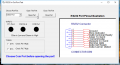
Years ago I made a small simple program to communicate with the comm port. While I did not run the DTS and RTS on a timer function you can turn the pins on and off. Here is an example of the program. There is not much to it. If you click the link and download the program is looks like this:
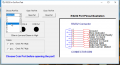
Using your Device Manager to see what your comm port is you choose the Comm Port from the drop down menu.
In the example on my computer it was Comm 4.
I used a common USB to RS232 converter, (Keyspan USA-19HS) My DTR and RTS outputs were about -5V and 5 volts. The DTR and RTS are digital outputs, the CTS, CSR and DCD are digital inputs. I applied 5 volts to the respective pins. After choosing the comm port click Open Port and the program runs. There is not a heck of a lot to it. So you open a port and once the port is open you can use code under a timer function to turn the DTR and RTS digital outputs on and off. It's just a Boolean function as in True or False.
The problem I see is taking that On and Off pulse and converting it to an accurate triangular waveform, especially with a 30 second duration. I don't see a pretty linear waveform happening. Anyway, feel free to play around with the little program. I also tried to get PWM from those lines and it failed for the reasons I already mentioned.
Now if someone has a thought as to how to make what you want happen they are welcome to present a schematic or something workable because I can't make it happen for the reasons I covered. I wrote the little program for either Windows 2000 or Windows XP, I forget but it was long ago. It has run fine on every Windows version since including Windows 10.
the UART Evaluation Board is a cheap device that you can just plug into ur USB. it comes with free software drivers from the FTDI website. install the drivers, plug in the board and check in device manager. there's a new COM port available. run a terminal program like teraterm on the PC and connect to the new port. the DTR line on the device will go high.
or just write ur own program to open and close the com port. the device drivers connect to the usb and they emulate a COM port.
add a cap and a resistor n get a triangle wave, and an extra diode to get a sawtooth wave.
Thank you all,
i need some time to test the various solutions proposed
from you, that took your time to answer.
I hope to be back very soon and share a working solution with all.
The link is just a USB to RS232 converter. Most newer computer motherboards do not have a RS232 port. The idea being thet you can open a port and then under a timer function enable and disable the DTR or RTS. The idea then being to take the square wave and convert it to a triangular wave I guess by mention of a resistor and capacitor. The problem is I doubt you will ever get a close to linear triangular waveform out. Not with the long duration you are looking for.
Years ago I made a small simple program to communicate with the comm port. While I did not run the DTS and RTS on a timer function you can turn the pins on and off. Here is an example of the program. There is not much to it. If you click the link and download the program is looks like this: View attachment 128071
Using your Device Manager to see what your comm port is you choose the Comm Port from the drop down menu.
I used a common USB to RS232 converter, (Keyspan USA-19HS) My DTR and RTS outputs were about -5V and 5 volts. The DTR and RTS are digital outputs, the CTS, CSR and DCD are digital inputs. I applied 5 volts to the respective pins. After choosing the comm port click Open Port and the program runs. There is not a heck of a lot to it. So you open a port and once the port is open you can use code under a timer function to turn the DTR and RTS digital outputs on and off. It's just a Boolean function as in True or False.
The problem I see is taking that On and Off pulse and converting it to an accurate triangular waveform, especially with a 30 second duration. I don't see a pretty linear waveform happening. Anyway, feel free to play around with the little program. I also tried to get PWM from those lines and it failed for the reasons I already mentioned.
Now if someone has a thought as to how to make what you want happen they are welcome to present a schematic or something workable because I can't make it happen for the reasons I covered. I wrote the little program for either Windows 2000 or Windows XP, I forget but it was long ago. It has run fine on every Windows version since including Windows 10.
Warning! Note that you cannot assume that the USB port will always be assigned the same COM port. Depending on what you plug into the available USB ports, the assigned COM port may change.
Warning! Note that you cannot assume that the USB port will always be assigned the same COM port. Depending on what you plug into the available USB ports, the assigned COM port may change.
After some time i have found a way to generate a .wav file that contains the wanted wave (triangular in this case).
I used LTSpice: a video remember me how to use it to specify the voltage source parameters, and how to define a .wav file name where you can save the output of the voltage source, with the wave you have specified. In my case i have specified a triangular wave with a period of 60sec and equal rise and fall time (30sec) with 5V of amplitude. LTSpice is very flexible in this kind of job. I am not an expert user of LTSpice, despite this, i get the .wav file very soon. I can not hear this very slow signal, but with the "scope" and "vu-meter" plug-in of VLC player, i can see that VLC is working on the file.
Next step: put a cable in the headphone output of my portable (a cable fitted to be connected to an oscilloscope) and see what happens.
I hope the following links can be helpful: http://www.linear.com/solutions/7185 http://www.linear.com/solutions/6087

 Facebook
 Google
 GitHub
 Linkedin