A problem with a simple not gate circuit

crutschow

Joined Mar 14, 2008
38,512
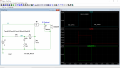
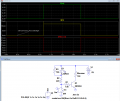
Below is the LTspice sim of boostbuck's single transistor circuit with an added resistor across the LED so its current is essentially zero when off:

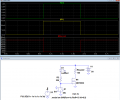
The bottom sim uses a MOSFET to eliminate two resistors and give no current through the LED when off.
1751471464638.png

1751471718353.png
 
Last edited:

Tonyr1084

Joined Sep 24, 2015
9,744
The circuits in post #21 & #22 both will constantly draw some current, even if it's minor, the battery will drain. I don't recall, is the project being battery powered? If so - the best way to prevent drainage is to put a switch at the battery so it can be totally shut off.

{I'll review the entire thread and edit if necessary}

[edit #1] That didn't take long. In post #1 the TS shows a battery. I still have more reviewing to do - but is the battery shown merely to represent a power source? Or is it really a battery?

[edit #2] There is little to almost no responses from the TS except for posts #1, 23 & 24. In post #23 this is said:
I tried and it worked 3 or 4 times then the led is on again when the switch is open and it is off whrn the switch is closed
So now it is working like the Ic not in the opposite
I can't think of a reason for this behavior. And I'm not even sure which circuit the TS has tried.
 
Last edited:

Tonyr1084

Joined Sep 24, 2015
9,744
Do we have good solder joints? Can we get some pictures please? Both sides? If this is built on a breadboard then it's suspect that the connections may be weak or faulty.
 

MisterBill2

Joined Jan 23, 2018
27,530
IF it is an electromagnetic buzzer, then simply connect the LED with limiting resistor ACROSS THE SWITCH, with the correct polarity. When the switch is open the LED will illuminate and the limited current will not sound the buzzer. when the switch is closed the buzzer will sound. I have used that scheme before, to verify that a circuit is live and ready to operate. With 120 VAC I use a neon indicator across the switch .
 

Thread Starter

Ghina Bayyat

Joined Mar 11, 2018
148
Do we have good solder joints? Can we get some pictures please? Both sides? If this is built on a breadboard then it's suspect that the connections may be weak or faulty.
I actualy made the circuit using a zero pcb and i have a good solder joint yes
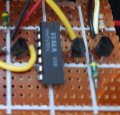
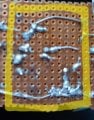
It is actualy a simple water level indicator and it used to work pretty well without the buzzer part but when i connect the not gate which is supposed to make the buzzer work when it reaches the lowest level it works but the led was on all the time and now after i put the base emitter resistor it is on and off with the buzzer not in the opposite to it20250707_180819.jpg20250707_180634.jpg
 

crutschow

Joined Mar 14, 2008
38,512
i have a good solder joint yes
From your blurry pictures, I would say no.
There are a lot of solder blobs, any of which could be a cold solder joint.
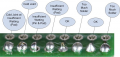
A good joint has solder smoothly flowed over the joint, with the shape of the joint visible (below):

Suggest you reflow all the joints to insure a good joint.

1751981017028.png
 

Tonyr1084

Joined Sep 24, 2015
9,744
There are a lot of solder blobs, any of which could be a cold solder joint.
A good joint has solder smoothly flowed over the joint, with the shape of the joint visible (below):

Suggest you reflow all the joints to insure a good joint.
This bears value in repeating. Only two of those joints are ideal. The rest need to be fluxed and reflowed with an iron at the proper temperature. You'd need to be with an instructor in order to get the best advice on fixing these solder joints. But yes - they are more than highly likely to be the root of your problem(s).

The ideal solder joint should exhibit good wetting action to both the pin and the pad. The pin should be visible at the tip of the joint and the solder should flow out to the edges of the pad, not over the edges. Balls of solder that obscure the pin or pad (or both) are not acceptable in most situations. Even in the hobby world, you want good joints. You may even have to extract some solder, but mostly I think adding flux and reflowing the joints will likely produce some beautiful solder joints.
 
Last edited:

Thread Starter

Ghina Bayyat

Joined Mar 11, 2018
148
This bears value in repeating. Only two of those joints are ideal. The rest need to be fluxed and reflowed with an iron at the proper temperature. You'd need to be with an instructor in order to get the best advice on fixing these solder joints. But yes - they are more than highly likely to be the root of your problem(s).

The ideal solder joint should exhibit good wetting action to both the pin and the pad. The pin should be visible at the tip of the joint and the solder should flow out to the edges of the pad, not over the edges. Balls of solder that obscure the pin or pad (or both) are not acceptable in most situations. Even in the hobby world, you want good joints. You may even have to extract some solder, but mostly I think adding flux and reflowing the joints will likely produce some beautiful solder joints.
So the problem is with the solder not the circuit
It was expensive and i felt it was strange when i used it but i thought no it must be good
Urghh
 

MisterBill2

Joined Jan 23, 2018
27,530
One unasked question I now have is what about all of the other inputs on that IC???
THERE WILL BE no normal functioning if there are any of the inputs left open. Certainly the circuit in the drawing on post #1 does not show the other portions of the IC, and certainly those connections do make a big difference. Consider that the MAXIMUM claimed input current is 0.1 MICROAMP, we know it is a very high impedance input. In addition, the data sheet page shows all unused inputs returned to common when the performance is being evaluated.
In addition, that explains why it might function correctly for a while and then fail.
THIS is another case of showing us only what has already been decided. Simply correctly terminating the unused inputs will assure correct operation.
 
Last edited:

Thread Starter

Ghina Bayyat

Joined Mar 11, 2018
148
b
One unasked question I now have is what about all of the other inputs on that IC???
THERE WILL BE no normal functioning if there are any of the inputs left open. Certainly the circuit in the drawing on post #1 does not show the other portions of the IC, and certainly those connections do make a big difference. Consider that the MAXIMUM claimed input current is 0.1 MICROAMP, we know it is a very high impedance input. In addition, the data sheet page shows all unused inputs returned to common when the performance is being evaluated.
In addition, that explains why it might function correctly for a while and then fail.
THIS is another case of showing us only what has already been decided. Simply correctly terminating the unused inputs will assure correct operation.
But those gates are not connected to each others and there is no Ic that has only one not gate
I only need one
Also the outputs of those gates arenot connected to anything so how would they affect the gate i am using ?
And if they are affecting then how am i supposed to deal with them ?
 

MisterBill2

Joined Jan 23, 2018
27,530
b

But those gates are not connected to each others and there is no Ic that has only one not gate
I only need one
Also the outputs of those gates arenot connected to anything so how would they affect the gate i am using ?
And if they are affecting then how am i supposed to deal with them ?
The method of "dealing with" unused digital inputs is to connect them to a defined logic level, which usually is that IC devices power common terminal. AND, while the application circuit shows multiple independent inverters, the actual internal circuit is considerably more complex. But if you do connect the unused INPUTS to the circuit common your problem will not appear.
 

Tonyr1084

Joined Sep 24, 2015
9,744
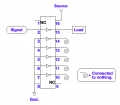
Proper use of a single gate on a Hex Buffer Inverter. This representation does not necessarily represent the inverter you used.
Screenshot 2025-07-12 at 7.08.05 AM.png
The unused gate inputs should be grounded. OR connected to the source. The outputs do not need to be connected to anything. The curly-Q merely represents a non-connection. In other words - nothing. Pins 1 & 9 are internally not connected to anything. Typically pin 8 is ground and pin 16 is power (source), whatever voltage the chip has been designed to operate on. Failure to ground (or source) the unused inputs will result in uncontrollable oscillation that can destroy the chip.

[Note] The drawing has been edited for clarity of the inverter symbol. The original post had too small a circle to represent a buffer-inverter.
 
Last edited:

Thread Starter

Ghina Bayyat

Joined Mar 11, 2018
148
I thought this method is used only if the output of those gates is connected to something and i thought those gates are completely seperated
So even if i don't need all the gates i shouldn't leave the outputs floating
 

Thread Starter

Ghina Bayyat

Joined Mar 11, 2018
148
Proper use of a single gate on a Hex Buffer Inverter. This representation does not necessarily represent the inverter you used.
View attachment 352546
The unused gate inputs should be grounded. OR connected to the source. The outputs do not need to be connected to anything. The curly-Q merely represents a non-connection. In other words - nothing. Pins 1 & 9 are internally not connected to anything. Typically pin 8 is ground and pin 16 is power (source), whatever voltage the chip has been designed to operate on. Failure to ground (or source) the unused inputs will result in uncontrollable oscillation that can destroy the chip.

[Note] The drawing has been edited for clarity of the inverter symbol. The original post had too small a circle to represent a buffer-inverter.
Thanks for your great explanation
 
Top