A Late Xmas Gift for me (oscilloscope)

tautech

Joined Oct 8, 2019
504
Does this oscilloscope have FFT capability?
Some of the best in its class.
However it takes some understanding to get FFT set up correctly to display meaningful results before you go using it for real.

Any repetitive signal will do however you need have many cycles of it on the display to get sufficient bins for a good FFT result.
Recently a good discussion on using FFT was on EEVblog and the last post has a couple of good documents on FFT that are advisable to study:
https://www.eevblog.com/forum/testg...the-fft-to-do-anything/msg3896663/#msg3896663
 

Thread Starter

Wendy

Joined Mar 24, 2008
23,805
Looks like I've got a lot to learn. Most excellent!

At this point I am totally clueless though.
 

MrChips

Joined Oct 2, 2009
35,022
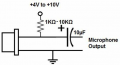
A quick and simple experiment you can do is set up an electret microphone circuit with a simple 3-9V power source.

1640921965555.png

Firstly, examine the voltage output on the the oscilloscope.
Then view the FFT while you whistle into the microphone.
 

MrSalts

Joined Apr 2, 2020
2,767
A quick and simple experiment you can do is set up an electret microphone circuit with a simple 3-9V power source.

View attachment 256477

Firstly, examine the voltage output on the the oscilloscope.
Then view the FFT while you whistle into the microphone.
Trying to get a stable tone for a FFT by whistling? Good luck.
try this site (or one of many other on-line tone generators. You can pick square, sine, triangle or sawtooth and your frequency. See that with a mic or just connect to the headphone jack on your pc or tablet.

https://www.szynalski.com/tone-generator/
 

tautech

Joined Oct 8, 2019
504
Later I'll do a FFT example for you to follow just using the probe compensation output....~3V square wave @ 1 KHz.
SDS1202X-E, same as Wendy has.
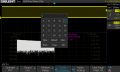
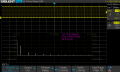
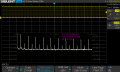
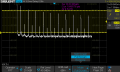
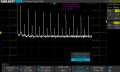
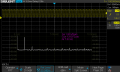
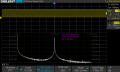
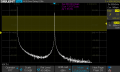
A selection of FFT screenshots starting with the 1 KHz square wave ex the probe compensation port.
First shows the virtual keypad available by pressing the multifunction control when an alphanumeric input box is selected within any of the menus.
Later we go to smaller memory depth settings in the Acquire menu to speed FFT writes. Some screenshots show Normal displays however I prefer Max Hold so not to see all the fluff below the noise floor.
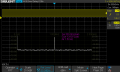
The last 4 are FFT of a 1 KHz sinewave from a standalone AWG at various settings.
All show the fundamental frequency and most display the harmonics excepting the last 3 where the focus is on the fundamental.

Enjoy and questions are welcome.
SDS00019.pngSDS00020.pngSDS00021.pngSDS00022.pngSDS00023.pngSDS00028.pngSDS00029.pngSDS00030.pngSDS00031.png
 
Last edited:
Top