8A load transistor/FET for 555 output

shortbus

Joined Sep 30, 2009
10,050
Been following this thread trying to learn. One thing I may have missed, but don't remember being mentioned is a "switch/contact bounce elimination" circuit being added to this. Is it possible that switch bounce is causing the problem?
 

Thread Starter

lvgforums

Joined Jul 12, 2015
51
I just tested this and it definitely happens with significant delays in between me tapping it. I stepped away for about 10 minutes and it happened again. I'm not sure what it is, how about I pose this question to simplify things - where would I put a tap for the lock pulse so the lights flash just once? If we can get that answer, that will point us directly where the problem could be.

You probably aren't giving capacitor C7 time to discharge fully via R8, so the FET may stay turned on between taps.
QUOTE]
 

Thread Starter

lvgforums

Joined Jul 12, 2015
51
Here are update pictures. I think I have the diodes in. I'm still missing one I think, D1, but I already have a wire powering the 555 and the FET trigger so I'm not sure where it even would go.

This one I traced the signal path. the green wire is the unlock on pushbutton, which goes to a diode, then jumps over to a resistor, then jumps to the cap, then goes to pin 2. also in that row is the yellow wire that jumpes down and has a diode also, which serves as the first pulse to turn the light on the first itme. (which I've been trying to tap into to get a single lock pulse, but have been experiencing weird side effects such as two flashes from)


2nd 555 : diode between pin 2 and the green cap and resistor


overview. the green wire and diode by row 40 is my "lock wire" I've been prodding around with.
 

ebeowulf17

Joined Aug 12, 2014
3,307
Ok, I see several problems with the current layout. Hopefully at least one solves this problem.

On the first 555, the unlock signal wire (connected to your momentary switch) should be in row 13 with the pull down resistor, one leg of cap, etc. The diode should have its anode in row 7 with the 555 trigger input and its cathode (black striped end) in the positive rail.

As a side note, you mentioned not knowing where to put D1, but you've already got it in. That's the diode in the middle of your two yellow extension wires headed towards the FET.

On the second 555, it looks like I see a bunch of things joining in row 19, none of which should be there. The capacitor leg and the resistor leg from 19 should both be in 21 with the 555's trigger. The diode's cathode (black striped end) should be in the positive rail (keeping its anode in the row with the 555 trigger, where you currently have it.)

I don't know if these changes directly relate to your current problem, but it'll be much easier for us to diagnose once they match the schematic!

As for testing your lock pulse, I believe what you're doing should work. I had also wondered if there was any chance you're ever touching anything else with the floating wire. Maybe safer to try touching it to the abcde side, row 62? Maybe just touch the diode leg in column d there?
 

Thread Starter

lvgforums

Joined Jul 12, 2015
51
Just a side question-can I use one of those ac-DC 9v converters as my source? I'm burning through 9v batteries and I don't have a dedicated 12v supply. I have a 9v ac-DC supply that's 9v, 300mA max. If I cut off the end connector and just have the wires that can work as my supply right? Is 300mA not enough juice to power everything? I can try to find a bigger one.
 
Last edited:

Alec_t

Joined Sep 17, 2013
15,121
A 9VDC converter should be fine. If it's an unregulated type its output voltage under light load (such as this circuit) may well be above 9V in practice. Make sure you get the polarity right ;).
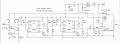
For adding the Lock function the circuit should be as in this modified schematic :-
DoubleFlash3.gif
D9 (a 1N4148) supplies the Lock pulse to the FET gate. Note the addition of D7 and D8 (1N4007) to suppress any negative spikes generated by the lock and unlock motors, as suggested by AnalogKid in post #16.
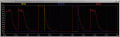
The graphs below show simulated Lock and Unlock pulses and the resulting pulses on the FET gate to turn it on.
LockUnlockWaveforms.gif
 

Attachments

ebeowulf17

Joined Aug 12, 2014
3,307
Been following this thread trying to learn. One thing I may have missed, but don't remember being mentioned is a "switch/contact bounce elimination" circuit being added to this. Is it possible that switch bounce is causing the problem?
I'm pretty sure switch bounce is non issue in this circuit. Regarding the recent troubles getting the "lock" signal to only flash once, simply wiring the diodes per Alec's recommendations should prevent triggering the 555s, regardless of bounce. The switch bouncing itself would be on the order of milliseconds, probably imperceptible to the naked eye.

Aside from the new "lock" signal question, triggering the 555s with a bouncy switch also shouldn't matter for essentially the same reason. I'm not sure if these 555s are configured to be re-triggerable or not, but if they did re-trigger, it would happen so fast you wouldn't see it. After the release of the last bouncy switch contact (again, within ms of intended start time) the intended timing of delay and subsequent light pulse should proceed normally.

Since this circuit isn't counting or incrementing anything, extra triggers would be harmless.

EDIT: Just did a little googling and reading and it looks like you have to go out of your way and do some creative work to make a monostable 555 re-triggerable, so I'm pretty sure these 555 circuits would completely ignore any bouncing on the switch contacts.
 
Last edited:

ebeowulf17

Joined Aug 12, 2014
3,307
Ok, I see several problems with the current layout. Hopefully at least one solves this problem.

On the first 555, the unlock signal wire (connected to your momentary switch) should be in row 13 with the pull down resistor, one leg of cap, etc. The diode should have its anode in row 7 with the 555 trigger input and its cathode (black striped end) in the positive rail.

As a side note, you mentioned not knowing where to put D1, but you've already got it in. That's the diode in the middle of your two yellow extension wires headed towards the FET.

On the second 555, it looks like I see a bunch of things joining in row 19, none of which should be there. The capacitor leg and the resistor leg from 19 should both be in 21 with the 555's trigger. The diode's cathode (black striped end) should be in the positive rail (keeping its anode in the row with the 555 trigger, where you currently have it.)

I don't know if these changes directly relate to your current problem, but it'll be much easier for us to diagnose once they match the schematic!

As for testing your lock pulse, I believe what you're doing should work. I had also wondered if there was any chance you're ever touching anything else with the floating wire. Maybe safer to try touching it to the abcde side, row 62? Maybe just touch the diode leg in column d there?
Ok, so Alec designed what I'm pretty sure is the perfect circuit for what you need and, with the possible exception of the recent addition of the "lock" signal input, essentially every problem has come down to mis-translating the circuit from schematic to breadboard. What follows is my attempt to demonstrate one way of approaching this which might make it easier. This is especially important now that Alec has added a few extra components for protection and to incorporate the "lock" signal.

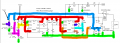
You can print out a copy of the schematic and use highlighters, colored pencils, or something similar to color code each wire in the schematic. Follow each wire until it hits a component and stop. Follow each wire through any junctions with dots (representing intersections) to the next component. NEVER follow the wire THROUGH a component or you'll end up short circuiting the component and the circuit will act as if that component doesn't exist. Below is an example of getting it started. I didn't do the whole thing because it gets cluttered quickly and I was running out of visually distinct colors. In this circuit, the ground symbol is used to show ground connections even when no wire is shown to join them all. This is common practice and makes the schematic much less cluttered. All the ground connections do join together, so I've highlighted them all in green.
DoubleFlash3.png
The various color-coded wires on the schematic represent parts of the circuit that should be electrically equivalent, but they don't necessarily represent wires in the real world. In the case of your breadboard, most of these colored wires on the schematic just represent rows on the breadboard. Everything that shares a wire color on the schematic should share a row (or power rail, or group of rows joined together as needed) so that they're all electrically connected.

Note 1 on the schematic shows a diode (D8) that you might be tempted to short circuit. Using the color highlighting method, you'll see that we had to change colors for different schematic wires on the two sides of that diode, so we need to use two different rows in the breadboard for the two legs of the diode.

Note 2 on the schematic shows an example of parallel connections. Two different components (D2 and R1) both connect to the same two wires on their respective sides, so the breadboard row matching the yellow wire will have connections to D2 and R2 (along with C1 and 555 trigger connections as well) and the other ends of D2 and R1 will connect to the same row in the breadboard (actually the positive power rail in this case.)

There are probably other key points or examples I should point out, but nothing springs to mind. Hopefully this approach helps. Good luck!
 

Alec_t

Joined Sep 17, 2013
15,121
+1 ebeowulf. That should help the OP.
Another suggestion to overcome disorientation and get board and schematic consistent is to mark on the printed copy the row/column letters/numbers of each leg of each component as you insert it into the breadboard.
 

ebeowulf17

Joined Aug 12, 2014
3,307
+1 ebeowulf. That should help the OP.
Another suggestion to overcome disorientation and get board and schematic consistent is to mark on the printed copy the row/column letters/numbers of each leg of each component as you insert it into the breadboard.
I like that idea. Certainly takes far fewer pens/highlighters!!!
 

Thread Starter

lvgforums

Joined Jul 12, 2015
51
Hello guys, had to put this on hold for a bit. I'm going to go to RS and try to find a 220u cap, but on their website it shows they only have a 35V 22u, will 35V work?

It's going to be tough to finish the breadboard but after that and verifying wires I'll have to solder it to a prototype board and the only type of solder equipment I have a hefty gun from the 1960s. I don't have a fine tip one so that might have to wait. Still don't have a power supply, so that's been another problem. I couldn't use the aforementioned 9V, since it was for something else.

Also, should I use a DIP socket when going to prototype? And, how complicated would it be to use a 556 and save space? I should just be able to match up the wires to a 556 right?
 
Last edited:

Alec_t

Joined Sep 17, 2013
15,121
I'm going to go to RS and try to find a 220u cap, but on their website it shows they only have a 35V 22u, will 35V work?
If you mean 220uF at 35V then yes.
A DIP socket has the advantage that if something goes wrong it's easier to replace an IC than unsolder/resolder. But for final in-car use a well-soldered IC would be vibration-proof, hence more reliable. Your call.
A 556 would be fine. The datasheet will give the pin-out.
 
Top