3 bit gray counter or binary counter

WBahn

Joined Mar 31, 2012
32,935
The input on my schematic is not ABC, is A=ASC=ASCENDENT.
G=0: When A=1 it should count 000 001 010 011 100 101 110 000... When A=0 it should count down 000 110 101 100 011 010 001 000..
G=1: When A=1 it should count 000 001 011 010 110 111 101 000... When A=0 it should count down 000 101 111 110 010 011 001 000..
Okay, we are getting somewhere (and we cross posted in our last posts).

Now, in your table heading, which signal is the left signal and which signal is the right signal?

 

Thread Starter

Joan Roig

Joined Jan 15, 2017
15
The left one is A and the right one is G.

When G=0 it means binary mode, when G=1 it means Gray mode
When A=0 counter descendent, when A=1 counter ascendent
 

WBahn

Joined Mar 31, 2012
32,935
THANK YOU!!!

Now, to clear up one last thing, in your original state diagram what are the meanings of the signals circled in green?

sdiag.png

Do these still mean something, or were they a mistake and shouldn't have been there?
 

WBahn

Joined Mar 31, 2012
32,935
You're talking about the 2 00s infront of 100 and 011?
Yes and no. Your transition signal has the notation (for the top one) of 00/00100 and, for the bottom one, of 01/00011. I'm assuming that the signals in front of the '/' are the input signals. The signals after the '/' are, in a conventional diagram, the output signals for a Mealy machine that is in the state the arrow is coming from and with the input signals that are in front of the forward slash.

It is looking like the last three signals in your group of five are the state you are going to. Is that correct? If so, then that is completely redundant since the arrow is pointing to the state that the system is going to. So, in that sense, the question is what are the first two signals in that group of five?
 

Thread Starter

Joan Roig

Joined Jan 15, 2017
15
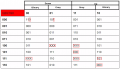
Here are the errors that I see in your truth table (red boxes):
View attachment 118831
We put the XXX becasue we want it to work until 1 value less than its maximum.
For example the count up in Binary Mode is only from 000 to 110, and the count up maximum in Gray is 000 to 101. So when in binary mode we never get to see 111 and when in Gray mode we never get to see 100
 

dl324

Joined Mar 30, 2015
18,386
We put the XXX becasue we want it to work until 1 value less than its maximum.
For example the count up in Binary Mode is only from 000 to 110, and the count up maximum in Gray is 000 to 101. So when in binary mode we never get to see 111 and when in Gray mode we never get to see 100
Binary mode is from 0-7. When counting up, you need 6 to go to 7 and 7 to go to 0.
 

WBahn

Joined Mar 31, 2012
32,935
We put the XXX becasue we want it to work until 1 value less than its maximum.
For example the count up in Binary Mode is only from 000 to 110, and the count up maximum in Gray is 000 to 101. So when in binary mode we never get to see 111 and when in Gray mode we never get to see 100
While terminating the count early for the binary sequence is fine (it just means you have mod-7 counter), you need to realize that terminating the count early for the Gray code counter means that it is no longer a Gray code sequence. You have a transition in which more than one bit is changing at the same time. That is NOT Gray code.
 

WBahn

Joined Mar 31, 2012
32,935
Why did you show 7 in the count sequences in your original post? As @WBahn pointed out, a gray counter only has one bit change between counts. And three bit counters are assumed to count 0-7; otherwise, you should have said Mod-7 to begin with.
I think he has pretty consistently shown the binary sequence as NOT including 7. The original post certainly showed it terminating at 110 going back to 000 and the state diagram was consistent with this as well. I agree that it would have been very nice to have stated that it was a mod-7 counter up front, but he is only beginning to learn how to communicate specifications effectively so there will be rough edges that have to get filed off.
 

LesJones

Joined Jan 8, 2017
4,509
Does the counter have to count in both modes or are you allowed to count in one mode and have a converter that would change binary to gray code or gray code to binary. you could then use gates to select which ouput to use. Years ago I made a 8 bit gray code encoder and needed the output as binary. the converter was quite simple. Making the counter count in binary would be the simplest. I have not looked at converting binary to gray code but I don't think it would be too difficult.

Les.
 

Thread Starter

Joan Roig

Joined Jan 15, 2017
15
Does the counter have to count in both modes or are you allowed to count in one mode and have a converter that would change binary to gray code or gray code to binary. you could then use gates to select which ouput to use. Years ago I made a 8 bit gray code encoder and needed the output as binary. the converter was quite simple. Making the counter count in binary would be the simplest. I have not looked at converting binary to gray code but I don't think it would be too difficult.

Les.
Yes, it has to count in bout modes. I solved the circuit, but thanks anyways for the interest
 

WBahn

Joined Mar 31, 2012
32,935
Does the counter have to count in both modes or are you allowed to count in one mode and have a converter that would change binary to gray code or gray code to binary. you could then use gates to select which ouput to use. Years ago I made a 8 bit gray code encoder and needed the output as binary. the converter was quite simple. Making the counter count in binary would be the simplest. I have not looked at converting binary to gray code but I don't think it would be too difficult.

Les.
Doing the binary to Gray isn't very difficult at all. My guess is that the intent was to design it completely as a state machine, but it might be worth asking the instructor if using a combinatorial converter block would be acceptable. Even better would be to present both designs. It might get some extra credit and, even if it didn't, would be a valuable learning exercise.
 

dl324

Joined Mar 30, 2015
18,386
I finnaly solved the full circuit, If anyone wants it'll upload it after. Thanks a lot for the help!
Glad you got it figured out. That means you didn't really need our help.

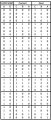
For future reference, this might be an easier format for reading and transferring data to Kmaps:
upload_2017-1-16_14-21-10.png
 
Last edited:
Top