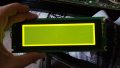
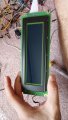
240x64 display do not show characters

Thread Starter

hide24

Joined Jul 9, 2019
84
Hi everyone
I have a synthesizer which it's display backlight don't turn on anymore. El I bought a new one but has 22 pins instead 20.
When I replaced only showed the backlight but not characters.
Anyone knows what can be the problem?
Thank you very much
 

Thread Starter

hide24

Joined Jul 9, 2019
84
*update

I tried now not to connect the last two pins 21-22 and it shows all the screen in black
 

jpanhalt

Joined Jan 18, 2008
11,087
Here's a link to the datasheet for the Optrex DMF5005N : https://www.mpja.com/download/14619opap.pdf
Do you have the datasheet for your new display? How did you know which pins to connect where?
Why didn't you buy the exact replacement?

On some displays, the drivers for contrast are set in code. Thus, you may be able to adjust those values by following instructions in the service manual for your synthesizer.
 

Thread Starter

hide24

Joined Jul 9, 2019
84
Thanks Jpanhalt!

I haven't bought the same display because uses a very light blue color which it was a bit hard to see.
I bought a yellow one in this website:
https://www.ebay.com/itm/301017374539

I'm asking the seller if he has the datasheet because don't let me download from this website.

By the way..
Why the optrex data sheet says : Pin 20 ( no connection) but in the ribbon cable is connected?

Thanks!
 

Thread Starter

hide24

Joined Jul 9, 2019
84
Thank you SamR
What I did is disconnect the pin 21-22 and connect the wire to the other side (A-K)
Backlight is no problem.
What I can not see is the characters of the display. I only see a black square.
 

Thread Starter

hide24

Joined Jul 9, 2019
84
Now I was thinking...
Maybe this kind of new display needs to connect a wire from the metal holder to the ground?
I saw it before in some displays, but i don't know exactly what is the reason they do.
 

jpanhalt

Joined Jan 18, 2008
11,087
I tried with the contrast, but nothing changes
Are you sure you adjusted the contrast and not just the backlight intensity? Contrast will give an all on or all black screen. It does not affect the backlight. For the original Toshiba screen it is Pin4. It could still be controlled by the MCU (depending on the code), or there might be a small variable resistor on the main board.

As for "unconnected," it is probably a standard 20 conductor cable and connector. Pin 20 may go nowhere on the PCB.

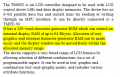
Your original screen also has a "font" size setting:

1601717498535.png
I would need to study the controller (T6963C) to see what's involved; however, your new screen way not have that function. The graphical displays I have used do not have that selection. You need to get the datasheet for the new screen.

EDIT:
Just looked up the T6963C controller datasheet. That is the controller for your new display.
Source: https://www.sparkfun.com/datasheets/LCD/Monochrome/Datasheet-T6963C.pdf

1601718548227.png
If your graphical display does not have a built-in character set, you may be SOL.
 
Last edited:

SamR

Joined Mar 19, 2019
5,487
Yup, backlight needs power but must also be adjusted. I can't remember, is there a pot on the backlight voltage supply?
 

jpanhalt

Joined Jan 18, 2008
11,087
By "contrast," I meant what equates to the Vcc-Vee voltage. On every display I have used, if that is set within readable limits, the display can be read even when backlight is off. In fact, I usually add an MCU-controlled backlight so the backlight can be turned off to save battery power.
 

Thread Starter

hide24

Joined Jul 9, 2019
84
Thank you Jpanhalt.
Since yesterday I tried to figure out what was wrong, and comparing the data sheet seems very different one from the other.
The synthesizer has a contrast level, which I can make it darker or lighter, the most strange is the rectangle black appears even I move the contrast controller.
I think will be easier to find a display Optrex right? Or do you recommend me another one which can help me to see easy the characters?
Or still there is hope to use this display I bought?
Thank you very much for the help!
 

Thread Starter

hide24

Joined Jul 9, 2019
84
Thanks SamR,
There is a contrast pot behind the synthesizer which can make it darker or lighter the screen.
 

jpanhalt

Joined Jan 18, 2008
11,087
Can you post a link to the datasheet for the replacement LCD you bought? I suspect it does not have a character set in RAM. The Optrex does. Whether your Synthesizer uses that RAM is another question. Nevertheless, if the display controllers are different, as I suspect they may be, trying to find a display with a different controller that works with your current system may be futile.

Thus, I would go with an identical Optrex replacement. There is still a chance that an exact replacement also will not work. What happened that makes you think the original display is at fault instead of something else?
 

Thread Starter

hide24

Joined Jul 9, 2019
84
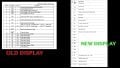
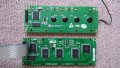
I attach a picture with the data sheet of both displays.
Sorry...I don’t know if I understood your question, but mainly I replaced the display because already had no backlight although was connected correctly.
The Optrex that used this synth had very light blue backlight which was difficult to see. I thought any kind of 24064 display could work only connecting the ribbon cable (as a standard LCD display for any kind of devices).

My synthesizer is a Korg Wavestation, and some displays are around 100 dolars in ebay. This one I bought , I paid 30 For it and I thought could be easy to install. But I paid the price of a newbie, because have no so much idea about electronics.
Thanks Jpanhalt :)
 

Attachments

jpanhalt

Joined Jan 18, 2008
11,087
As you observed, pins 1-4 are presumably OK; after that there is mismatch for the read/write commands and the data. Every instruction includes a read/write bit, which tells the display whether the MCU is reading data from or writing data to the display.

There are also no backlight pins specifically identified in the old display. It could be that backlight power is derived from the main power (Vcc) and ground, or there could be separate power to the backlight. I would check into the old LCD PCB to see whether there seems to be separate power to the LED backlight(s). That is, something other than the 20-conductor cable.

Or, go with a new display, which is what I would do.
 
Top