1N135 Optocoupler : Pspice Replacement

Thread Starter

lhern034

Joined Oct 23, 2017
46
My model:
.SUBCKT 6N136 2 3 5 6 8 7
* ANODE CATHODE EMITTER col phkat BAZA
* Current Transfer Ratio (CTR)=(H*G*BF)=19%
VM 2 60
D1 60 3 LED
d2 2 3 ledc
H1 70 0 VM .00152 ; 6N135 0.00056 (CTR) = (H*G*BF) = 7%
R1 70 80 1K
C1 80 0 80PF
G1 8 7 80 0 1
d3 7 8 phd
Q1 6 7 5 QOPTO
.MODEL LED D(N=2.63 RS=1.25 IS=757f)
.MODEL LEDc D(N=5 RS=1.25 CJO=60PF IS=10p)
.model phd d cjo=5p is=1p
.MODEL QOPTO NPN(IS=7p NF=1.23 CJC=2PF
+ CJE=7PF TF=.55NS TR=10NS BF=125 BR=10
+ IKF=100MA VAF=100)
.ENDS
Im not sure how to use this,
 

Bordodynov

Joined May 20, 2015
3,426
Read HELP for ORCAD. 13 years ago I tried to use this program. After reading HELP, I made a new symbol and added a spice model. Now, after testing many other spice programs, I switched to using LTspice.
 

Alec_t

Joined Sep 17, 2013
15,119
Did you understand the Pspice error message? It may be complaining that you've given the ground node two different names.
Try putting a resistor (say 1μΩ) between 'Grn' and '0'.
 

eetech00

Joined Jun 8, 2013
4,709
Did you understand the Pspice error message? It may be complaining that you've given the ground node two different names.
Try putting a resistor (say 1μΩ) between 'Grn' and '0'.
pins 3 and 6 are supply pins and are connected wrong in the schematic.

Pin 3 is GND, Pin 6 is VDD

eT
 

Thread Starter

lhern034

Joined Oct 23, 2017
46
Did you understand the Pspice error message? It may be complaining that you've given the ground node two different names.
Try putting a resistor (say 1μΩ) between 'Grn' and '0'.
upload_2017-11-18_23-4-8.png
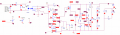
This is how it looks like now, but it will not identify the opto coupler and it takes to long to simulate. it stops at 78% towards the simulation
 

Thread Starter

lhern034

Joined Oct 23, 2017
46

bertus

Joined Apr 5, 2008
22,937
Hello,

R6 is to large. Make it smaller, so the capacitor can build-up charge.
In the original circuit it is 3 X 33 Ohms, a 100 Ohms resistor will do for simulation:

HV_pulser.png

Bertus
 

Alec_t

Joined Sep 17, 2013
15,119
I used a generic diode. Use a high speed, high voltage one if you want an accurate sim.
You are using the LM5111. I used the LM5114. For the LM5111, if the outputs are coupled together as shown then INB should be connected to INA, not to ground. (Always check the datasheets for the parts you use).
 

Thread Starter

lhern034

Joined Oct 23, 2017
46
I used a generic diode. Use a high speed, high voltage one if you want an accurate sim.
You are using the LM5111. I used the LM5114. For the LM5111, if the outputs are coupled together as shown then INB should be connected to INA, not to ground. (Always check the datasheets for the parts you use).
OK, I managed to get the results using your schematic, thank you so much:
upload_2017-11-19_15-59-21.png
upload_2017-11-19_15-59-49.png
Is there a way that we can make it peak at 94V or more for around 100us or 0.1 sec without making the period longer than 25ms
upload_2017-11-19_16-2-22.png
 

Alec_t

Joined Sep 17, 2013
15,119
Is there a way that we can make it peak at 94V or more for around 100us or 0.1 sec without making the period longer than 25ms
Yes. Increase R7 from 1k to, say, 22k. R8 should be increased proportionally if you want to preserve the voltage-monitoring scale factor.
 

Thread Starter

lhern034

Joined Oct 23, 2017
46
Yes. Increase R7 from 1k to, say, 22k. R8 should be increased proportionally if you want to preserve the voltage-monitoring scale factor.
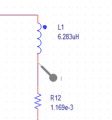
Thanks, but if I had this type of load:

upload_2017-11-20_17-33-46.png

How would I make the amplitude of the current reach at least 15A?
 

Alec_t

Joined Sep 17, 2013
15,119
My sim says you'd get at least 15A for at least 93us with that inductor. Play with some component values and see the results for yourself.
 

Thread Starter

lhern034

Joined Oct 23, 2017
46
My sim says you'd get at least 15A for at least 93us with that inductor. Play with some component values and see the results for yourself.
The most I seem to get is 4A
how did you connected the load?
upload_2017-11-21_18-35-6.png
here are my highest results
 
Last edited:

Thread Starter

lhern034

Joined Oct 23, 2017
46
Sorry for the late response, we have decided to go along with the current circuit simulation. Thank you all so much for the help!!!
 

Thread Starter

lhern034

Joined Oct 23, 2017
46
Hello,

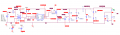
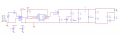
I was wondering what would I need to add to this circuit to amplify the the pulse generator V7 ( arduino) in order to make the circuit work properly:


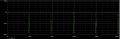
this is the current result:


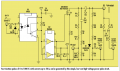
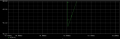
this is the intended result ( it works when the pulse generator's V2 is set to 20.025V)


this is on PSPICE
 
Top