Writing to a single line in serial monitor using Arduino

Thread Starter

hunterage2000

Joined May 2, 2010
487
Hi all,

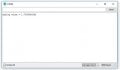
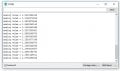
I'm not sure if you can do this but I want to write a measured analogue value to a single line (see pic) in Arduinos serial monitor.

Apart from printing to a new line (see pic) after every read this is what i want.

The code is here:

Code:
const int analogPin = A0;
float analogValue = 0;
float voltage;
float five = 5.000000;
void setup() {
  // put your setup code here, to run once:
Serial.begin(9600);
}

void loop() {
  // put your main code here, to run repeatedly:
//analogValue = map(analogValue, 0, 1023, 0, 5);

analogValue = analogRead(analogPin);
voltage = (analogValue/1023)*five;
Serial.print("analog value = " );
Serial.println(voltage, DEC);
delay(125);
}
}
I have used Serial.writeln as if not it just writes horizontally. Is this possible because I can't see what can do this in the Serial library.
 

Attachments

djsfantasi

Joined Apr 11, 2010
9,237
Just use Serial.write() instead of Serial.writeln()

The print() and println() functions are similar. The "ln" suffix in the method name says to start a new line after printing the value(s).
 

OBW0549

Joined Mar 2, 2015
3,566
Try inserting a line containing Serial.write(13) before line 16. This should (I think) cause your terminal to set its insertion point back to the beginning of the current line, without issuing a new line feed. Also, change line 17 to use Serial.print() instead of Serial.println().

If I'm right, this should cause each new data item to be overlaid on, and replace, the previous data displayed.
 
Last edited:

Raymond Genovese

Joined Mar 5, 2016
1,653
Try inserting a line containing Serial.write(13) before line 16. This should (I think) cause your terminal to set its insertion point back to the beginning of the current line, without issuing a new line feed. Also, change line 17 to use Serial.print() instead of Serial.println().

If I'm right, this should cause each new data item to be overlaid on, and replace, the previous data displayed.
While it makes perfect sense to send a CR, this will definitely NOT work with the Arduino IDE monitor. Nor will printing "\r". You can't even use a backspace control code (8).

It is a known issue and the basic explanation is that the serial monitor is not a true terminal and does not function like one.

The explanation is then followed by encouragement to use a real terminal program. In fact, that is a good solution.

This has been my experience and I would love to see an Arduino sketch that could genuinely overwrite lines on the serial monitor as the OP is trying to do..
 

OBW0549

Joined Mar 2, 2015
3,566
Thanks for clarifying that, Raymond. I usually use a terminal program (TeraTerm) to communicate with microcontrollers, which is probably why I just assumed it would work with the Arduino serial monitor.

Back to the drawing board, I guess...
 

Hermaans

Joined Jun 19, 2017
1
Try inserting a line containing Serial.write(13) before line 16. This should (I think) cause your terminal to set its insertion point back to the beginning of the current line, without issuing a new line feed. Also, change line 17 to use Serial.print() instead of Serial.println().

If I'm right, this should cause each new data item to be overlaid on, and replace, the previous data displayed.
The Arduino Serial Monitor ignores the Serial.write(13); as well.
 
Top