Write data to LCD

Thread Starter

Gajyamadake

Joined Oct 9, 2019
310
Post your current code with the fixed init values and we can take a look.
string should be show on first line but that doesn't happen I only get courser
C:
// CONFIG
#pragma config FOSC = HS        // Oscillator Selection bits (HS oscillator)
#pragma config WDTE = ON        // Watchdog Timer Enable bit (WDT enabled)
#pragma config PWRTE = OFF      // Power-up Timer Enable bit (PWRT disabled)
#pragma config BOREN = ON       // Brown-out Reset Enable bit (BOR enabled)
#pragma config LVP = OFF        // Low-Voltage (Single-Supply) In-Circuit Serial Programming Enable bit (RB3 is digital I/O, HV on MCLR must be used for programming)
#pragma config CPD = OFF        // Data EEPROM Memory Code Protection bit (Data EEPROM code protection off)
#pragma config WRT = OFF        // Flash Program Memory Write Enable bits (Write protection off; all program memory may be written to by EECON control)
#pragma config CP = OFF         // Flash Program Memory Code Protection bit (Code protection off)

// #pragma config statements should precede project file includes.
// Use project enums instead of #define for ON and OFF.

#define _XTAL_FREQ 20000000 //Specify the XTAL crystal FREQ
#include <xc.h>

#define RS           RB1
#define RW           RB2
#define EN           RB3
#define LCD_Port     PORTD

/* Make all PORTD pins low and Configured PORT pins as Output*/
void  Port_Initialize (void)
{
   PORTA = 0;
   PORTB = 0;
   PORTC = 0;
   PORTD = 0;
   PORTE = 0;

   TRISA = 0b00000000;
   TRISB = 0b00000000;
   TRISC = 0b00000000;
   TRISD = 0b00000000;
   TRISE = 0b00000000;
}

/* Function to send command instruction to LCD */
void LCD_Command(unsigned char Command)
{
    LCD_Port = Command;
    RS=0;
    RW=0;
    EN=1;
    __delay_ms(2);
    EN=0;
}
/*LCD Initialize*/
void LCD_Initialize (void)
{
    LCD_Command(0b00110000);
    __delay_ms(20);
    LCD_Command(0b00001110);
    __delay_ms(20);
    LCD_Command(0b00000110);
    __delay_ms(20);
    LCD_Command(0b01001001);
    __delay_ms(20);
}

/*Function to send message to LCD */
void LCD_Data(unsigned char Message)
{
    LCD_Port = Message;
    RS=1;
    RW=0;
    EN=1;
   __delay_ms(2);
    EN=0;
}


void Messagebuffer( unsigned char *pointer)
{

    while (*pointer != '\0')
    {
      LCD_Data(*pointer);
     
        pointer++;
    }
}

void main(void)
{
  int i = 0;

  unsigned char Message1 []="Hello World";

  Port_Initialize ();
  LCD_Initialize ();

  Messagebuffer(Message1);
   
    while(1)
    {

    }
    return;
}
1577646505571.png
 

Thread Starter

Gajyamadake

Joined Oct 9, 2019
310
In #18 you showed it was displaying. Where did that come from?
that's was showing on second line but I want to display at first line

post #18 display message on second line

I wrote code in post #21 to display message on first line according table but It doesn't show
 

dendad

Joined Feb 20, 2016
4,637
Ben Eater has a pretty good explanation of driving an LCD...
This is part of his 6502 computer on breadboard series, and is pretty interesting.
Not a bad introduction to the nitty-gritty of a micro. It brings back memories of programming my Signetics 2650 using the data sheet, and hex codes entry.
 

JohnInTX

Joined Jun 26, 2012
4,787
Try adding a little delay after EN=0 to give the display time to process the character.
Check your init values and always use comments so that you know what you are trying to do!
Your code, my comments. Edit to fix the problems noted.
Also, your code is NOT 'Initialize By Instruction', it assumes that the LCD display is in the normal, after-power-up condition. Most initialize routines DO use 'Initialize by Instruction' as it guarantees that the LCD is ready to use regardless of its starting condition.
C:
/*LCD Initialize*/
void LCD_Initialize (void)
{                         // <<-- A power up delay is required - 40ms or more
    LCD_Command(0b00110000); // Function set: 8 bit interface, 1 line, 5x8 character set <<-- You probably want TWO lines here
    __delay_ms(20);
    LCD_Command(0b00001110); // Display ON/OFF control: Display ON, Cursor ON, Blink OFF
    __delay_ms(20);
    LCD_Command(0b00000110); // Entry mode set: Increment on each character, no shift
    __delay_ms(20);
    LCD_Command(0b01001001); // Set CGRAM address = 09h  <<-- this is an ERROR and writes will go to the character generator instead of display memory (DDRAM)
    __delay_ms(20);
}
What code did you use to generate the display in #18? I don't see any of your posted code doing that.

Good luck!
 
Last edited:

Thread Starter

Gajyamadake

Joined Oct 9, 2019
310
Also, your code is NOT 'Initialize By Instruction', it assumes that the LCD display is in the normal, after-power-up condition. Most initialize routines DO use 'Initialize by Instruction' as it guarantees that the LCD is ready to use regardless of its starting condition.
I try to improve it and I will come back Apart from this, I do not understand one thing is delay. I need the delay in ms and us in program.

How to get delay for 15ms and 100us that's required in datasheet

Code:
void wait (unsigned int n)
{
    for(i=0; i<n; i++)
}

void main ()
{
    wait(100); // wait for 100 us seconds 
}
Does it gives a delay of 100 us ?
 

JohnInTX

Joined Jun 26, 2012
4,787
Does it gives a delay of 100 us ?
No. The delay functions are already provided in XC8 for the PICs. Attempting to create a delay by counting in C is not a very good way to do it, even though many textbooks teach it. Avoid counting and just use the built in delay functions as shown in your own code. The reason is that delays like this are made by counting a precise number of CPU cycles to burn time for the delay. You don't know what instructions the compiler will use to count so you can't possibly know what the delay will be.

Question for you: You were using __delay_ms() before, why the question now about counting delays? Did you actually write that code yourself?
 

Thread Starter

Gajyamadake

Joined Oct 9, 2019
310
No. The delay functions are already provided in XC8 for the PICs. Attempting to create a delay by counting in C is not a very good way to do it, even though many textbooks teach it. e.
I was using inbuilt delay in my program. Its name suggests that it gives delay in ms but I need delay in us and ms in program.
So I was going to make one routine that would give delay in us and ms

Question : How to get delay of 100 us using __delay_ms()

Did you actually write that code yourself?
Yes i wrote this code. And now I have explained why I was making delay routine in program.
okay as you said I will use __delay_ms() but my question is how to get delay in us ?
 

JohnInTX

Joined Jun 26, 2012
4,787
Last edited:

Thread Starter

Gajyamadake

Joined Oct 9, 2019
310
OK. In XC8, you use.. __delay_us() for microseconds. It’s covered in the XC8 users guide.
https://www.microchip.com/mymicrochip/filehandler.aspx?ddocname=en606961
page 269
Thanks for link I didn't aware about that functions before

Now I can see on LCD that I wanted to see
1577700059328.png
C:
// CONFIG
#pragma config FOSC = HS        // Oscillator Selection bits (HS oscillator)
#pragma config WDTE = ON        // Watchdog Timer Enable bit (WDT enabled)
#pragma config PWRTE = OFF      // Power-up Timer Enable bit (PWRT disabled)
#pragma config BOREN = ON       // Brown-out Reset Enable bit (BOR enabled)
#pragma config LVP = OFF        // Low-Voltage (Single-Supply) In-Circuit Serial Programming Enable bit (RB3 is digital I/O, HV on MCLR must be used for programming)
#pragma config CPD = OFF        // Data EEPROM Memory Code Protection bit (Data EEPROM code protection off)
#pragma config WRT = OFF        // Flash Program Memory Write Enable bits (Write protection off; all program memory may be written to by EECON control)
#pragma config CP = OFF         // Flash Program Memory Code Protection bit (Code protection off)

// #pragma config statements should precede project file includes.
// Use project enums instead of #define for ON and OFF.

#define _XTAL_FREQ 20000000 //Specify the XTAL crystal FREQ
#include <xc.h>

#define RS           RB1
#define RW           RB2
#define EN           RB3
#define LCD_Port     PORTD

/* Make all PORTD pins low and Configured PORT pins as Output*/
void  Port_Initialize (void)
{
   PORTA = 0;
   PORTB = 0;
   PORTC = 0;
   PORTD = 0;
   PORTE = 0;

   TRISA = 0b00000000;
   TRISB = 0b00000000;
   TRISC = 0b00000000;
   TRISD = 0b00000000;
   TRISE = 0b00000000;
}

/* Function to send command instruction to LCD */
void LCD_Command(unsigned char Command)
{
    LCD_Port = Command;
    RS=0;
    RW=0;
    EN=1;
    __delay_ms(2);
    EN=0;
}

/*LCD Initialize*/
void LCD_Initialize (void)
{
    __delay_ms(40); // request a delay in milliseconds
    LCD_Command(0x30);  // 8-bit interface data, 1-line display, 5 × 8 dot character font
    __delay_ms(5);  
    LCD_Command(0x30);
    __delay_us(100);
    LCD_Command(0x30);
    __delay_us(40);
    LCD_Command(0x01); //Clears display
    __delay_us(40);
    LCD_Command(0x0F);  //display on, cursor on, cursor blink on
    __delay_us(40);
}


/*Function to send message to LCD */
void LCD_Data(unsigned char Message)
{
    LCD_Port = Message;
    RS=1;
    RW=0;
    EN=1;
   __delay_ms(2);
    EN=0;
}


void Messagebuffer( unsigned char *pointer)
{

    while (*pointer != '\0')
    {
      LCD_Data(*pointer);
     
        pointer++;
    }
}

void main(void)
{
  int i = 0;

  unsigned char Message1 []="Hello World";

  Port_Initialize ();
  LCD_Initialize ();

  Messagebuffer(Message1);
   
    while(1)
    {

    }
    return;
}
0 0 1 DL N F * *

2. Function set:
DL = 1; 8-bit interface data
N = 0; 1-line display
F = 0; 5 × 8 dot character font

0x30 = 0 0 1 1 0 0 0 0

sets on/off of all display (D), cursor on/off (C), and blink of cursor position character (B).
0 0 0 0 1 D C B
1 = display 1 = cursor on, 1 = cursor blink on
0x0F = 00001111
 

Thread Starter

Gajyamadake

Joined Oct 9, 2019
310
@JohnInTX I have done work for 4 bit mode. I have modified two routines command and message routine to send 4 bit data
remember I have incomplete LCD Initialize routine and I am working on it. I will test complete code

I just want to confirm what i'm doing is right Please look at these routine
C:
// CONFIG
#pragma config FOSC = HS        // Oscillator Selection bits (HS oscillator)
#pragma config WDTE = ON        // Watchdog Timer Enable bit (WDT enabled)
#pragma config PWRTE = OFF      // Power-up Timer Enable bit (PWRT disabled)
#pragma config BOREN = ON       // Brown-out Reset Enable bit (BOR enabled)
#pragma config LVP = OFF        // Low-Voltage (Single-Supply) In-Circuit Serial Programming Enable bit (RB3 is digital I/O, HV on MCLR must be used for programming)
#pragma config CPD = OFF        // Data EEPROM Memory Code Protection bit (Data EEPROM code protection off)
#pragma config WRT = OFF        // Flash Program Memory Write Enable bits (Write protection off; all program memory may be written to by EECON control)
#pragma config CP = OFF         // Flash Program Memory Code Protection bit (Code protection off)

// #pragma config statements should precede project file includes.
// Use project enums instead of #define for ON and OFF.

#define _XTAL_FREQ 20000000 //Specify the XTAL crystal FREQ
#include <xc.h>

#define RS           RB1
#define RW           RB2
#define EN           RB3
#define LCD_Port     PORTD

/* Make all PORTD pins low and Configured PORT pins as Output*/
void  Port_Initialize (void)
{
   PORTA = 0;
   PORTB = 0;
   PORTC = 0;
   PORTD = 0;
   PORTE = 0;

   TRISA = 0b00000000;
   TRISB = 0b00000000;
   TRISC = 0b00000000;
   TRISD = 0b00000000;
   TRISE = 0b00000000;
}

/* Function to send command instruction to LCD */
void LCD_Command(unsigned char Command)
{
    LCD_Port = Command & 0xF ;
    RS=0;
    RW=0;
    EN=1;
    __delay_ms(2);
    EN=0;
   
    __delay_ms(40);
   
    LCD_Port = (Command << 4) & 0xF;
    RS=0;
    RW=0;
    EN=1;
    __delay_ms(2);
    EN=0;
}

/*LCD Initialize*/
void LCD_Initialize (void)
{

}

/*Function to send message to LCD */
void LCD_Data(unsigned char Message)
{
    LCD_Port = Message & 0xF ;
    RS=1;
    RW=0;
    EN=1;
   __delay_ms(2);
    EN=0;
   
    __delay_ms(50);
   
    LCD_Port =  (Message << 4) & 0xF;
    RS=1;
    RW=0;
    EN=1;
   __delay_ms(2);
    EN=0;
}

void Messagebuffer( unsigned char *pointer)
{

    while (*pointer != '\0')
    {
      LCD_Data(*pointer);
   
        pointer++;
    }
}

void main(void)
{
  int i = 0;

  unsigned char Message1 []="Hello World";

  Port_Initialize ();
  LCD_Initialize ();

  Messagebuffer(Message1);
 
    while(1)
    {

    }
    return;
}
 

JohnInTX

Joined Jun 26, 2012
4,787
Shifts for the nibble output are the wrong direction.
Are the nibbles sent in the correct order? Comments would help you figure that out.
Why the big delays between the 2 nibbles?
What happens if you have something connected to the other pins on the data portrays?

Consider combining the data byte output into one routine. The only difference is the value of RS. Having different functions for what is basically the same operation can lead to problems like your different (and unnecessary) delays between the nibbles.

If you expect this to work on real hardware,
Try adding a little delay after EN=0 to give the display time to process the character. (third time to suggest that)
 
Last edited:

Thread Starter

Gajyamadake

Joined Oct 9, 2019
310

JohnInTX

Joined Jun 26, 2012
4,787
Shift: correct if you are using the RD3-RD0 for the 4 bit data bus.

Nibble order:
unsigned char Message1 []="Hello World"; // MSB to LSB
Not that and the comment does not make sense here. I am referring to the fact that with a 4 bit interface, you send each 8 bit character as two 4 bit nibbles. With the shift corrected, you are correctly splitting the 8 bit data into the two 4 bit nibbles, the upper 4 bits and the lower 4 bits. You have to send the two 4 bit nibbles in two operations. The question is: do you send the lower nibble followed by the upper OR do you send the upper followed by the lower to make up one 8 bit character?? See pp 33, Fig 17 in the HD44780 datasheet. Which comes first?
Once you have that figured out, review your LCD_Data and LCD_Command functions. Are you sending the two nibbles in the necessary order?

Other port bits:
it is my biggest concern that's reason I did not write LCD Initialize routine in my code.#32
Not sure what you mean here but the point I was making is that with your code in the 4 bit mode, the other 4 PORTD lines are not usable because your code writes to the whole port. There are a couple of ways to fix that, can you think of some? Note that one big reason to use the 4 bit interface is to free up the other port bits for other things or to use a smaller, cheaper PIC. If you clobber those extra lines writing to the LCD, you might as well use the 8 bit interface.

Still need answers to:
Why the big delays between the 2 nibbles?

If you expect this to work on real hardware,
Try adding a little delay after EN=0 to give the display time to process the character. (third time to suggest that)

And as long as you are working on the byte output routines:
Consider combining the data byte output into one routine. The only difference is the value of RS. Having different functions for what is basically the same operation can lead to problems like your different (and unnecessary) delays between the nibbles.

Carry on.
 
Last edited:

Thread Starter

Gajyamadake

Joined Oct 9, 2019
310
Carry on.
I tried my code that wrote for 4 bit mode but it was not showing anything on the LCD screen that means, I am making many mistakes
So I thought I should work on the LCD initialize first because I can make mistake in LCD initialize

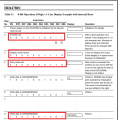
Datasheet page 46, figure 24

I have created table for figure 24 LCD 4 bit interface

RSRWD7D6D5D4WaitDescription
0 0001115msFunction set
0000115msFunction set
000011100usFunction set
00001040 usFunction set 4 bit long
00N
0
F
0
*
1
*
0
40 usN - 0 = 1/8 or 1/11 duty (1 line),
F - 0 = 5×8 dots,, ** = 10
00000040 usDisplay on/off control
00100040 usDisplay on/off control
00000040 usClear display
00000140 usClear display
00000040 usEntry mode set
0001I/D
1
S
1
40 usEntry mode set
ID = 1 increment cursor position;
S = 1 display shift


Does my table match with the figure 24 in the datasheet for 4 bit interface?

LCD is connected to port D
C:
#define LCD_Port     PORTD
#define RS           RD1
#define RW           RD2
#define EN           RD3

/* Function to send command instruction to LCD */
void LCD_Command(unsigned char Command)
{
    LCD_Port = Command  // pass only higher nibble
    RS=0;
    RW=0;
    EN=1;
    __delay_us(40);
    EN=0; 
    __delay_us(40);
}
 

Attachments

Last edited:

JohnInTX

Joined Jun 26, 2012
4,787
I have created table for figure 24 LCD 4 bit interface

RSRWD7D6D5D4WaitDescription
15msPower up delay before ANY writes
0 000115msFunction set #1 - wait 5ms AFTER write
000011100usFunction set #2 - wait 100us AFTER write
00001140usFunction set #3 - wait 40us AFTER write
00001040 usFunction set #4 - 4 bit long
Instructions after this are 8 bits long
0000100usFunction set 4 bit interface
00N
1
F
0
*
1
*
0
40 usN - 0 = 1/8 or 1/11 duty (2 line),
F - 0 = 5×8 dots,, ** = 10
0000000 usDisplay on/off control
00110040 usDisplay on/off control - cursor ON
You only need delay after both nibbles
0000000 usClear display
0000013 msClear display
Takes a long time
0000000 usEntry mode set
0001`I/D
1
S
0
40 usEntry mode set
ID = 1 increment cursor position;
S =0 - no shift for now
Does my table match with the figure 24 in the datasheet for 4 bit interface?


LCD is connected to port D
C:
#define LCD_Port     PORTD
#define RS           RD1
#define RW           RD2
#define EN           RD3

/* Function to send command instruction to LCD */
void LCD_Command(unsigned char Command)
{
    LCD_Port = Command  // pass only higher nibble
    RS=0;
    RW=0;
    EN=1;
    __delay_us(40);
    EN=0;
    __delay_us(40);
}
Pretty good on the table! The Hitachi datasheet is hard to read, even for me.
I made changes to the timings as required. The 15ms power up delay is BEFORE any writes.
You don't need additional delay between nibbles of 8 bit bytes only after the full 8 bits. The delay is to process commands.
Note the long delay after CLEAR DISPLAY. Some datasheets call out 1.52ms but I am pretty sure it is about 3ms. The controller has to clear each byte of of the 80 byte DDRAM so it takes some time. (37.5us * 80 characters).

I was wrong about the shift direction earlier. The 4 bit data bus is on the 4 most significant bits RD7-RD4 so:
(data & 0xF0) // for upper nibble
((data << 4) & 0xF0); // for lower nibble

Note that some of your LCD commands are 4 bits and others are 8 bits.

Carry on!

EDIT: Number of lines should be set to 2
 
Last edited:
Top