I know about drawing software. I wanted to know some software where I can select and drag and add those electronic elements like battery, resistor, capacitor etc.
I know about drawing software. I wanted to know some software where I can select and drag and add those electronic elements like battery, resistor, capacitor etc.
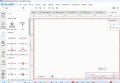
I urge you to try EasyEDA standard edition available free at JLCPCB.com. It's truly easy to use and has simple access to generic components (resistors, capacitors, batteries, etc.) and a gigantic library of specific components.
If you want to go on to creating a printed circuit board, it's easy to do and they can be ordered from JLCPCB or another vendor of your choice.
I have used AUTOCAD with an extended electronic components library. It was far from free, but the company owned it and had the license, so all was legal. I also have EAGLE, a free version, on the computer still needing to be repaired from the lightning hit. The great thing about the EAGLE software is the ability to also do PC board designs and then export the drawings to a board maker company.
"Easy EDA" looks like it could be a good choice as well, but I am not familiar with it.
I am still using win7 because when I tried win10 on a demo computer I found that a whole lot had been changed, simply for the sake of changing it. And I did not want to have to deal with a new set of bugs and a new string of bug fix updates and patches. A good product does not need repairs and fixes all of the time. A poor product certainly will require them.
"" I am still using win7 because when I tried win10 on a demo computer I found that a whole lot had been changed, simply for the sake of changing it. And I did not want to have to deal with a new set of bugs and a new string of bug fix updates and patches. A good product does not need repairs and fixes all of the time. A poor product certainly will require them. ""
.
Me too !!!
I use a ~20-year-old program called "Microsoft-Picture-It",
it's mostly manual, but it's full-featured, and it still works without a glitch.
The only real drawback is it "thinks" that it "must-be" out of Memory
when the "Canvas" size exceeds roughly ~40" X ~50" @ 150 Pixels-per-inch,
and I like very high-resolution PNG pictures.
.
.
.
.
I also use EasyEDA. It has a gigantic, and I mean gigantic component library.
Would you desire to draw a circuit employing Soviet era IV-25 VFD tubes? Yup, they are in the library.
LTspice (freeware from Analog Devices) is fine for circuits with basic components. Symbols for more complex components are generally available from user groups such as https://groups.io/g/LTspice.
For controls drawings I have no need for simulation, and that ".ASC" format needs the simulator program. Also, it is not what I had been using since 1976. Learning curves are sometimes a challenge. Eagle was a very big challenge after using my cad program at work for so many years.
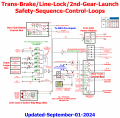
@LQC: that is a very interesting circuit. A controller for possibly a pro-stock dragster??

 Facebook
 Google
 GitHub
 Linkedin