usb connection not working

Thread Starter

denison

Joined Oct 13, 2018
334
Hi All, Got an annoying problem with the usb connection to my laptop when I have a mains operated device connected to an output. The mains operated device does not work when the usb is connected.
I am using the arduino nano board. My program connects via hardware to a mains operated device. The program works perfectly when the usb is not connected. If connected the mains operated device does not work.


Does anybody know why and more importantly how can I fix it? In just about any application using a computer you can look at your screen and see what is happening and even intervene as necessary. In a lot of industrial processes you have an operator sitting at a console seeing that the process is proceeding correctly.
 

dendad

Joined Feb 20, 2016
4,637
Really, more detailed info is needed. A "mains operated device" could be just about anything!
The mains operated device does not work when the usb is connected.
Is the Arduino connected directly to the "mains operated device" or is there (I hope) an isolated mains power supply involved?
Does the device work with the laptop USB connected, but the laptop power supply unplugged?
A lot of switch mode power bricks have quite a bit of leakage from the mains to the output.
Also, is there an Earth on both your laptop and the "device"?
PLEASE give a detailed description, with a diagram and/or photo.
 

Thread Starter

denison

Joined Oct 13, 2018
334
Really, more detailed info is needed. A "mains operated device" could be just about anything!

Is the Arduino connected directly to the "mains operated device" or is there (I hope) an isolated mains power supply involved?
Does the device work with the laptop USB connected, but the laptop power supply unplugged?
A lot of switch mode power bricks have quite a bit of leakage from the mains to the output.
Also, is there an Earth on both your laptop and the "device"?
PLEASE give a detailed description, with a diagram and/or photo.
The mains device is an electric motor with power factor correction with capacitors.
The isolation device is a random phase opto-coupler.
It does not work with the laptop power unplugged and usb connected.
There is an earth on the laptop but none on the motor. The motor plug did not come with the earth pin. This is not unusual. Many appliances come without earth pins.
My detailed description is just that, very detailed. It would take too long to explain.
I think the answer may be in the usb being a power supply as well a way of connecting the arduino to the laptop. I have a 9v supply to the arduino board. The board regulates this to 5v. The usb connection may be trying to connect 5v or 3v to the circuit. In either case the power supply would be wrong as the onboard 5v regulator would not then work.
If I don't have the 9v power supply connected the boards led light still comes on when the usb is plugged in showing that it is supplying the power to the board. If I could have the usb plugged in without it supplying power to the board I think I might then be able to have my program working while watching it on the laptop.
 

Ya’akov

Joined Jan 27, 2019
10,235
Though I am finding it hard to follow what you are doing, if the problem is the power on the USB port, there are power only USB cables, or you can modify the one you have by cutting the red wire in it.

I have yet to encounter a USB cable that failed to follow the color code of red for +5V, black for 0V, white for +DATA and green for -DATA. Just cut the cut the cable, strip it back on both sides, splice it back together omitting the red wire, or, even better put a switch on the red wire to allow for power or no power. I have also made up cables with two switches, one on the red to kill power and one on the white to kill data. That way the cable can be power only or data only.
 

bloguetronica

Joined Apr 27, 2007
1,544
Though I am finding it hard to follow what you are doing, if the problem is the power on the USB port, there are power only USB cables, or you can modify the one you have by cutting the red wire in it.

I have yet to encounter a USB cable that failed to follow the color code of red for +5V, black for 0V, white for +DATA and green for -DATA. Just cut the cut the cable, strip it back on both sides, splice it back together omitting the red wire, or, even better put a switch on the red wire to allow for power or no power. I have also made up cables with two switches, one on the red to kill power and one on the white to kill data. That way the cable can be power only or data only.
I think the problem is not the USB cable. The OP stated that the LED still lights on. And, even on self powered USB devices (I'm going a tangent here just to get my point across), the Vbus is still required to "signal" the presence of a host to the device (it is actually more complicated, since the PHY still uses the Vbus rail coming from the host to raise D+ and D-, even if it is powered by something else). Thus, the problem is not the cable.

Without a photo of the actual board, this will be a guess game. I'm betting that there is isolation somewhere. However, strangely, the part that is isolated from the motor still requires some ground reference? Odd, to say the least. It would be even better if you could provide some schematic or a pointer to the actual board. This doesn't seem to be a software issue.
 

Ya’akov

Joined Jan 27, 2019
10,235
I think the problem is not the USB cable. The OP stated that the LED still lights on. And, even on self powered USB devices (I'm going a tangent here just to get my point across), the Vbus is still required to "signal" the presence of a host to the device (it is actually more complicated, since the PHY still uses the Vbus rail coming from the host to raise D+ and D-, even if it is powered by something else). Thus, the problem is not the cable.

Without a photo of the actual board, this will be a guess game. I'm betting that there is isolation somewhere. However, strangely, the part that is isolated from the motor still requires some ground reference? Odd, to say the least. It would be even better if you could provide some schematic or a pointer to the actual board. This doesn't seem to be a software issue.
My response was intended to allow the TS to eliminate or confirm his speculation that the power supply from the USB port was the cause, not to suggest it was. I think it is a good idea for him to test it since his description of the problem is very hard to follow and the information needed to understand the actual problem is not available.

If removing the USB power from the Arduino solves the problem, that’s good—though I find it unlikely. If it doesn’t we can solicit more information from a motivated TS possibly in a more orderly way.
 

Ya’akov

Joined Jan 27, 2019
10,235
But that requires him to practically destroy the cable.
Many people have more USB cables than they could ever practically use because they come with everything. And if not, they are cheap, and, a cable that can be switched is useful, I use them to avoid mounting devices I just want to charge or power and powering devices that have other sources.

I also use them when programming certain MCU boards that require disconnecting and reconnecting like the Digispark.
 

sagor

Joined Mar 10, 2019
1,049
Lots of unknowns. What pins of the Nano are interfaced to the "mains" device? Remember that D0 and D1 (TX and RX) are connected to the USB interface chip. You cannot use both at the same time.
Also, it may be a grounding or ground loop problem. Power supplies need a common ground. How is the Nano powered when not using the USB? And so on, need more details.
Draw a schematic on paper and take a picture of it. Show any power supplies and interface signals.
 

Thread Starter

denison

Joined Oct 13, 2018
334
Though I am finding it hard to follow what you are doing, if the problem is the power on the USB port, there are power only USB cables, or you can modify the one you have by cutting the red wire in it.

I have yet to encounter a USB cable that failed to follow the color code of red for +5V, black for 0V, white for +DATA and green for -DATA. Just cut the cut the cable, strip it back on both sides, splice it back together omitting the red wire, or, even better put a switch on the red wire to allow for power or no power. I have also made up cables with two switches, one on the red to kill power and one on the white to kill data. That way the cable can be power only or data only.
I don't believe I could cut the wires and then put it back together like you suggest and still have any hope of using the usb connection. You say that there are power only usb devices. What about data only usb? If there are any idea where I could get one?
 

Ya’akov

Joined Jan 27, 2019
10,235
I don't believe I could cut the wires and then put it back together like you suggest and still have any hope of using the usb connection. You say that there are power only usb devices. What about data only usb? If there are any idea where I could get one?
I have never heard of such a thing. Power only is designed to protect tour device from unknown USB ports (e.g.: public charging) but data only is pretty specialized.

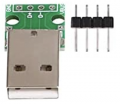
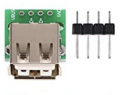
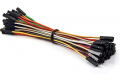
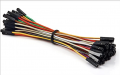
The closest thing I can find wold be to buy two sets of these in the appropriate types, but it is a lot more expensive than cutting a cable up. Can you solder on headers? Do you have female-to-female DuPont wires?

1646900918184.png 1646900961051.png 1646901363601.png
IF you have a spare breadboard around you could solder the headers facing down and use male-to-male DuPont wires. It would also hold the arrangement rigid which would be an advantage.
 

Attachments

Top