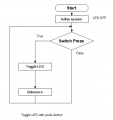
Toggle LED with push-button

Thread Starter

Parth786

Joined Jun 19, 2017
642
Hi
Push button and LED is connected with 8051 Microcontroller. When the push-button press, the LED turns ON. Release the push-button and there is no change to the status of the LED. Press the push-button again and the LED turns OFF. Repeat forever.

Does this flow chart match with above Statements ?
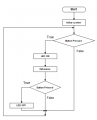
upload_2017-10-15_12-59-53.png
 

MrChips

Joined Oct 2, 2009
34,629
I provided you with a hint to the solution and you didn't use it. The hint was the word "toggle" in the title.

You forgot to debounce the push-button on the second time pressed.
There is no difference between the first press and the second press. See if you can generalize this for a simpler algorithm,
 

Thread Starter

Parth786

Joined Jun 19, 2017
642
I provided you with a hint to the solution and you didn't use it. The hint was the word "toggle" in the title.

You forgot to debounce the push-button on the second time pressed.
There is no difference between the first press and the second press. See if you can generalize this for a simpler algorithm,
Does it make any sense?

upload_2017-10-15_14-42-13.png
 

MrChips

Joined Oct 2, 2009
34,629
Button Pressed function is the same and does not need to be repeated.
Think of how you can call the Button Pressed function only once in the main loop.
 

be80be

Joined Jul 5, 2008
2,394
You have states here you have to save the old state to see if it's a new state

If button pressed button save = 1 ledon
if button pressed button save = 0 ledoff
You test for the press and save that turn on the led
wait for new press and change save turn off led
 
Last edited:

Thread Starter

Parth786

Joined Jun 19, 2017
642
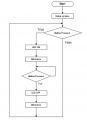
Flow chart

upload_2017-10-16_18-31-39.png

C:
 #include<REGX51.h>

  #define TRUE            (1)
  #define FALSE           (0)
  #define FOREVER        (TRUE)

  #define LED_OFF         (0)
  #define SWITCH_PRESSED  (0)

  /*set bit P3^2 to Switch*/
  sbit  Switch = P3^2;

  /*set bit P1^0 to LED*/
  sbit LED = P1^0;

  /* This is delay function */
  void Delay (unsigned long n)
  {
       unsigned int i;
       for (i = 0; i < n;  i++);
  }

  void main (void)
  {
     LED = LED_OFF;

  while (FOREVER)
  {
      if (Switch ==  SWITCH_PRESSED)

        {
            LED = ~LED;
            Delay (20000);
        }
 
  }
}
Note : I haven't made subroutine for delay
 
Last edited:

MrChips

Joined Oct 2, 2009
34,629
You are going around in circles aimlessly seeking out any solution that might have a chance of working but with no concrete basis for correct design.

Where is your switch debounce?
Why do you need Delay (20000)?
What do you need to accomplish in your Initialization?

You need to create a single Switch_Pressed() function, not simply (Switch == SWITCH_PRESSED)
 

Thread Starter

Parth786

Joined Jun 19, 2017
642
You are going around in circles aimlessly seeking out any solution that might have a chance of working but with no concrete basis for correct design.

Where is your switch debounce?
Why do you need Delay (20000)?
What do you need to accomplish in your Initialization?

You need to create a single Switch_Pressed() function, not simply (Switch == SWITCH_PRESSED)
Can you please tell me What's wrong in program?. Does it not toggle LED with push button?

Delay and debounce are same just wait for some time. I mean if switch press, wait sometime for next press

I have read somewhere on internet. 20ms or 50 ms is good for push button
 

MrChips

Joined Oct 2, 2009
34,629
Delay and debounce are not the same thing. Delay is used in a debounce procedure but is not sufficient alone.

What happens if you held the button down continuously?
 

Thread Starter

Parth786

Joined Jun 19, 2017
642
Does it make any sense ?

C:
#include<REGX51.h>

/*set bit P3^2 to Switch*/
sbit  Switch  =  P3^2;

/*set bit P1^0 to LED*/
sbit LED  =  P1^0;

#define TRUE                 1
#define FALSE                0
#define FOREVER             TRUE

#define Switch_Pressed       0
#define Switch_Not_Pressed   1

/* This is Debounce time  */
  void Debounce_Time (unsigned long n)
  {
      unsigned int i;

     for (i  =  0; i  <  n;  i++)

        {

        }
   }

unsigned int check_Switch(void)
  {
        if(Switch  ==  0)                             /* Switch is pressed */
         {
                Debounce_Time(2000);                  /* wait 20 msec */

                if(Switch  ==  0)                     /* check switch again */
        
               return Switch_Pressed;                 /* switch is really pressed */
        }
   }

int main(void)
{
   unsigned int old_state  =  check_Switch();

  while (TRUE)
  {

      unsigned  int New_state  =  check_Switch();

       if(New_state  !=  old_state  &&  New_state  ==  Switch_Pressed)
       {
               LED = ~LED;
        }
              old_state = New_state ;
   }

}
 
Last edited:

MrChips

Joined Oct 2, 2009
34,629
No. It doesn't make any sense.

Here is the main program in pseudo code.

Initialize ports
repeat forever:
.. wait for key pressed
.. toggle LED

In this exercise we are not worried if the key pressed function blocks program flow.
In the next exercise we will have two push-buttons and two LEDs. Hence we will implement non-blocking code in that up-coming exercise.
 

Thread Starter

Parth786

Joined Jun 19, 2017
642
No. It doesn't make any sense.
.
OK Please tell me, what's wrong in program? Where does it fail?

I have written new code again

C:
#include<REGX51.h>

/*set bit P3^2 to Switch*/
sbit  Switch  =  P3^2;

/*set bit P1^0 to LED*/
sbit LED = P1^0;

#define TRUE           1
#define FALSE          0
#define FOREVER      TRUE

#define Switch_Pressed            0
#define Switch_Not_Pressed        1

#define LED_OFF                   0


/* This is Debounce time  */
  void Debounce_Time (unsigned long n)
  {
      unsigned int i;
     for (i  =  0; i  <  n;  i++)
       {

       }
   }

  void Initialization()
    {
        Switch  =  Switch_Not_Pressed ;
        LED    =  LED_OFF;
   }

/* check switch */
bit check_Switch(void)
  {
      if(Switch  ==  Switch_Pressed)                            /* Switch is pressed */
       {
          Debounce_Time(2000);                                  /* wait 20 msec */
          if(Switch  ==  Switch_Pressed)                       /* check switch again */
          return Switch_Pressed;                               /* switch is really pressed */
       }
        return Switch_Not_Pressed;
  }

unsigned int wait_for_a_switch(void)
  {
        unsigned int return_value;
         if(!Switch)
         {
             return_value  =  check_Switch();
         }
            return return_value;
    }

unsigned int wait_for_no_switches(void)
  {
       unsigned int retuarn_value;
       retuarn_value  =  Switch_Not_Pressed;
       return retuarn_value;
  }

int main(void)
{
      unsigned int old_state  =  wait_for_a_switch();

      Initialization();

  while (TRUE)
  {

     unsigned  int New_state  =  wait_for_a_switch();

      if(New_state  !=  old_state  &&  New_state  ==  Switch_Pressed)
      {
           LED  =  ~LED;
      }

  old_state = New_state ;
  }

}
 
Last edited:

Brian Griffin

Joined May 17, 2013
64
Can we use a switch with a resistor and capacitor instead? I taught my students with these one first, and then letting them explore the software debouncing. Software debouncing is a very tough topic (did that in previous work but doesn't involve a switch, not easy!!), and we normally start with some simple hardware configuration first. There are many examples of the switch, resistor and capacitor combo: http://www.ganssle.com/debouncing-pt2.htm (look for RC debouncer)

Ah, also, OP needs to use an actual microcontroller and some electronic components, instead of blindly guessing the flow in the simulator.
 

Thread Starter

Parth786

Joined Jun 19, 2017
642
Ah, also, OP needs to use an actual microcontroller and some electronic components, instead of blindly guessing the flow in the simulator.
Yes I agree with you. very soon I will purchase microcontroller and electronic components

But right now I need help in program. I am just waiting for reply. Is there anything wrong in program? Now does it make any sense ?
 

MrChips

Joined Oct 2, 2009
34,629
Yes I agree with you. very soon I will purchase microcontroller and electronic components

But right now I need help in program. I am just waiting for reply. Is there anything wrong in program? Now does it make any sense ?
Are you using a simulator? I didn't catch that.
You cannot test the operation of a push-button with a simulator. You need to use real-world components.

Write a procedure for the following:

Enter into a loop when the push-button pressed is detected.
Stay in the loop while the push-button is continuously pressed.
Exit the loop when the push-button is released.
Use switch-debounce techniques for both button pressed and button released.

Test with real-world components.

Edit: This is not what we want but we will get to that later.
 

Thread Starter

Parth786

Joined Jun 19, 2017
642
Are you using a simulator? I didn't catch that.
You cannot test the operation of a push-button with a simulator. You need to use real-world components.

Test with real-world components.
Yes I am using simulator software. I don't have microcontroller and other electronic component. There is no electronic market, where I live. I have to go for away from my place And They sell very expensive items but I will purchase very soon. I have just financial issues.

Write a procedure for the following:

Edit: This is not what we want but we will get to that later.
Sorry but I didn't understand that. What you want. you want me to draw flow chart or you want me to write program.

You didn't reply on program. Is that program you want ?
 

MaxHeadRoom

Joined Jul 18, 2013
30,562
@Parth786 there is small test boards on ebay for $5.00 using a 12F675 that has LED's and P.B's for testing something like this.
I recently had a project that used a similar function, every time the P.B. was pressed the bit was stored and on the Push of the button just XOR'd the last state so just toggled it.
Max.
 

WBahn

Joined Mar 31, 2012
32,707
Hi
Push button and LED is connected with 8051 Microcontroller. When the push-button press, the LED turns ON. Release the push-button and there is no change to the status of the LED. Press the push-button again and the LED turns OFF. Repeat forever.

Does this flow chart match with above Statements ?
View attachment 137333
I know I'm coming to this thread late and that you have a whole bunch of flowchart/code versions beyond this initial one, but I am getting little sense that you are making much effort to understand what the shortcomings of each of the versions. Instead, you seem to be making almost random changes hoping that, at some point, something will just happen to work. Design-by-happening is not a methodology that has a long track record of success.

So let's examine this flowchart, and let's assume that our switch has no bounce issues and that we catch each event perfectly. Under those ideal conditions, this flowchart still will not do what we want. Why not?

After initializing the system I ask if the button is pressed. Let's say that it is. So you turn on the LED. Now you check if the button is pressed and let's say that it is not. So you go back to the top of the loop and check if the button is pressed. Let's say that it is. Now you WANT to turn the LED off, but your flowchart has you turn the LED on again.

So you see that? More importantly, do you see how I walked around the flowchart doing what it told me to do and compared that to what I wanted to have happen?
 

Thread Starter

Parth786

Joined Jun 19, 2017
642
I know I'm coming to this thread late and that you have a whole bunch of flowchart/code versions beyond this initial one, but I am getting little sense that you are making much effort to understand what the shortcomings of each of the versions. Instead, you seem to be making almost random changes hoping that, at some point, something will just happen to work. Design-by-happening is not a methodology that has a long track record of success.
Good to see your reply. I made many flow chart wrong. I don't want that some how it should be work by making random flow chart. I always tried my best effort to solve problem. Do you see any improvement in me before starting. I want to tell you that I want to learn. That's why I follow your and other advice. I can never compare between you and me because you have lot of year experience. you have learned lot over time

I think person learn over time. I was very scared. I thought I was not making progress after my many efforts sometime ago I have started there where i didn't understand anything. At first I found it very difficult to make flow chart. but I think I learned a lot in last 2 month's. Now I make flowchart and there are some mistakes in it. Give me some time. I will try to improve myself.

So let's examine this flowchart, and let's assume that our switch has no bounce issues and that we catch each event perfectly. Under those ideal conditions, this flowchart still will not do what we want. Why not?

After initializing the system I ask if the button is pressed. Let's say that it is. So you turn on the LED. Now you check if the button is pressed and let's say that it is not. So you go back to the top of the loop and check if the button is pressed. Let's say that it is. Now you WANT to turn the LED off, but your flowchart has you turn the LED on again.

So you see that? More importantly, do you see how I walked around the flowchart doing what it told me to do and compared that to what I wanted to have happen?
Initially I made flow chart which was wrong. After that I didn't make flow chart. I wrote directly program and I have tested that program in simulator. It works as I wanted to do. I wanted to know that what's wrong in program. any logical error or any mistakes .
 
Last edited:
Top