The JBL L75ms Repair

Thread Starter

R!f@@

Joined Apr 2, 2009
10,004
Below link is the one I am talking about. I got one for repair.
I did a lot of search and got nothing so far
It's a 2016 model I believe.

I can start posting the repair, but I like to know from mods, if there will be any copyright sorta thing issue. Pls let me know

https://www.jbl.com/loudspeakers/L75MS.html

(edit) I cannot add hyperlink to the text ...!!!
 
Last edited:

KeithWalker

Joined Jul 10, 2017
3,607
From your post I understand that you have a JBL speaker for repair, and can't find much information on it, but I don't quite understand what you are asking for.
 

WBahn

Joined Mar 31, 2012
32,874
Below link is the one I am talking about. I got one for repair.
I did a lot of search and got nothing so far
It's a 2016 model I believe.

I can start posting the repair, but I like to know from mods, if there will be any copyright sorta thing issue. Pls let me know

https://www.jbl.com/loudspeakers/L75MS.html

(edit) I cannot add hyperlink to the text ...!!!
We'll discuss it a bit, but my guess is that it comes down to exactly what you are looking to post and what kinds of policies/restrictions JBL wants observed.

In general, I would say that if you are going to post information that you would be expected to pay JBL (or a proxy) for, such as service manuals and schematics, then they would not want them published on a public forum.

But if you are posting your own information about your repair, such as parts of the circuit you have reverse engineered, then you should be okay.

In any event, thanks for asking ahead of time.
 

Wendy

Joined Mar 24, 2008
23,798
I have no clue where you could buy something like this, back in last century the posted the schematic inside case. No more.
 

Thread Starter

R!f@@

Joined Apr 2, 2009
10,004
Thank you all.
I have seen you tube videos from Louis Rossmann and mend it mark regarding own repair videos giving problem
I cannot find a schema and I will post my findings if possible and my attempt to get it fixed as I have done before.

And members input if possible to get it done.

@Wendy How are you doing ? I am doing fine an been busy.

Will continue from next post onwards
 

Thread Starter

R!f@@

Joined Apr 2, 2009
10,004
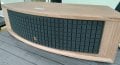
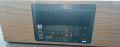
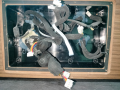
Just to show you the one I am working with.

Font.jpg

Back.jpg

As I have said before, I cannot find any detail concerning any repair attempt on this type of unit.
The Issue was that it has no sound whatsoever.
Power indicator, remote & switch panel works. Bluetooth can be connected. I did not try ARC, network or airplay cause I don't have any way to do it.
JBL has it's own thing concerning power ON and OFF sound and also for device connectivity.
Customer informed that this one has no ON OFF sound but Bluetooth ACK tone is there. After damage it is not there.
He was correct. Bluetooth connected indication is not there.

I did my research on how it is assembled and saw a video that shows a PSU is inside beside the main board scewed to the sink on the back plate.
As I do before, I figured if no sound what so ever and front panel working, it could be the main PSU issue, and the Stby PSU working, no protection indication.
Now to dismantle it.

to be continued .......
 
Last edited:

Wendy

Joined Mar 24, 2008
23,798
It appears to me you're going to have disassemble it and look, in my experience many issue can be spotted visually.Follow the power supply (as IMO it's a likely culprit.
 

Thread Starter

R!f@@

Joined Apr 2, 2009
10,004
It's auto volt, so works all around the world.

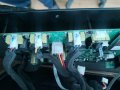
The DSP and Amp board came out easily after removing the back screws. The antenna connectors came off on it's own when it was pulled out.
Only thing to note was the mid and 2 woofer cables are of the same type, so need to mark those out to know which goes where.


Speaker connection.jpg

The other cable are fool proof. 2 PSU cables for Amps, 1 for stby and on/off and flex for control panel.

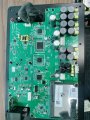
Main PCB.jpg

This is could be what it claim to be. 5 separate amps for each speaker with linkwitz riley (advertised) active network. Sound should be awesome, although I haven't heard it yet.

The PSU would be behind the air tight cover housing at the back.

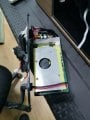
Pocket.png

Remove those and it came out quite easily with the PSU since they were plugged into it. PSU was not fixed but it was in a slide in groove sorta at the sides of the box. Needed to clear some glue that were used to seal the cable hole to free the inside panel.

Remove PSU.jpg

Off to the bench now.
 
Last edited:

Thread Starter

R!f@@

Joined Apr 2, 2009
10,004
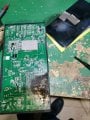
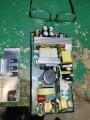
2.png

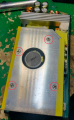
Remove the top sink screws holding the PSU top plate.

Some additional screws for the back plate

1.png


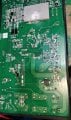
And Viola.....! MAGIC SMOKE.


PSU 2.jpg
 
Last edited:

Thread Starter

R!f@@

Joined Apr 2, 2009
10,004
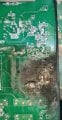
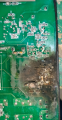
PSU 3.jpg

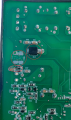
Cleaned the area.....

PSU 4.jpg

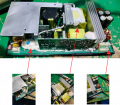
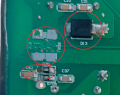
It seems two low value R's caught fire. Studying the diagram shows they are at GND, so they are shunts.
Problem is I cannot make out the value.
2 nos Low value R ( unknown )
1 nos 10R
1 nos Ceramic capacitor

PSU Back close up.png

Power components are yet be to checked
 

Thread Starter

R!f@@

Joined Apr 2, 2009
10,004
What's on the other side of this?
View attachment 349045
The damaged components so far

Damaged.png

A high speed diode, 2 shunt R, 1 low R and a cap.

Diode and the 10R is no problem.

The cap I figured would be a 10nf 600V or so.
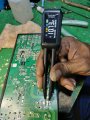
I checked all the identical caps and they turned out to be same through out and other same type caps were 100pf


Capacitor Measurement.jpg

PSU 5 - Sink Removed.jpg
Heats sink mounted components tested good. But the MOSFET DMM test does not turn it ON, so I did gate voltage injection test and seems to turn and off as it should.

No other components are found problematic.

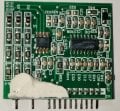
I studied the layout and I pulled out the controller to see the data since no schema is there.

Removing Cntrl.jpg

PWM_PFC Controller.jpg

This thing has a built in PFC / PWM chip.
Observation showed me the PFC blew but without the MOSFET and the fuses. Never had that kinda issue before. I am wondering WTH happened. Client says problem came after power outage. Still why no power component blew.

The nf cap and the small 10R might be a victim of the fire from the shunt R's.

The PFC/PWM chip data shows a typical layout but there are no shunts involved as far as I have seen.
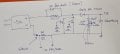
Most of the time if the PFC is giving issues, I can always not use it or by pass it, but here it might be not possible. Since PFC & PWM are managed by a single chip. I am trying to make crude diagram on the blown components location.
 

Thread Starter

R!f@@

Joined Apr 2, 2009
10,004
Sketch.jpg

My CAD software is quite expensive.

The diode across inductor was shorted, dunno why it would short.
The 2W low R caught fire. The sparking might have taken out the 10R and the cap as they just next to each other.

Damaged.png

I am thinking if I put a low R shunt, main supply would work if the controller does not switch off due to PFC voltage not rising.

Or could it be the diode shorting prevent the voltage rising since the B+ line is now directly connected to bridge and the FET switching caused a current spike, resulting power dissipation way over the SMD shunt. The FET's are 18 amps each. The fuse won't respond that fast.
That diode will reverse bias when the FET start switching under normal operation.

A blown shunt would definitely disconnect the power switching side at the GND side. But not the Stby PSU.
 
Last edited:
Wendy

Joined Mar 24, 2008
23,798
It is likely part of the power supply filter circuit. which picture shows the top of that circuit board? The damage appears pretty significant, Look for caps that have spewed their electrolyte out, it it has blown semiconductors it is possible beyond repair.
 

Thread Starter

R!f@@

Joined Apr 2, 2009
10,004
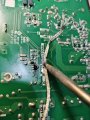
I tried to check the PSU without PFC.
The stby works, so jumped the ON terminal with 10K.

Nothing :confused:
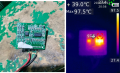
I should have checked the IC. Found a short on it's supply.
Removed the card, checked the supply pins from data sheet and .....

Thermal.png

The PFC/PWM chip was short...! Go figure !

Sigh ! I guess I have to wait for parts to even try anything.

Till then ...ta ta.
 
Top