Facebook
 Google
 GitHub
 Linkedin
I’m trying to identify why the circuit breakers in my home keep tripping, and I’m beginning to suspect that my Mac Studio M3 Max may be involved. I would appreciate help diagnosing the root cause and finding a permanent solution.
1. My Current Setup
I’m using a Mac Studio M3 Max with a high-end configuration, connected to three external displays:
2. What Happens When the Circuit Breakers Trip
This has happened several times. When it occurs, the circuit breaker trips, cutting power to the Mac Studio and other devices connected to the wall outlets.
On one occasion, I witnessed the following sequence:
My previous Mac Studio also experienced overheating symptoms. Its fans would run at high speed, and I noticed a burning smell. It subsequently suffered repeated unexpected power failures.
I researched the issue and consulted ChatGPT, which suggested that the problem might be related to excessive power consumption from multiple connected devices, including several USB devices rated at around 600 W. I disconnected some of these devices to reduce the load, but the problem persisted.
Eventually, the Mac Studio stopped powering on altogether, even after I replaced its power cable. I took it in for service and received a replacement unit. The service centre replaced the logic board and the internal power supply assembly.
Given these previous incidents, I’m concerned that there may be an underlying electrical issue, a problem with the Mac Studio, or an interaction between the computer and my home electrical system.
4. APC ACR LS1000-MS Power Protection Device
After replacing the Mac Studio, I purchased an APC ACR LS1000-MS power protection device because I wanted the computer to remain powered on during brief power interruptions or circuit breaker trips.
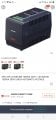
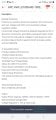
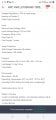
However, I’m now unsure whether the device is working as intended.
After some time, I noticed that the indicator light on the rear of the APC unit was no longer red. The Mac Studio still received power through the device and operated normally, so I couldn’t tell whether the APC was functioning correctly.
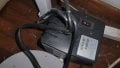
More importantly, when the circuit breakers tripped, the Mac Studio shut down as well. It did not remain powered on as I had expected.
I’m therefore unsure whether:
I would appreciate advice from people with experience in electrical systems, high-power computers, Mac Studio hardware, and APC power protection equipment.
Specifically:
Any technically grounded advice, diagnostic suggestions would be greatly appreciated.
1. My Current Setup
I’m using a Mac Studio M3 Max with a high-end configuration, connected to three external displays:
- Two Apple Cinema Displays
- One iPad mini 6th generation, used as an additional display
2. What Happens When the Circuit Breakers Trip
This has happened several times. When it occurs, the circuit breaker trips, cutting power to the Mac Studio and other devices connected to the wall outlets.
On one occasion, I witnessed the following sequence:
- The Mac Studio was running with its displays turned off. I remotely accessed it through AnyDesk and started instructing an AI coding agent to perform a coding task.
- Shortly afterwards, the circuit breaker tripped, cutting power to the devices connected to the wall outlets.
- I checked the electrical panel and found that breaker No. 1 had tripped.
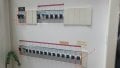
- When I tried to switch breaker No. 1 back on, breakers No. 2 (the main house breaker), No. 1, and No. 3 (the home office breaker) tripped again.
- I then reset the breakers in the following order: No. 3, No. 1, and finally No. 2. I heard a small popping sound, but all the breakers remained on afterwards. Power was restored, and all the devices appeared to work normally again.
- Breaker No. 1: Controls the entire circuit supplying power to the wall outlets, separate from the shorter row of breakers above it, which controls the lighting circuits.
- Breaker No. 2: The main circuit breaker for the entire house.
- Breaker No. 3: Controls the home office where my Mac Studio is located.
My previous Mac Studio also experienced overheating symptoms. Its fans would run at high speed, and I noticed a burning smell. It subsequently suffered repeated unexpected power failures.
I researched the issue and consulted ChatGPT, which suggested that the problem might be related to excessive power consumption from multiple connected devices, including several USB devices rated at around 600 W. I disconnected some of these devices to reduce the load, but the problem persisted.
Eventually, the Mac Studio stopped powering on altogether, even after I replaced its power cable. I took it in for service and received a replacement unit. The service centre replaced the logic board and the internal power supply assembly.
Given these previous incidents, I’m concerned that there may be an underlying electrical issue, a problem with the Mac Studio, or an interaction between the computer and my home electrical system.
4. APC ACR LS1000-MS Power Protection Device
After replacing the Mac Studio, I purchased an APC ACR LS1000-MS power protection device because I wanted the computer to remain powered on during brief power interruptions or circuit breaker trips.
However, I’m now unsure whether the device is working as intended.
After some time, I noticed that the indicator light on the rear of the APC unit was no longer red. The Mac Studio still received power through the device and operated normally, so I couldn’t tell whether the APC was functioning correctly.
More importantly, when the circuit breakers tripped, the Mac Studio shut down as well. It did not remain powered on as I had expected.
I’m therefore unsure whether:
- The APC device is defective or configured incorrectly.
- It is not actually a UPS with battery backup, or its backup function is unavailable.
- The device is unable to protect the Mac Studio against the type of electrical fault occurring.
- The circuit breaker trips for a reason that a power protection device cannot prevent.
I would appreciate advice from people with experience in electrical systems, high-power computers, Mac Studio hardware, and APC power protection equipment.
Specifically:
- What could be causing the circuit breakers to trip repeatedly? Could the Mac Studio, its connected peripherals, a faulty power supply, an electrical overload, a short circuit, or an earth leakage fault be responsible?
- Could the Mac Studio be triggering the problem when an AI coding agent starts working? The incident I witnessed occurred shortly after I remotely accessed the machine and started a coding task. Could this be related to increased CPU/GPU power consumption, or might the timing be coincidental?
- Could the previous burning smell, high fan speeds, and power supply/logic board replacement indicate an underlying problem? Is it possible that an issue with the electrical supply damaged the previous Mac Studio?
- Why do multiple breakers trip together when I attempt to restore power? What might explain the sequence involving the office breaker, the wall-outlet circuit breaker, and the main breaker? Could the small popping sound indicate arcing or another electrical fault?
- Is the APC ACR LS1000-MS suitable for this purpose? Does this particular model provide battery backup, or does it only offer surge protection or voltage regulation? How can I verify whether it is working properly and whether its indicator lights are normal?
- What is the safest and most effective way to isolate the root cause? Should I have a licensed electrician inspect the circuit, have the Mac Studio and APC tested separately, or investigate another component first?
Any technically grounded advice, diagnostic suggestions would be greatly appreciated.