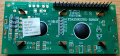
STM32F103C8 (Bluepill) LCD 16*2 (mc21605c6w-spr-v2) LCD issue

Thread Starter

seanstevens

Joined Sep 22, 2009
323
I am trying to run this sketch in Arduino IDE and the display just won't display anything at all. The sketch compiles and I know it runs as scoping the various data/control pins shows lots of (clean) activity. I suspect the LCD. It is new, nothing is pulling more than about 10mA 12V is feeding a 5V regulator that feeds the Bluepill and the LCD.

Looking at the datasheet, it does say the logic level is 5V, but looking around the net, many are using these 'type' of LCD with Bluepill, besides, I would at least expect the LED backlight to come on even if the logic is 5V but it doesn't.
There are many PCB pad links on the back of the board (see attached), but the datasheet says nothing about them. To me, it just looks like something isn't quite switched on, but for the life of me, I can't figure out what else needs to be done. The wiring has been checked and taken off and put back together many times but nothing lights up on the darn thing! Help!

It is my first time using the Bluepill, but I have run a number of sketches and they all are OK, just not with this display. My next desperate move is to use an Arduino so that I can eliminate if it is the 5V logic, but I suspect not, why doesn't the LED backlight come on at all!
 

Attachments

MrChips

Joined Oct 2, 2009
34,807
First things first.

Get out your DMM and measure the voltages going to the BACKLIGHT pins,
pin-15 LED positive (+5V)
pin-16 LED negative (GND)
 

sarahMCML

Joined May 11, 2019
697
I am trying to run this sketch in Arduino IDE and the display just won't display anything at all. The sketch compiles and I know it runs as scoping the various data/control pins shows lots of (clean) activity. I suspect the LCD. It is new, nothing is pulling more than about 10mA 12V is feeding a 5V regulator that feeds the Bluepill and the LCD.

Looking at the datasheet, it does say the logic level is 5V, but looking around the net, many are using these 'type' of LCD with Bluepill, besides, I would at least expect the LED backlight to come on even if the logic is 5V but it doesn't.
There are many PCB pad links on the back of the board (see attached), but the datasheet says nothing about them. To me, it just looks like something isn't quite switched on, but for the life of me, I can't figure out what else needs to be done. The wiring has been checked and taken off and put back together many times but nothing lights up on the darn thing! Help!

It is my first time using the Bluepill, but I have run a number of sketches and they all are OK, just not with this display. My next desperate move is to use an Arduino so that I can eliminate if it is the 5V logic, but I suspect not, why doesn't the LED backlight come on at all!
According to the datasheet there's no backlight connected to pins 15 and 16!
 

MrChips

Joined Oct 2, 2009
34,807
According to the datasheet there's no backlight connected to pins 15 and 16!
Interesting. That is good to know.
If there is no backlight. The next thing to do is to apply power to the LCD. Do not run any software.
Adjust the contrast setting. You should see a row of black rectangles on the screen.
 

Thread Starter

seanstevens

Joined Sep 22, 2009
323
Thank you both.

First things first.

Get out your DMM and measure the voltages going to the BACKLIGHT pins,
pin-15 LED positive (+5V)
pin-16 LED negative (GND)
Done it already, from BP to LCD 5V is delivered. I have done a continuity test on all pins from LCD to my breadboard.

According to the datasheet there's no backlight connected to pins 15 and 16!
I missed that but I have connected 5V directly to the A/K on the far right, but nothing at all.

Interesting. That is good to know.
If there is no backlight. The next thing to do is to apply power to the LCD. Do not run any software.
Adjust the contrast setting. You should see a row of black rectangles on the screen.
Havent done it with no software, but I have closely looked for the usual LCD pixels/shadow whilst changing the contrast, nothing at all! Its like it is completely dead but it cant be.
 

Thread Starter

seanstevens

Joined Sep 22, 2009
323
Just an update; I have just tried the built-in Arduino uno example LiquidCrystal Hello World sketch on the 2.2.1 IDE on an Uno and that worked with the LCD. So the LCD is not dead, the contrast voltage needs to be 1.1V before the LCD characters appear, any higher and you cant see anything at all. I have now connected it to the 0V fo high contrast which just looks normal.
I haven't got the BluePill with me now to try it. I will update when I test later on.
 

Thread Starter

seanstevens

Joined Sep 22, 2009
323
Update on the situation... Sadly, the BluePill and the LCD had a fatal accident when they both accidentally ran into a 12VDC rail and passed away. This was of course due to me being extremely clumsy. I did try to resuscitate the BluePill by changing its 3.3V regulator, but the 3.3V was unsurprisingly shorted to the ground... RIP BP!
 
Top