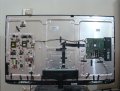
Sony Bravia LCD TV Repair

Thread Starter

hamadahmad

Joined Aug 2, 2010
8
Please guide me to troubleshoot my TV Problem
Sony LED TV
KDL-46EX520
No Picture, but the Sound is OK.
TV Channels are working without picture.
Backlight appears when the TV is Plugged-In
Fuse on T-Con is tested and is OK

Regards.
 

Attachments

Thread Starter

hamadahmad

Joined Aug 2, 2010
8
Cordial Thanks Dodgydave for your Reply.

Please tell me how can I identify that which board is creating problem i.e.
Backlight Inverter Board, the Video/Audio processor or the T-Con

The Audio is OK . TV Channels are there but there is no Video. Remote is working. Channels can be changed. No indication from Green or Red Lights. Both are stable.

Please advise me Sir.
 

Attachments

Thread Starter

hamadahmad

Joined Aug 2, 2010
8
Dear PackratKing, I did try all the options.

I even attached my Laptop as well as my Sony Digital Camera with the TV. They previously worked.

But now there is no response.

Please guide me Sir.

Also note that I'm by profession a Civil Engineer having a reasonably good knowledge of Electronics.
 

Thread Starter

hamadahmad

Joined Aug 2, 2010
8
Dear I read your profile PackratKing.

You will definitely be pleased to know that I too love electronics. Do experiments, make electronic circuits, devices, circuit boards (PCBs) as well as other mechanical hobby repairs and experiments.
 

sheldons

Joined Oct 26, 2011
613
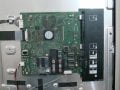
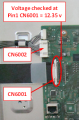
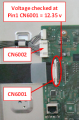
tcon pcb is not at fault-how many times does the standby led flash?what do you get when you press the home key on the remote control?if you get the menu display its localised the fault to a specific board which depending on the fault may scrap the set-if you have no display then it may well be scrap anyway-you need to check voltages on the psu B board(pin1 CN6001-5v for 22"/26" model,12v for the ex model/)
if that supply is there its down to the G board-but check the wiring harnesses first going board to board -also check the logic level of the BL_ON line-at pin 6 of CN6002-if its lo replace the harness from B to G board-if its hi replace the lvds cable connecting the tcon pcb-if you still have no fault found and no display ill talk you thro the rest of the fault finding procedure
depending wether you have deep pockets the next few steps involve detailed examination of the G board or replacement or scrapping the set......I have repaired a few of these sets and unless its done correctly servicing wise you will be going round in circles wasting time if you dont test things in the correct order......
 
Last edited:

Thread Starter

hamadahmad

Joined Aug 2, 2010
8
Nothing appears on the Screen when I press "Home" on the Remote Control.
But the sound comes that the command has been executed.
TV channels are OK and their sound is clear.
 

sheldons

Joined Oct 26, 2011
613
have you checked all cables are firmly seated in the connectors from B board to G board and is that supply present on B board,pin 1 CN6001.....either 12v or 5v .....and what is the BL_ON line? The logic level here determines where we go next......
 

R!f@@

Joined Apr 2, 2009
10,004
Question is, does the backlite comes on?

U can make sure of this from the back of the set. There are holes located all over the back plate. U can see if the back lite comes on or not.
Confirm this.
 

R!f@@

Joined Apr 2, 2009
10,004
Another way to check the LCD is shine a bright torch from the sides.
If the picture is there, u will see movement of the picture when u look closely and carefully while shining the light from the sides close to screen
 

sheldons

Joined Oct 26, 2011
613
if that supply is there and stable not pulsing its down to the G board-but check the wiring harnesses first going board to board -also check the logic level of the BL_ON line-at pin 6 of CN6002-if its lo replace the harness from B to G board-if its hi replace the lvds cable connecting the tcon pcb-if you still have no fault found and no display ill talk you thro the rest of the fault finding procedure....
 

Thread Starter

hamadahmad

Joined Aug 2, 2010
8
In the start of the problem, the video came for few seconds and then gone.

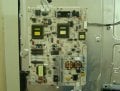
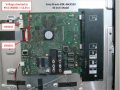
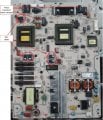
I replaced the capacitors as shown. But no effect (No video but only sound).

I also tested and replaced the FETs (KF 5N50).

There is dim blue light on the screen. Sound OK Channels are Tuned, But No Video
2. CN 6001 & 6002 Voltage Check.png

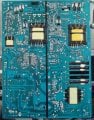
Invertor Board (Back).jpg

Invertor Board (Front).jpg
Regards.
 
Top