Setting Up a CAN Bus Using MCP2515 and Arduino Uno

Thread Starter

Embededd

Joined Jun 4, 2025
131
Hi,

I’m trying to go a bit deeper into how CAN actually works, so I thought I’d set up a small test setup at home. I’ve ordered two MCP2515 modules and I’ll be using them with a pair of Arduino Uno boards. Still waiting for the hardware to arrive though.

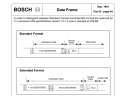
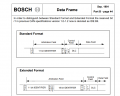
In the meantime, I’ve been reading through the CAN specification to get a better understanding. One thing I’m wondering about when it comes to standard vs extended frames, is that something that depends on the hardware itself? Or can any CAN hardware (like MCP2515) support both frame types depending on how we configure it?
1753358967654.png

Just trying to clear that up before I start coding!
 

Attachments

Papabravo

Joined Feb 24, 2006
22,058
Certainly, the hardware needs to support extended frame if you intend to use it. There were early CAN controllers that did not support extended frame operation. Most implementation standards defining higher layers in the stack chose one or the other. I'm not aware of any implementations that allowed a mix of standard and extended frames on the same network.
 

Thread Starter

Embededd

Joined Jun 4, 2025
131
Certainly, the hardware needs to support extended frame if you intend to use it. There were early CAN controllers that did not support extended frame operation. Most implementation standards defining higher layers in the stack chose one or the other. I'm not aware of any implementations that allowed a mix of standard and extended frames on the same network.
So I’m trying to understand CAN in a more practical way, like step by step. What I’ve got so far is , the sender starts with a start bit, and then sends 11 bits which act as the identifier. After that, there’s a bit that can be either high or low… and that’s where I’m a bit confused.

From what I’ve read, it seems like if that bit is low, it means it’s a data frame, and if it’s high, it should be a remote frame. But then I came across something called the SRR bit, and now I’m not sure how that fits in. Why do we need SRR if just one bit is enough to indicate data or remote frame? Basically, I’m trying to understand what SRR actually means and why it’s needed when the bit already has two possible states (high or low).


1753369721339.png
 

MrChips

Joined Oct 2, 2009
34,626
Don't confuse Standard Format and Extended Format.
In both formats, there are two bits following the 11-bit IDENTIFIER.

Standard Format
RTR IDE = x 0
RTR = Remote Transmission Request = 0 for data frame, 1 for remote request

Extended Format
SRR IDE = 1 1

SRR means nothing. It simply replaces the slot filled by RTR. It is always 1.
 

Thread Starter

Embededd

Joined Jun 4, 2025
131
This protocol is a bit tricky to follow at times. For example, in the Standard Frame, the IDE bit comes under the control field, but in the Extended Frame, it’s part of the arbitration field. So it seems like we really need to remember the exact bit sequence for each format carefully. Standard and Extended follow different orders, and that can be a bit confusing at first.
 

Papabravo

Joined Feb 24, 2006
22,058
This protocol is a bit tricky to follow at times. For example, in the Standard Frame, the IDE bit comes under the control field, but in the Extended Frame, it’s part of the arbitration field. So it seems like we really need to remember the exact bit sequence for each format carefully. Standard and Extended follow different orders, and that can be a bit confusing at first.
OK, but you will never see these details from the point of view of the firmware talking to a CAN Controller. So, there is not much to understand.
 

Thread Starter

Embededd

Joined Jun 4, 2025
131
OK, but you will never see these details from the point of view of the firmware talking to a CAN Controller. So, there is not much to understand.
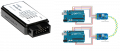
I will connect two nodes using MCP2515 CAN modules and Arduino Uno boards. The idea is simple Node A will send a command to blink an LED, and Node B will receive that command and start blinking its LED.

The main reason I’m doing this is to get a clear picture of how CAN frames are constructed and transmitted, and how the nodes on the bus actually interpret the data.

Now while going through the CAN specification, I tried to break down how a standard CAN data frame works in this context.

Here's what I think should happen with LED blinking example:

Let’s say Node A wants to tell Node B to start blinking its LED.

  1. Start of Frame:
    Node A sends a start bit (0) to signal that a new message is about to start on the CAN bus.
  2. Identifier (11 bits):
    It then sends an identifier, for example 0x123. This ID tells the receiving node (Node B) what kind of message it is, in this case, maybe it means "LED control command." It also helps with priority handling on the bus.
  3. RTR Bit:
    Since Node A is sending data, it sets the RTR bit to 0. If it were requesting data, this bit would be 1. But here, it’s a data frame.
  4. IDE Bit:
    Node A sets this bit to 0, meaning it’s using a standard 11-bit identifier frame. Extended frames use a 29-bit ID and would set IDE = 1.
  5. r0 Bit:
    This is just a reserved bit, always 0. Nothing special here.
  6. DLC (Data Length Code):
    Next, Node A sends a value indicating the length of data. let’s say DLC = 1, meaning 1 byte of actual data is coming.
  7. Data:
    Node A now sends 1 byte, for example 0x01, which could mean “start blinking LED.” Node B knows this value from predefined logic in the code.
  8. CRC + CRC Delimiter:
    Node A calculates and sends a CRC (error check) . This lets Node B verify the data was transmitted without errors.
  9. ACK Slot:
    Node A waits for Node B to acknowledge receipt. Node B does this by pulling the ACK bit dominant (0) if everything was received correctly.
  10. End of Frame:
    Node A then end communication.

Now, about mask and filter on Node B:

While Node A is sending its message, Node B doesn't just blindly receive everything on the CAN bus. it uses filters and masks to decide which messages to accept and which to ignore.

  • A mask tells Node B which bits in the incoming message’s identifier are important for comparison.
  • A filter is then applied to the relevant bits (as selected by the mask) to decide if Node B should accept or ignore the message.

I am Just want to check Am I going in the right direction with this? Does this approach and understanding make sense? Let me know if I’m missing something!
 

Ian0

Joined Aug 7, 2020
13,097
Don't worry about the complexity of the data protocol, the peripheral does it all for you.
1) Set up the baud rate
2) Set up the transmission mailboxes
3) Set up the receive mailboxes and filters.
After that, anything that you put in a transmit mailbox finds its way to the receive mailboxes at any other nodes which have their filters configured to accept them. The peripheral deals with any data collisions and receive errors by automatically repeating the message.
Don't confuse mailbox numbers with message id numbers - mailbox numbers are the addresses in the peripheral where messages are stored.
Use standard ID, because 2048 message numbers is plenty for most applications; unless you are communicating with SAE-1939 or something of that ilk.
You can use receive filters in three ways:
To receive any message on the bus
To receive messages with one specify ID
To receive messages with a group of IDs.

I've never needed the remote transmission request, and not seen it used.
 

Papabravo

Joined Feb 24, 2006
22,058
Are you going in the right direction? No, but that can hardly be expected at this point. There are many issues that you need to worry about over and above the functionality provided by the hardware controllers. They are the least of your worries. If you want a list of the things you should worry about, we can do that.

Different protocols at a higher level than the CAN controller use the various features of the CAN protocol to implement various useful features. You need to STOP worrying about how things happen on the wire unless you are trying to debug the actual cable plant for a large network. Focus on the CAN controller's firmware interface.

The RTR feature is normally used with a zero-length data field as a broadcast message to all nodes or a subset of nodes to send, based on the value of the identifier, the predefined data value(s) associated with that identifier. Some higher-level protocols do not use RTR frames at all. The responses, if they can be contained within a single frame can be any length from zero to eight. They can be longer if you wish to implement a fragmentation protocol.

A useful debug strategy when you are bringing up your first node is to let it be a lonely node. Since there are no other nodes to receive a transmitted frame and provide a dominant bit in the ACK slot, the lonely node will repeatedly retry the transmission. If you want to look at "bits-on-the-wire", this is the way to do it.
 

Thread Starter

Embededd

Joined Jun 4, 2025
131
A useful debug strategy when you are bringing up your first node is to let it be a lonely node. Since there are no other nodes to receive a transmitted frame and provide a dominant bit in the ACK slot, the lonely node will repeatedly retry the transmission. If you want to look at "bits-on-the-wire", this is the way to do it.
Thank you!I have a USB logic analyzer, and I’d like to use it to capture the waveform of the CAN bus for better understanding.

For this, I plan to intentionally remove the jumper from both nodes so I can test each node in standalone mode (one at a time).

Now I’m wondering for capturing the CAN waveform:

  • Do I need to connect one channel or two channels from the logic analyzer?
  • And where exactly should I connect the channel(s) to CAN_H, CAN_L, pins of MCP2515 boards?

1753434597023.png


Just want to make sure I set it up correctly without damaging anything. Would appreciate your guidance on how to safely connect the logic analyzer to capture the CAN signals properly.
 

Papabravo

Joined Feb 24, 2006
22,058
I don't know if your logic analyzer is the right tool. The CAN bus signals do not look like logic level signals. Assuming the transceivers have a Vcc of +5 Volts you can expect the recessive level of both bus signals to be about one half of Vcc or 2.5 volts each. They won't be exactly equal, but they will be close to that level. For a dominant bit CAN_H will be driven to nearly the supply rail of +5 Volts. Long cables or improper termination will affect this reading. Similarly, CAN_L will be driven close to GND. Again, long cables or improper termination may affect this level.

Don't forget that when looking at the bus there will be stuff bits that are added and removed by the CAN controller. It is incredibly easy to trick yourself into thinking you are seeing what is not really there. Don't tie yourself in knots with this exercise. The best you can do with this exercise is verify that the bit rate is set correctly and identically in both devices. Beyond that, looking at the bus is a useless exercise in my humble opinion unless you are having problems with the cable system itself and then you want to look at the waveforms in the analog domain to check transmit levels, receiver thresholds, reflections, and inter-symbol interference.

Still if you're bound and determined to do it to satisfy your curiosity then go ahead and scratch that itch. After you do that, I'd like to know if you think it was time well spent.
 
Last edited:

Thread Starter

Embededd

Joined Jun 4, 2025
131
I don't know if your logic analyzer is the right tool.

Still if you're bound and determined to do it to satisfy your curiosity then go ahead and scratch that itch. After you do that, I'd like to know if you think it was time well spent.
I actually gave it a try!

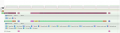
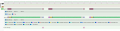
Just to experiment, I removed the jumper from both nodes, so there were no termination resistors on the CAN bus. Then I connected the CAN_L pin to Channel 0 of my logic analyzer and captured the waveform. I was able to see some transitions

Just sharing with you the waveform I captured from CAN_L using my logic analyzer.

1753448521239.png

1753448540232.png

1753448557875.png
 

Thread Starter

Embededd

Joined Jun 4, 2025
131
@Papabravo I just loaded sender and receiver example sketches with some changes into two Arduino Uno boards.

Sender Code: It sends CAN messages

C:
// CAN Send Example
//

#include <mcp_can.h>
#include <SPI.h>

MCP_CAN CAN0(10);     // Set CS to pin 10

void setup()
{
  Serial.begin(115200);

  // Initialize MCP2515 running at 16MHz with a baudrate of 500kb/s and the masks and filters disabled.
  if(CAN0.begin(MCP_ANY, CAN_500KBPS, MCP_8MHZ) == CAN_OK) Serial.println("MCP2515 Initialized Successfully!");
  else Serial.println("Error Initializing MCP2515...");

  CAN0.setMode(MCP_NORMAL);   // Change to normal mode to allow messages to be transmitted
}

byte data[8] = {0x00, 0x01, 0x02, 0x03, 0x04, 0x05, 0x06, 0x07};

void loop()
{
  // send data:  ID = 0x100, Standard CAN Frame, Data length = 8 bytes, 'data' = array of data bytes to send
  byte sndStat = CAN0.sendMsgBuf(0x100, 0, 8, data);
  if(sndStat == CAN_OK){
    Serial.println("Message Sent Successfully!");
  } else {
    Serial.println("Error Sending Message...");
  }
  delay(100);   // send data per 100ms
}

/*********************************************************************************************************
  END FILE
*********************************************************************************************************/
The serial monitor on the sender confirms Messages are sent.
Code:
Entering Configuration Mode Successful!
Setting Baudrate Successful!
MCP2515 Initialized Successfully!
Message Sent Successfully!

Receiver Code: It receive message

C:
// CAN Receive Example
//

#include <mcp_can.h>
#include <SPI.h>

long unsigned int rxId;
unsigned char len = 0;
unsigned char rxBuf[8];
char msgString[128];                        // Array to store serial string

#define CAN0_INT 2                              // Set INT to pin 2
MCP_CAN CAN0(10);                               // Set CS to pin 10


void setup()
{
  Serial.begin(115200);

  // Initialize MCP2515 running at 16MHz with a baudrate of 500kb/s and the masks and filters disabled.
  if(CAN0.begin(MCP_ANY, CAN_500KBPS, MCP_8MHZ) == CAN_OK)
    Serial.println("MCP2515 Initialized Successfully!");
  else
    Serial.println("Error Initializing MCP2515...");

  CAN0.setMode(MCP_NORMAL);                     // Set operation mode to normal so the MCP2515 sends acks to received data.

  pinMode(CAN0_INT, INPUT);                            // Configuring pin for /INT input

  Serial.println("MCP2515 Library Receive Example...");
}

void loop()
{
  if(!digitalRead(CAN0_INT))                         // If CAN0_INT pin is low, read receive buffer
  {
    CAN0.readMsgBuf(&rxId, &len, rxBuf);      // Read data: len = data length, buf = data byte(s)
   
    if((rxId & 0x80000000) == 0x80000000)     // Determine if ID is standard (11 bits) or extended (29 bits)
      sprintf(msgString, "Extended ID: 0x%.8lX  DLC: %1d  Data:", (rxId & 0x1FFFFFFF), len);
    else
      sprintf(msgString, "Standard ID: 0x%.3lX       DLC: %1d  Data:", rxId, len);

    Serial.print(msgString);

    if((rxId & 0x40000000) == 0x40000000){    // Determine if message is a remote request frame.
      sprintf(msgString, " REMOTE REQUEST FRAME");
      Serial.print(msgString);
    } else {
      for(byte i = 0; i<len; i++){
        sprintf(msgString, " 0x%.2X", rxBuf[i]);
        Serial.print(msgString);
      }
    }
       
    Serial.println();
  }
}

/*********************************************************************************************************
  END FILE
*********************************************************************************************************/
The serial monitor on the receiver confirms Messages are received.

Code:
Entering Configuration Mode Successful!
Setting Baudrate Successful!
MCP2515 Initialized Successfully!
MCP2515 Library Receive Example...
Standard ID: 0x100       DLC: 8  Data: 0x00 0x01 0x02 0x03 0x04 0x05 0x06 0x07
 

Papabravo

Joined Feb 24, 2006
22,058
That's all good. As you add more nodes it is useful to remember that all CAN controllers on the network are listening to every transmitted frame and voting on the correctness of the frame on the wire. If any receiver on the CAN network, including the receiver in the transmitting node, detects a problem, it will throw an ERROR frame. The presence of an ERROR frame will cause every receiver on the network to have its transmitter also throw an ERROR frame. It is an ERROR frame cascade from which there is no escape or recovery. The transmitting node will happily wait for the cascade to subside and try to transmit the frame again. This process will terminate when the error counters in the controller reach their limit and the node goes BUSOFF.
 

Thread Starter

Embededd

Joined Jun 4, 2025
131
That's all good. As you add more nodes it is useful to remember that all CAN controllers on the network are listening to every transmitted frame and voting on the correctness of the frame on the wire. If any receiver on the CAN network, including the receiver in the transmitting node, detects a problem, it will throw an ERROR frame. The presence of an ERROR frame will cause every receiver on the network to have its transmitter also throw an ERROR frame. It is an ERROR frame cascade from which there is no escape or recovery. The transmitting node will happily wait for the cascade to subside and try to transmit the frame again. This process will terminate when the error counters in the controller reach their limit and the node goes BUSOFF.
I’ve now connected one more node an Arduino Mega with MCP2515 making it a three-node CAN network. At this point, I just want to verify that all nodes are communicating correctly without any errors or bus issues.

Basically, I want to make sure I’ve wired everything properly, termination is correct

What would you suggest each of the three nodes should do to confirm proper operation?
 

Papabravo

Joined Feb 24, 2006
22,058
I’ve now connected one more node an Arduino Mega with MCP2515 making it a three-node CAN network. At this point, I just want to verify that all nodes are communicating correctly without any errors or bus issues.

Basically, I want to make sure I’ve wired everything properly, termination is correct

What would you suggest each of the three nodes should do to confirm proper operation?
Create a storage ring. Pick one node to start the process. Have each node setup to receive a message directed at that node. When the message is received make a recognizable change, like incrementing a counter from the received message, and send it to the next node. Let this procesws proceed until the counter reaches the maximum value.

To do this each node will need a unique address which you can predetermine. The next step will be to do this with arbitrary nodes joining and leaving the ring.
 
Top