Power strip and Laptop

Thread Starter

odm4286

Joined Sep 20, 2009
265
Just noticed something strange. Lately my laptop has been running slow as hell, I knew for a fact it wasn't a software issue so I started to try other things. I decided to try and plug it into the wall instead of the power strip and out of no where I gained about 20% in speed.

I know that laptops lower performance to save battery when they aren't connected to an AC source, but my question is could my power strip lower the voltage available to the AC adapter so much that it was affecting my laptop?
 

timwhite

Joined Apr 10, 2014
50
could my power strip lower the voltage available to the AC adapter so much that it was affecting my laptop?
I don't think so, but it's hard to be sure. Here is a link to a good list of steps to take to verify that your power supply is not faulty or supplying improper voltages.

Also it might be a good idea to use a can of compressed air to clean out the fan ports on your laptop. Dust can raise the temperature of your hardware which in turn can put a real damper on your speeds.
 

djsfantasi

Joined Apr 11, 2010
9,237
Be cautious when using cans of compressed air to blow out fan ports on a laptop. Some can be damaged by the voltage generated when the fan rotates in the air stream .

Keep the fan blades from rotating or disconnect the fan from the motherboard.
 

Thread Starter

odm4286

Joined Sep 20, 2009
265
Thanks for the tips guys, went out and bought a new power strip and the problem is gone. Weird....

Got curious and took my old power strip apart and didn't notice anything out of the ordinary, salvaged the power cord and the on off switch so I guess I got something out of it.
 

MikeML

Joined Oct 2, 2009
5,444
Thanks for the tips guys, went out and bought a new power strip and the problem is gone. Weird....

Got curious and took my old power strip apart and didn't notice anything out of the ordinary, salvaged the power cord and the on off switch so I guess I got something out of it.
Probably the sockets are worn out. Usually just bent tangs of Phosphor-Bronze or plated steel. They oxidize, get hot, lose their temper and dont grab the plug pins like they should...
 

inwo

Joined Nov 7, 2013
2,419
Did you do a double test? Installing the old one again.

I'd be very surprised to see a difference. Unless you are using some type of "Home Plug" system.
 

MrChips

Joined Oct 2, 2009
35,131
+1

A power strip would not (should not) affect the power demand of a laptop, except perhaps your power strip was dead and your laptop was running on batteries.
 

#12

Joined Nov 30, 2010
18,224
I thought everybody knew that Windows systems save up things to do during rebooting. I shut mine off every night just so the, "housekeeping" chores don't pile up.
 

Thread Starter

odm4286

Joined Sep 20, 2009
265
weird, I'm having the same problem again. I swear this thing speeds right up as soon as I plug it into the wall. Its not the computer either, I'm sure of it.
 

Thread Starter

odm4286

Joined Sep 20, 2009
265
ah I feel dumb, just noticed the charger itself is failing. When I move it, it goes on an off. Thanks guys, it wasn't the power strip after all.
 

timwhite

Joined Apr 10, 2014
50
ah I feel dumb, just noticed the charger itself is failing. When I move it, it goes on an off. Thanks guys, it wasn't the power strip after all.
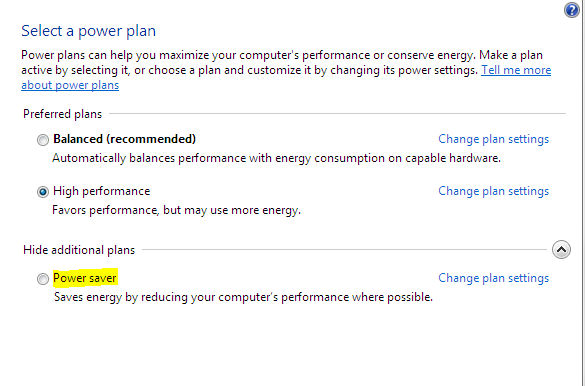
Being plugged into AC vs Battery should not change the operating speed of your computer. If you are using Windows, check the bottom right corner of your screen for your power settings, and see if your "On Battery" profile has speed set low, like CPU speed, hard drive speed, etc... If you are in "Power Saving" mode, your computer will surely run slower than if when it is plugged and using "Extreme Computing Hyper Awesome" mode. See image below.


Top