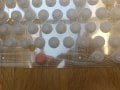
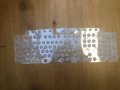
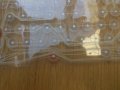
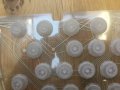
Power not getting to a certain line of keys?

Thread Starter

Bod

Joined Sep 18, 2016
317
(1. Sorry for the bad title, 2. Sorry if it's in the wrong forum section.)

I have an Exibel Gaming Keyboard (to be specific Exible Gaming Keyboard GK600 19-8386 5VDC 200mA), given to me by a friend, in which the keys -
B N M , . / < > ? - don't work. This could be due to a mechanical failure or a broken trace (or anything) . I could find no data-sheet or spare part replacements.

If you can find some thing that would make it so that specific line of keys don't work, it would be much appreciated.


Thanks,
Bod
 

Attachments

Raymond Genovese

Joined Mar 5, 2016
1,653
(1. Sorry for the bad title, 2. Sorry if it's in the wrong forum section.)

I have an Exibel Gaming Keyboard (to be specific Exible Gaming Keyboard GK600 19-8386 5VDC 200mA), given to me by a friend, in which the keys -
B N M , . / < > ? - don't work. This could be due to a mechanical failure or a broken trace (or anything) . I could find no data-sheet or spare part replacements.

If you can find some thing that would make it so that specific line of keys don't work, it would be much appreciated.


Thanks,
Bod
Did it ever work? I assume that it did not work from the start because you never mentioned otherwise.

If I understand correctly, that keyboard is for connection to a Windows USB port. As such, before suspecting electrical problems, I would first look to the possibility of software problems. Specifically, the driver.

There is plenty of online help in that regard - like here or just a regular search like this one
 

Thread Starter

Bod

Joined Sep 18, 2016
317
@Raymond Genovese

It was bought from a friend. I messaged him on Skype if it worked before I bought it - no response yet. Will post when there is one.

About the drivers, as far as I know there is no kind of software that you need for the keyboard (if I understand that sentence correctly), you just have to plug it in. Again I will ask my friend.

Thanks for the reply.

-Bod

EDIT: There could be one obvious reason - I'm plugging it into a mac and it might be a windows only keyboard, although saying that all the other characters work.
 

Thread Starter

Bod

Joined Sep 18, 2016
317
Friend just replied - All the keys worked before and there is no software you have to install for the keyboard. Hope this gives a little more info.

Bod
 

Raymond Genovese

Joined Mar 5, 2016
1,653
Friend just replied - All the keys worked before and there is no software you have to install for the keyboard. Hope this gives a little more info.

Bod
According to the Instructions, the keyboard, as you stated, has listed system requirements for use with Windows machines. So, that part is not good.

Drivers are definitely being used, but it does not appear to require any 'extra' or special drivers. I am not an expert on keyboards and their drivers, but it is easy to imagine the use of key codes and translation tables. Even situations where a set of keys is mapped incorrectly is not out of the question.

On the other hand, people do, apparently, use Windows keyboards with MACs - see here for example. Even Microsoft gives instructions about keyboard mapping when using PC keyboards on a MAC. Most of that, however, concerns mapping of special keys, not the ordinary ones like those not working in your case.

There are a couple of things to look into further I would think. One would be to verify how the keyboard works now on a Windows machine. I read what you said your friend told you, but still, if you have access to a Windows machine, it would be valuable to see if the same keys did not work.

If the keyboard does not work on a Windows machine now, you could check the continuity of the connections and operations of those keys. Are there any electronics that are not shown in your pictures? Is the cable damaged anywhere? Anything spilled on it at any time? Those could be other possible problem sources.

If the keyboard does work on a Windows machine, then I think it is a MAC/driver issue and you might be able to do some kind of remapping in the MAC OS (look at those links or elsewhere on line).

Someone else here may have some addition help to offer.

In any event, let us know what you end up doing, even if it is just giving up - I always like to know how things turn out.

Hope this helps.
 

Thread Starter

Bod

Joined Sep 18, 2016
317
Thanks for the reply, as for the key mapping and testing it on a Windows machine I will do that after school since the keyboard is disassembled.

The circuit board was excluded in the photos but I took a good look and nothing seemed apparently broken. The wires are fine.

My friend has spilt some drink on the keyboard but there is no visible signs of it shorting anything or causing any concerns.

Again, after school I will assemble the keyboard and reply with what happens.

Thanks,
Bod
 

Thread Starter

Bod

Joined Sep 18, 2016
317
Back with keyboard assembled! - On Windows the keys listed work but now some other keys don't work.

Same deal with the Mac - B N M , . / < > ? work now but roughly half the keyboard doesn't work (just make your mind up keyboard!)

Any help?
Im more baffled than I was before,

Thanks Bod

EDIT: P.S After looking on the website you sent me I found this:

Connects to your computer with a simple USB connection. Plug and Play. No software required. Compatible with Windows 10 (32/64-bit), Windows 8 (32/64-bit), Windows 7 (32/64-bit), Vista (32/64-bit), XP (SP2) and OS X 10.4.11 or later.

That rules out the fact it's a Windows only keyboard, and the electrical fault is also ruled out since that specific line of keys is working. That leaves (me) with a half dead control chip, or a mechanical failure. I am using 10.12.4
 
Last edited:

BR-549

Joined Sep 22, 2013
4,928
Hold the membrane up against the sky......look closely and flex or roll the membrane while looking for expanded breaks....or dirty contamination shorts.
 
Top