PIC Assembler 10F200 Light an LED Program

Thread Starter

PICNewbee

Joined Mar 31, 2017
355
Bebe Thank you!

You beat me to there.

Sounds like 'the tortoise and the hare'.

Let me ask my little tortoise like question.

movlw b'1101'

Does this lay the values into the 8 bit address just like you see it?

I am talking about the little 8 box picture you see a lot.

With boxes numbered 0 to 7. Left to right.

Since there are only 4 digits here.

Where does it end up. On the leftmost or rightmost?
 
Last edited:
Bebe

You beat me to there.

Sounds like 'the tortoise an hare'.

Let me ask my little tortoise like question.

movlw b'1101'

Does this lay the values into the 8 bit address just like you see it?

I am talking about the little 8 box picture you see a lot.

With boxes numbered 0 to 7. Left to right.

Since there are only 4 digits here.

Where does it end up. On the leftmost or rightmost?
...jumping in....

My advice is to NOT overthink it. If you want to know what the instruction does, look it up in the chip's data sheet....
MOVLW
Move literal to W
Syntax:[label] MOVLW k
Operands: 0 <= k<=255
Operation:
k->(W)
Status Affected: None
Description:
The eight-bit literal ‘k’ is loaded into the W register. The “don’t
cares” will assembled as ‘0’s.

movlw b'1101' is the exact same assembled instruction as movlw b'00001101' as movlw 13 as movlw h'0d (or 0x0d whatever the syntax). You are always loading eight bits into the W register. With some experience you will see that right away. When I code, I sometimes will use all eight binary bits just to remind me - especially if I am dealing with a lot of cases where I am not dealing exclusively with eight bits. That is, I suppose, a style option, but understanding the instruction is not.
 

Thread Starter

PICNewbee

Joined Mar 31, 2017
355
Thank you Bebe OBW and Raymond!

One more question about this and I will move on to next mini subject.

Is it safe to say you are after the 'pattern' not the actual 'number' or 'sum'?

Example: '0000 1000' puts a 1 in that position and the compiler or program reads the byte

looking at all 8 positions

That position has significance?

Another example: 1000 0000

Assembler is not really interested in the amount just what is in the '0' bit or first

position?

Using 0-7 numbering left to right.

EDIT Maybe better to say 'First, Second Third...' position.
 
Last edited:

Thread Starter

PICNewbee

Joined Mar 31, 2017
355
Note: Wrote my post before these last two responses by Bebe and John.

Edit

Oh oh! Looked in 10F200 data sheet SFR register section.

Microchip DOES 'countdown'. Numbers 7-0.

My questions still stand though.
 

be80be

Joined Jul 5, 2008
2,395
Right to left position has significance
Port's are 0 to 7
Porta0 Porta1 Porta2 so on If you want to say make PORTA0 high you'd write B'00000001' to PORTA or GPIO
Just depends on which port's your chip has.

The baseline chips work better writing the GPIO all at once.
Code:
movlw b'00000001'
movwf GPIO
It's like this if you start at 0 and end at 7 could you get there without a 0
No cause you have to start at 0 and move left

bobbob.png
Reading is a whole new story.
 
Last edited:

Thread Starter

PICNewbee

Joined Mar 31, 2017
355
Thank you Bebe!

Okay. I will put LED and resistor back on the correct pin.

Then compile and run this program.

Then call it good.

Wait until you see next lesson!

I need to break lock on the .PDF lessons.

Have to cut and paste parts of it.
 

JohnInTX

Joined Jun 26, 2012
4,787
And be in the habit of setting TRIS with movwf rather than flipping individual bits. Many PICs have issues/conflicts with single bit flips on TRIS.
 

Thread Starter

PICNewbee

Joined Mar 31, 2017
355
Bebe and John

Thank you!

Will respond tomorrow.

Note Datasheet is a 'Secured' .PDF document too!

Can't cut and paste from that!
 

OBW0549

Joined Mar 2, 2015
3,566
Note Datasheet is a 'Secured' .PDF document too! Can't cut and paste from that!
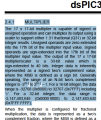
I have no trouble copying and pasting text from data sheets (whether opened in my Chrome web browser or in Adobe Reader), even though Adobe Reader shows them as "SECURED". It doesn't always come out very pretty when pasted, but it does work. For example, here's a screenshot of a portion of a page from the dsPIC30F3013 data sheet, with text selected:

sample.png

Hit CTRL-C to copy, then come over here to the comment edit window and hit CTRL-V to paste, and voila:

2.4.1 MULTIPLIER The 17 x 17-bit multiplier is capable of signed or unsigned operation and can multiplex its output using a scaler to support either 1.31 fractional (Q31) or 32-bit integer results. Unsigned operands are zero-extended into the 17th bit of the multiplier input value. Signed operands are sign-extended into the 17th bit of the multiplier input value. The output of the 17 x 17-bit multiplier/scaler is a 33-bit value which is sign-extended to 40 bits. Integer data is inherently represented as a signed two’s complement value, where the MSB is defined as a sign bit. Generally speaking, the range of an N-bit two’s complement integer is -2N-1 to 2N-1 – 1. For a 16-bit integer, the data range is -32768 (0x8000) to 32767 (0x7FFF) including ‘0’. For a 32-bit integer, the data range is -2,147,483,648 (0x8000 0000) to 2,147,483,645 (0x7FFF FFFF).​

Like I said, it might not be very pretty due to the text formatting being lost, but it does work.
 

Thread Starter

PICNewbee

Joined Mar 31, 2017
355
OBW

Thank you!

No dice!

Just gave it a whirl this morning with datasheet and just got what I had copied

from last using it.

I'll figure it out.

It's windows 7 upgraded to Windows 8.1.

Newest Adobe Reader. Acrobat maybe.
 
Top