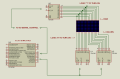
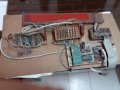
PIC 16F88 project for birthday gift

dl324

Joined Mar 30, 2015
18,402
I am not sure what is row scanning and column scanning. My idea is something like this
You could turn on a single LED at a time, or do it by a whole column or row.

When I did my display, I chose to do it a column at a time because I can only get a couple hundred kHz from my I/O ports. I'm using a $9 C.H.I.P. computer (which is no longer available) and no one has documented how to use the registers for higher speeds than the sysfs interface can provide.

I was going to post a video showing scrolling on a 5x7 matrix, but the only video I've found has a ghosting problem that I later fixed.
 

Thread Starter

absf

Joined Dec 29, 2010
1,968
You could turn on a single LED at a time, or do it by a whole column or row.

When I did my display, I chose to do it a column at a time because I can only get a couple hundred kHz from my I/O ports. I'm using a $9 C.H.I.P. computer (which is no longer available) and no one has documented how to use the registers for higher speeds than the sysfs interface can provide.

I was going to post a video showing scrolling on a 5x7 matrix, but the only video I've found has a ghosting problem that I later fixed.
I am now away from my PC . I am not used to typing on hand phone. So I'll reply you tomorrow night.

Thanks.
 

Thread Starter

absf

Joined Dec 29, 2010
1,968
U5 driving U3 ?
I have turned the 2 matrices upside down and now using a "0" for the column and a "1" for the Row. I removed U3 and just drive the Row direct through HC595 shift register.

It is something like this now. Only a block diagram without all the details.

8X16 MATRIX CECILIA.PNG
Do you think this is logical. Does HC595 have the current capacity to directly sink and source the 8x16 matrices?

Allen
 

Thread Starter

absf

Joined Dec 29, 2010
1,968
You could turn on a single LED at a time, or do it by a whole column or row.

When I did my display, I chose to do it a column at a time because I can only get a couple hundred kHz from my I/O ports. I'm using a $9 C.H.I.P. computer (which is no longer available) and no one has documented how to use the registers for higher speeds than the sysfs interface can provide.

I was going to post a video showing scrolling on a 5x7 matrix, but the only video I've found has a ghosting problem that I later fixed.
Yes, I've heard about the C.H.I.P. $9 computer and I hate to say they didn't succeed like the arduino or RPi.

I have a few version of the matrix display right now: using PIC, Arduino, 4051 or even the TI launchers (as featured by MrChips in his blog). But I missed the target date for my daughter's birthday which was yesterday and was too tired to reply and went to sleep after taking my shower. It was 40 minutes flight from my town to hers by air.

The matrix version is for my wife and I dont want to miss the date this time.

It's nice to have your video for me to get some clues on how to do it rightly and elegantly. ;)

Allen
 

dl324

Joined Mar 30, 2015
18,402
Yes, I've heard about the C.H.I.P. $9 computer and I hate to say they didn't succeed like the arduino or RPi.
I think they tried to run before they could walk and got too ambitious for their own good. They started working on Chip V2, a stripped down version called Chip Pro, and some Dashbot thing before they got Chip V1 right. Spread themselves too thin and put themselves out of business. Too bad. For the price, it couldn't be beat.

It's nice to have your video for me to get some clues on how to do it rightly and elegantly.
What I did wasn't elegant, or the best way. It was a prototype that I threw together with parts I had on hand.

I regretted not making the display larger almost as soon as I finished wiring it.

This is the original video.

I put it back together and it still seems to have a ghosting problem that's only apparent when it's recorded. I'll do more checking later. I did it about 2 years ago and started working on how to make a larger display, assembled from smaller boards; lost interest and put it aside.
 

dl324

Joined Mar 30, 2015
18,402
I did some testing on my program and it appears to be working. I made another video, but Youtube is complaining about my .mpg file and won't upload.

I have options to change the multiplexing frequency, pulse width, and repetition. Without repeating the data multiple times before changing the displayed data, persistence was a problem. The information would scroll by so fast that it wasn't readable.
 

Thread Starter

absf

Joined Dec 29, 2010
1,968
If you have more 5*7 matrices connected together, it wouldn't be so bad . Btw how to upload video onto this forum? Do I have to go through YouTube first?
 

dl324

Joined Mar 30, 2015
18,402
If you have more 5*7 matrices connected together, it wouldn't be so bad .
That was what I regretted as soon as I finished wiring the 5x7 matrix. I ended up buying some 5x8 bicolor displays that will be easier to use.

I have thousands if 3mm LEDS I wanted to find a use for, but alignment would have been tedious.

The single digit has served its purpose. After I set it back up, I've been using it to display the time. Since Chip has WiFi, I can login remotely to access the display.

Btw how to upload video onto this forum? Do I have to go through YouTube first
No video formats are supported, so I use YouTube; it also makes the files smaller. You could host the files on another site, but they'll still be large.
 

Thread Starter

absf

Joined Dec 29, 2010
1,968
This is how I did it 12 years ago. The controller was 8051 with one 8255 PIA . I didn't know about HC595 then so I used many LS373 and octal latches & flip flops for the extra columns . The 8051 was running on 11.592Mhz clock and was just fast enough . The matrix as can be seen was 64×8 using 3 mm LEDs.

The LEDs then was expensive so I can only afford 64 per month with my pocket money. That's why you see 2 types of red LEDs. When I bought another 64 LED on the 2nd month, the old batch LED was gone. The new batch LED came with a slightly different red color.:( If I used ULN 2804 or 2003 then it would reduced the amount of transistors used.

The SMD on the green PCB was an 8KB 6264 SRAM I took from another PCB as RAM was hard to get then too. The whole project was written in 8051 assembly language as I haven't learn any C yet. (even now I am still a beginner in C)

Wish I can make it work again after sleeping in my storage for so long.

20180706_102318.jpg
 
Last edited:

dl324

Joined Mar 30, 2015
18,402
My first bulk buy of 5mm red leds in 1976 was only $10 for 100. I still have dozens of them.

Things are a lot easier and less expensive now.

The part of my program that drives the matrix is less than 100 lines (of C). I require 9 I/O's from the ARM processor: 7 for the row drivers, 1 for the clock to the column drivers, and 1 for column reset.

The code to define the characters is 6oo lines, but I wrote a Perl script to generate that part and I include it in the main file so I don't have to look at it. The font definition file used by the Perl script is another 800 lines.
 

dl324

Joined Mar 30, 2015
18,402
How's your project going?

Since I had my single digit matrix hooked back up, I started doing more work with it. I wrote a script to invoke the program in a loop and passed it the current time, so I had a single digit clock.

Then I decided to make another version of the program that looped infinitely to display the current time. Now I'm thinking of getting some more Chips (there's someone in China selling them for $15 each) and start making clocks for friends and relatives. Once you configure a Chip to connect to a WiFi network, it automatically updates the time when it boots (and I think periodically while it's running). That makes for a clock that is always correct for those who can't remember how to set their clocks manually (thinking of my Mother-in-law).

Running Linux comes a lot of benefits, but one fault is that the display can be interrupted by the OS.
 

Thread Starter

absf

Joined Dec 29, 2010
1,968
Now I'm thinking of getting some more Chips (there's someone in China selling them for $15 each) and start making clocks for friends and relatives.
What chips are they? Was is a WiFi with GPS function?

As for my project, I am still waiting for the extra 5 pcs of 8x8 matrix I ordered from eBay last week.

At the mean time I am still studying the codes sent by @Ian Rogers. It was able to do some animations on the matrix but I left that out for the time being. I am now on the interrupt routines and I don't understand how the row data was being put in.

The code I'm also having trouble is here:

C:
void charput(char ch, signed char x,signed char y)
    {
    signed char x1, y1;              
    const char* addr2;                // pointer to character
    char disp;
    ch -= 0x20;                        // characters starts a 0 not 0x20
    addr2 = &fnt[0];                // start of font array
    addr2 = addr2 + ((int)ch * 8);    // start place in font array
    for( y1=0;y1<8;y1++)            // eight rows
        {
        disp = *addr2;
        for (x1 = 0; x1<8; x1++)    // eight pixels
            {          
            if(disp & pow[x1])
                pixel(x+x1,y+y1,0); // OR the pixel to the display buffer
            }
        addr2++;
        }  
    }
If addr2 is a pointer, then in line 8 what is &fnt[0];
In line 12, what is the content of "disp" ,

The complete codes are here...
 

Attachments

Ian Rogers

Joined Dec 12, 2012
1,136
Okay fnt[] is the bitmaps.. Each bitmap is 8 bytes ADDR2 is pointed to the address of each character within fnt[]..

lets say &fnt[0] is at location 12345 in memory and we are displaying "A".. Each character is 8 bytes, so the character will be ASCII "A" is 65, but we start at the space " " which is 32 from this ADDR2 needs to be set at 33 * bitmap size, so the bitmap array will give us the bits we need

ADDR2 = ( start of array ) + ( (character - 32 ) * 8 bytes) … This will give us the first set of pixels ADDR+ 1 is the second set etc...

disp is the byte of pixels for that particular space in the display buffer!! Think of the display buffer as another screen
 

dl324

Joined Mar 30, 2015
18,402
What chips are they? Was is a WiFi with GPS function?
I meant more C.H.I.P. computers.

What are your memory constraints on the microcontroller?

I assume you're going to display a scrolling message repeatedly. The way I implemented my single digit display (also applicable to wider displays) is I initialized an array with the message, then I treated my display as a window that I slid over the message buffer.

I used the sysfs interface for my GPIO's. The message buffer (sbuf) is a 7x1024 2D array (I just picked 1024 out of the air, it allows a message of 170 characters). The inner loop writes the 7 rows, the loop around that writes the column for the width of the window. The loop around that repeats the window for visibility (persistence). The outer loop slides the window along the message buffer.

ont and offt implement duty cycle for display brightness.

colbase is a little confusing because it was used to construct the message buffer. In that context, colbase represented the next usable column in the buffer. I reused the variable in the output loop; after subtracting two, it represents the index of the end of the message buffer (I think there's a fence post error here and I'm clipping the last column; made a note to myself to run in debug mode to check. I had a fence post error the other way and over compensated).

Code:
    for (i = 0; i < colbase; i++) {
      for (j = 0; j < repCnt; j++) { // display multiple times for visibility
        for (col = i; col < i+5; col++) {
          for (row = 0, k = 0; k < 7; k++)
            fprintf(rw[k], "%c", sbuf[row++][col]);
          nanosleep(&ont, &remstr);

          for (k = 0; k < 7; k++) // turn all off before incrementing column
            fprintf(rw[k], "1");
          nanosleep(&oft, &remstr);

          fprintf(clk, "1"); nanosleep(&clkslp, &remstr); fprintf(clk, "0");
        }
      }
    }
Keep in mind that this is just code I threw together to check my LED matrix drivers and is still in prototype mode. I wasn't overly concerned with minimizing writes, etc.
 
Last edited:

Thread Starter

absf

Joined Dec 29, 2010
1,968
Okay fnt[] is the bitmaps.. Each bitmap is 8 bytes ADDR2 is pointed to the address of each character within fnt[]..

lets say &fnt[0] is at location 12345 in memory and we are displaying "A".. Each character is 8 bytes, so the character will be ASCII "A" is 65, but we start at the space " " which is 32 from this ADDR2 needs to be set at 33 * bitmap size, so the bitmap array will give us the bits we need

ADDR2 = ( start of array ) + ( (character - 32 ) * 8 bytes) … This will give us the first set of pixels ADDR+ 1 is the second set etc...

disp is the byte of pixels for that particular space in the display buffer!! Think of the display buffer as another screen
Thank you for the clear explanations. Now I begin to get the big picture.

Since the buffer contains 8 bytes, so it would take 64 interrupts (assuming the matrix of 64x8) to display the whole buffer which is roughly 88mS. Then at the background, you are constructing the next frame of buffer while the interrupt is displaying the old frame, right?

How much time is taken to construct the next frame, so that the frame is advancing a column at a time? Or is it advancing 8 columns at one time?

I need more time to digest the rest of the code.;) As I said I am a beginner in C and slow in absorbing the new tricks.

Allen
 

Thread Starter

absf

Joined Dec 29, 2010
1,968
What are your memory constraints on the microcontroller?
I use 16F886 for this project. The program memory is 8192W, RAM is 368 bytes and eeprom is 256 bytes. I would say the RAM is adequate for this project...

I assume you're going to display a scrolling message repeatedly. The way I implemented my single digit display (also applicable to wider displays) is I initialized an array with the message, then I treated my display as a window that I slid over the message buffer.

I used the sysfs interface for my GPIO's. The message buffer (sbuf) is a 7x1024 2D array (I just picked 1024 out of the air, it allows a message of 170 characters). The inner loop writes the 7 rows, the loop around that writes the column for the width of the window. The loop around that repeats the window for visibility (persistence). The outer loop slides the window along the message buffer.
Yes, this is how I did it with the 8051.

My 8051 board has 8KB of static ram and I put the program plus the display patterns all inside the 8KB memory while developing the project. The 8051 has only 256 bytes of RAM while 8031 only got 128 bytes if I remembered correctly.

When the project was completed, I burnt both the program and the display patterns in an 27c64 eprom and use the RAM totally as buffers and other temporary stuffs.

colbase is a little confusing because it was used to construct the message buffer. In that context, colbase represented the next usable column in the buffer. I reused the variable in the output loop; after subtracting two, it represents the index of the end of the message buffer (I think there's a fence post error here and I'm clipping the last column; made a note to myself to run in debug mode to check. I had a fence post error the other way and over compensated).
Thanks for the code too and I'd study it while I am free in the next 2 weeks.

Allen
 

John P

Joined Oct 14, 2008
2,064
Speaking of LED matrix units, I wrote a little display program a while ago that ran on a PIC16F690 and controlled the matrix via SPI. Now I've started using the PIC16F18345, which comes with vastly more features (bewildering at times, but I'm getting used to it) and I just updated the program for that controller. Here's a short video showing it in action. The processor is on a circuit board that I made for a different project using the PIC16F690, and it's the only electronic component there; the power is coming in from a USB-to-serial converter.
 
Top