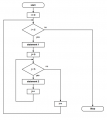
@WBahn I didn't understand what do you mean by return statement to "return 42;". both loop doesn't return anythingTo put it another way, how would your flowchart be different if you were to change the return statement to "return 42;"? If the flowchart wouldn't change, then you would be claiming that the two pieces of code must behave identically, which clearly they would not.
You asked if your flow chart matched your code. When I look at your code, I see a return statement.@WBahn I didn't understand what do you mean by return statement to "return 42;". both loop doesn't return anything

okay Now, Does my code match with flow chart ?You asked if your flow chart matched your code. When I look at your code, I see a return statement.
void main ()
{
for (i=0; i<5; i++)
{
for (j=0; j<5; j++)
{
}
}
}
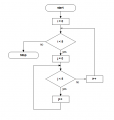
Does my flow chart indicate nested for loop ?Here is an example of a single FOR loop.
Why bother to ask?Does my flow chart indicate nested for loop ?
int main (){
while(1){
.... nest loops here!
}
return 0;
}
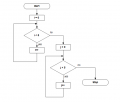
@MrChips Can you please tell me Where does my last flow chart fail ? What is process box indicate in loop ?No!
Have you read what I have posted?
Your last flow chart is two loops in series.@MrChips Can you please tell me Where does my last flow chart fail ? What is process box indicate in loop ?
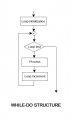
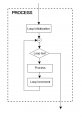
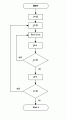
What does action box do in your flow chart ? What does it need to convert to code ?Here is the best rendition i believe. See how regular the structure is. "Action" is the routine that actually does something.
You can nest as many loops as you need this same way and it is always very readable.
okay thanks, Why the flow chart in post #17 is best and what's drawback in my last flow chart post #16Action is the same as Process.
The rectangular box is any action or process that needs to done.
This is the generic way of drawing flowcharts that can be applied to any stituation.