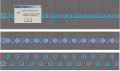
It is not hard. Just use the information in the data sheet. In this case I would first create 25 pads in a line setting the snap grid to 1.27mm or 50 mils. Then set the grid to 2mm. select every other pad. Use pad 1 as reference point. Then move all the selected pads one snap grid in on the Y axis. I am not sure it should be up or down in this case. Then you have your framework done. All pads are placed with correct spacing. Edit hole size and pad size to what you prefer. Add keepout layer and you are done. I do not use Eagle but the steps will be simlar in your ECAD tool. It will take you no more than 10 minutes. A note about the hole size. It look like all pins do not have the size.
You really have to be careful about using someone elses' Eagle library.
Some of the libraries that I've downloaded even from Cadsoft's user-uploaded library had very poorly laid-out parts in them.
Also, there is a danger of copying a part out of someone's schematic that was done with a "cracked" version of Eagle; if you've used such a part in a schematic and/or board, you eventually won't be able to open the schematic/board any more.
It's not as bad as they say it is. Like anything, practice makes perfect. If you goof up the library part, your board will either be useless, or require modifications.
Don't forget to leave plenty of room around this IC for your heat sink. If you don't, you will be very sorry.
Besides the somewhat acceptable typos, I've seen swapped pins on 3-pin regulators, multi-gate parts in a single rectangular schematic symbol, mis-named package types, wrong size pads on BGA devices, on and on and on...
If it's got more than a few pins (in the one case, 3 pins), it's usually not even worth trying to find something close to use as a template for editing. You spend more time checking it than making it yourself.
It was from a CNC forum....... You can open up the eagle sch file and just delete everything except for the IC you are using, then design your circuit around that, I basically just wanted to provide the IC footprint you were looking for... you can check the footprint of the IC to see if it matches your actual device by printing out the board image and placing the component on the printout, eagle usually prints out the board image as the actual size...

 Facebook
 Google
 GitHub
 Linkedin