My alerts are alarming me

Thread Starter

ErnieM

Joined Apr 24, 2011
8,415
Something has gone out askew on the alerts tab, the drop down box that drops down when I hover over my avatar.

If I right click – open in new window I get my page of alerts. If I click it directly I get a 404 (“The requested page could not be found.”)

Now in the old software I could get a pop up list of just the new alerts. Now I have to go to the page of all alerts and try to remember which I handled. If you could add that back in….
 

Georacer

Joined Nov 25, 2009
5,182
A ctrl+click on the pop-up list of alarms opens them in a new tab. Of course, you have to refresh the page to update them as read.
 

tjohnson

Joined Dec 23, 2014
611
Now in the old software I could get a pop up list of just the new alerts. Now I have to go to the page of all alerts and try to remember which I handled. If you could add that back in….
I would request this as well. Sometimes just after I logged in, I thought I saw a popup list of alerts flash in the upper right corner for just a second. But I can't figure out how to access it otherwise, and would much prefer it to having to open the page listing all my alerts.
 

tjohnson

Joined Dec 23, 2014
611
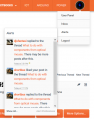
@jrap: I think I found a bug with the alerts. As I mentioned, I haven't been seeing the alerts popup when I mouse over the Alerts link. I just noticed that if I zoom out (decrease text size) once, then it appears:
alerts_popup.png
but when I view the page using the default text size, then I no longer see the alerts popup. The Inbox popup exhibits the same behavior. I'm using the latest version of Firefox on a 1280x1024 monitor.

I would really appreciate if you could fix this so I can see the popups using the default text size. Thank you.
 
Top