Multiple button press dection for a combination in C

Thread Starter

ArakelTheDragon

Joined Nov 18, 2016
1,366
Hi! I am strugling with a problem, can someone help me solve it please?
I have a keypad (4x4 matrix with diodes), I have a function which scans which button is pressed and records it in a global variable "kcode". I want to detect a combination of buttons, which prooves to be difficult. I tried various times and failed. I can not seem to send "Success multirecord" to the display. I reached to this result last.

This is not the whole code.
Code:
void main ()
{
    KeypadScan ();/* Scan for a button pressed, working. */
    RecordMultipleButtonPress ();/* Records the pressing of multiple sequential buttons, not working. */
    ClearRecordMultipleButtonPress ();/* Clear the recorded combination of multiple sequential buttons, not working. */
}

void RecordMultipleButtonPress ()
{
     Combination[i] = kcode; /* "kcode" is a global variable that records which button is pressed. */
     i++; /* 'i' has to be a global variable. */
     if (i == 4) /* If we have recorded 4 buttons in a row, start from the first element of the array again. */
     i = 0;
     if (Combination [0] == 0 && Combination [1] == 1 && Combination [2] == 2 && Combination [3] == 3)/* If this combination is pressed (0, 1, 2, 3), do: */
     lcd_data ("Success, multirecord.");/* send "Success, multirecord." to the LCD. */
}
void ClearRecordMultipleButtonPress ()
{
     if (get_timer0 () > 127)/* Every 8.128 mS, 1uS instruction clock, 64 mS per tick. */
         j++; /* Must be a global variable. *//* Increment on every 8.128 mS. */
     if (j > 1270) /* If more than 10.5 seconds have passed. */
     {
         for (i=0; i<4; i++)/* Clear the "Combination array" that has recorded the buttons pressed. */
             Combination [i] = 0;
         set_timer0 (0);/* Set the timer to "0". */
         j = 0;/* Set the global counter variable to '0' .*/
         i = 0;/* Set i to '0', or the device might start recording from the '2' array element in the next run. */
     }
}
 
Last edited:

MrChips

Joined Oct 2, 2009
34,809
I assume that you are attempting to detect two buttons being pressed simultaneously.
Can you post a schematic drawing of how the 4x4 keypad is interfaced to the MCU?

Off the top of my head, I can see that this will require some twisted programming that requires you to switch input and output ports.
 

Thread Starter

ArakelTheDragon

Joined Nov 18, 2016
1,366
I am attempting to detect sequential button press. Like a combination on a door lock. I will post the circuit when I can. But its a simple matrix keypad module with a PIC16F690.
 

MrChips

Joined Oct 2, 2009
34,809
If it is simply sequential button presses, one button at a time, then the programming is usually straight forward.
Make sure you have implemented a switch-bounce algorithm.
 

Thread Starter

ArakelTheDragon

Joined Nov 18, 2016
1,366
If it is simply sequential button presses, one button at a time, then the programming is usually straight forward.
Make sure you have implemented a switch-bounce algorithm.
So far I have not, because the testing is only on a simulation. I intend to implement a hardware debouncing, because the software becomes too complex.

I understand its straight forward, but after I test it again, if it does not work, I will post the circuit and full code, if someone can help with the debugging.
 

MrChips

Joined Oct 2, 2009
34,809
So far I have not, because the testing is only on a simulation. I intend to implement a hardware debouncing, because the software becomes too complex.

I understand its straight forward, but after I test it again, if it does not work, I will post the circuit and full code, if someone can help with the debugging.
I almost never simulate SW or HW. Go to the real thing to get realistic results.
 

eetech00

Joined Jun 8, 2013
4,705
Hi! I am strugling with a problem, can someone help me solve it please?
I have a keypad (4x4 matrix with diodes), I have a function which scans which button is pressed and records it in a global variable "kcode". I want to detect a combination of buttons, which prooves to be difficult. I tried various times and failed. I can not seem to send "Success multirecord" to the display. I reached to this result last.

This is not the whole code.
Code:
void main ()
{
    KeypadScan ();/* Scan for a button pressed, working. */
    RecordMultipleButtonPress ();/* Records the pressing of multiple sequential buttons, not working. */
    ClearRecordMultipleButtonPress ();/* Clear the recorded combination of multiple sequential buttons, not working. */
}

void RecordMultipleButtonPress ()
{
     Combination[i] = kcode; /* "kcode" is a global variable that records which button is pressed. */
     i++; /* 'i' has to be a global variable. */
     if (i == 4) /* If we have recorded 4 buttons in a row, start from the first element of the array again. */
     i = 0;
     if (Combination [0] == 0 && Combination [1] == 1 && Combination [2] == 2 && Combination [3] == 3)/* If this combination is pressed (0, 1, 2, 3), do: */
     lcd_data ("Success, multirecord.");/* send "Success, multirecord." to the LCD. */
}
void ClearRecordMultipleButtonPress ()
{
     if (get_timer0 () > 127)/* Every 8.128 mS, 1uS instruction clock, 64 mS per tick. */
         j++; /* Must be a global variable. *//* Increment on every 8.128 mS. */
     if (j > 1270) /* If more than 10.5 seconds have passed. */
     {
         for (i=0; i<4; i++)/* Clear the "Combination array" that has recorded the buttons pressed. */
             Combination [i] = 0;
         set_timer0 (0);/* Set the timer to "0". */
         j = 0;/* Set the global counter variable to '0' .*/
         i = 0;/* Set i to '0', or the device might start recording from the '2' array element in the next run. */
     }
}
You need to show all the code.

eT
 

Thread Starter

ArakelTheDragon

Joined Nov 18, 2016
1,366
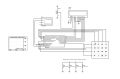
Circuit:
In attachments.

CCS PIC C compiler
Used Proteus 8 for simulation (I know I shouldn't, but its visual and I need a visual simulator).
Full code:
Code:
#include   <16F690.h>
#include   "lcd4bit.c"        /* Custom. */
#include   "Initialization.c" /* Custom. */
#use       delay(clock=4M)
#use rs232(baud=9600,parity=N,xmit=PIN_B7,rcv=PIN_B5,bits=8)

#fuses   NOMCLR, NOPROTECT, NOWDT, INTRC_IO

#define   col0      pin_a0
#define   col1      pin_a1
#define   col2      pin_a2
#define   col3      pin_a4

#define   row0      pin_a5
#define   row1      pin_b4
#define   row2      pin_b6
#define   row3      pin_c7

/////////////////////////////////////////////////
///////// variables /////////////////////////////

unsigned int8 i;
unsigned int8 j;
unsigned int8 kcode;
unsigned int8 ButtonPressed [4];

/////////////////////////////////////////////////
///////// functions /////////////////////////////

void   kp_scan   (void);
void   Clear_MultiButtonRecord ();  /* Clears which button combination has been pressed after 1 sec. */
void   RS232Communication ();  /* Communicates with other MCUs through RS232 serial interface at "5VDC" and "0VDC". */
void   MultiButtonRecord ();   /* Check which combination of buttons is pressed for tha last "period" of time. */

/////////////////////////////////////////////////

/*********************************/
/*********************************/
void main()
{   
                                   /* Local variables. */
   Initialization ();
   output_b(0b00000000);
   /* set_tris_c(0b00001111); */ /* Not needed as I used a different pinout and set everything in the "Initialization ()". */
   /* output_c(0b00001111);     */ /* Not needed as I used a different pinout and set everything in the "Initialization ()". */
                         /* Originally these 2 lines were used, because a different keypad mode was used. */
   lcd_init();

   lcd_data("   SUBSCRIBE   ");
   
   set_timer0 (0);
   
   while(1)
   { 
         lcd_cmd (0xc0);   // set lcd cursor on line2
         kp_scan();        /* Scan for which button is pressed. */
         MultiButtonRecord ();
         Clear_MultiButtonRecord ();
         lcd_data(kcode);  /* Send to the LCD the button pressed. */
      delay_ms(300);
       
   }
}
/*********************************/
/*********************************/

/**************Keypad*******************/

void kp_scan (void)
{
/********************Row0********************/
   
   output_high (row0);
   if(input(col0) == 1)
      kcode='0';
   if(input(col1) == 1)   
      kcode='1';
   
   if(input(col2) == 1)   
      kcode='2';
   
   if(input(col3) == 1)   
      kcode='3';
   
   output_low (row0);
   
/**************************************************/
/********************Row1********************/
   output_high (row1);
   if(input(col0) == 1)
      kcode='4';
   if(input(col1) == 1)   
      kcode='5';
   
   if(input(col2) == 1)   
      kcode='6';
   
   if(input(col3) == 1)   
      kcode='7';
   
   output_low (row1);
   
/**************************************************/
/********************Row2********************/
   output_high (row2);
   if(input(col0) == 1)
      kcode='8';
   if(input(col1) == 1)   
      kcode='9';
   
   if(input(col2) == 1)   
      kcode='A';
   
   if(input(col3) == 1)   
      kcode='B';
   
   output_low (row2);
   
/**************************************************/
/********************Row3********************/
   output_high (row3);
   if(input(col0) == 1)
      kcode='C';
   if(input(col1) == 1)   
      kcode='D';
   
   if(input(col2) == 1)   
      kcode='E';
   
   if(input(col3) == 1)   
      kcode='F';
   
   output_low (row3);
   
/**************************************************/
   
}

void ClearButtonPressed () /* Not used, can be deleted. */
{
   ;
}

void RS232Communication ()
{
   printf ("Test\n\r");
   putc (kcode);
   putc ('\r');                      /* Starts a new line on the "RS232" interface. */
}

void MultiButtonRecord ()   /* Check which combination of buttons is pressed for tha last "period" of time. */
{
   if (i=3)
     i=0;
   ButtonPressed [i] = kcode;
   i++;
   
   if (ButtonPressed [0] == 0 && ButtonPressed [1] == 1 && ButtonPressed [2] == 2 && ButtonPressed [3] == 3)
      lcd_data("Success");
}

void Clear_MultiButtonRecord ()
{
   if (get_timer0 () > 127)
      j++;
   if (j >1270)
   {
      for (j=0; j<4; j++)
         ButtonPressed [j] = 0;
      i = 0;
      j = 0;
   }
}
 

Attachments

Thread Starter

ArakelTheDragon

Joined Nov 18, 2016
1,366
There are matrix keypad reading libraries already written, maybe you can port one to your platform or maybe the source will help you. Here is one for Arduino:

https://playground.arduino.cc/code/keypad
https://playground.arduino.cc/Main/KeypadTutorial

And this thread discusses multi-press on matrix keypads. I only skimmed it, but the info might be useful to you:

https://forum.arduino.cc/index.php?topic=107430.0
Thanks, I will check them, I am very busy lately. I am in Germany tomorrow.
 

eetech00

Joined Jun 8, 2013
4,705
Circuit:
In attachments.

CCS PIC C compiler
Used Proteus 8 for simulation (I know I shouldn't, but its visual and I need a visual simulator).
Full code:
Code:
#include   <16F690.h>
#include   "lcd4bit.c"        /* Custom. */
#include   "Initialization.c" /* Custom. */
#use       delay(clock=4M)
#use rs232(baud=9600,parity=N,xmit=PIN_B7,rcv=PIN_B5,bits=8)

#fuses   NOMCLR, NOPROTECT, NOWDT, INTRC_IO

#define   col0      pin_a0
#define   col1      pin_a1
#define   col2      pin_a2
#define   col3      pin_a4

#define   row0      pin_a5
#define   row1      pin_b4
#define   row2      pin_b6
#define   row3      pin_c7

/////////////////////////////////////////////////
///////// variables /////////////////////////////

unsigned int8 i;
unsigned int8 j;
unsigned int8 kcode;
unsigned int8 ButtonPressed [4];

/////////////////////////////////////////////////
///////// functions /////////////////////////////

void   kp_scan   (void);
void   Clear_MultiButtonRecord ();  /* Clears which button combination has been pressed after 1 sec. */
void   RS232Communication ();  /* Communicates with other MCUs through RS232 serial interface at "5VDC" and "0VDC". */
void   MultiButtonRecord ();   /* Check which combination of buttons is pressed for tha last "period" of time. */

/////////////////////////////////////////////////

/*********************************/
/*********************************/
void main()
{
                                   /* Local variables. */
   Initialization ();
   output_b(0b00000000);
   /* set_tris_c(0b00001111); */ /* Not needed as I used a different pinout and set everything in the "Initialization ()". */
   /* output_c(0b00001111);     */ /* Not needed as I used a different pinout and set everything in the "Initialization ()". */
                         /* Originally these 2 lines were used, because a different keypad mode was used. */
   lcd_init();

   lcd_data("   SUBSCRIBE   ");

   set_timer0 (0);

   while(1)
   {
         lcd_cmd (0xc0);   // set lcd cursor on line2
         kp_scan();        /* Scan for which button is pressed. */
         MultiButtonRecord ();
         Clear_MultiButtonRecord ();
         lcd_data(kcode);  /* Send to the LCD the button pressed. */
      delay_ms(300);
    
   }
}
/*********************************/
/*********************************/

/**************Keypad*******************/

void kp_scan (void)
{
/********************Row0********************/

   output_high (row0);
   if(input(col0) == 1)
      kcode='0';
   if(input(col1) == 1)
      kcode='1';

   if(input(col2) == 1)
      kcode='2';

   if(input(col3) == 1)
      kcode='3';

   output_low (row0);

/**************************************************/
/********************Row1********************/
   output_high (row1);
   if(input(col0) == 1)
      kcode='4';
   if(input(col1) == 1)
      kcode='5';

   if(input(col2) == 1)
      kcode='6';

   if(input(col3) == 1)
      kcode='7';

   output_low (row1);

/**************************************************/
/********************Row2********************/
   output_high (row2);
   if(input(col0) == 1)
      kcode='8';
   if(input(col1) == 1)
      kcode='9';

   if(input(col2) == 1)
      kcode='A';

   if(input(col3) == 1)
      kcode='B';

   output_low (row2);

/**************************************************/
/********************Row3********************/
   output_high (row3);
   if(input(col0) == 1)
      kcode='C';
   if(input(col1) == 1)
      kcode='D';

   if(input(col2) == 1)
      kcode='E';

   if(input(col3) == 1)
      kcode='F';

   output_low (row3);

/**************************************************/

}

void ClearButtonPressed () /* Not used, can be deleted. */
{
   ;
}

void RS232Communication ()
{
   printf ("Test\n\r");
   putc (kcode);
   putc ('\r');                      /* Starts a new line on the "RS232" interface. */
}

void MultiButtonRecord ()   /* Check which combination of buttons is pressed for tha last "period" of time. */
{
   if (i=3)
     i=0;
   ButtonPressed [i] = kcode;
   i++;

   if (ButtonPressed [0] == 0 && ButtonPressed [1] == 1 && ButtonPressed [2] == 2 && ButtonPressed [3] == 3)
      lcd_data("Success");
}

void Clear_MultiButtonRecord ()
{
   if (get_timer0 () > 127)
      j++;
   if (j >1270)
   {
      for (j=0; j<4; j++)
         ButtonPressed [j] = 0;
      i = 0;
      j = 0;
   }
}
In my opinion, its ok to simulate buttons as long as you keep in mind they are PERFECT buttons.
Real buttons have bounce. So be sure to breadboard with real buttons with debounce circuits before going to the fab house.

in MultiButtonRecord() function

this:
Code:
if (i=3)
should be:
Code:
if (i == 3)
eT
 
Top