Facebook
 Google
 GitHub
 Linkedin

hello friends
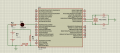
i really need help. I am new to PIC. So i have been using pic18f45k22 microcontroller. I created hex file in MikroC Pro. Than i loaded it to Proteus and its working fine.
Next, i wanted to load it into real pic.
I am using PICkit3 and MPLAB IDE V7.76. I connected pins from 1 till 6 to MCLR, Vdd, Vss, PGD, PGC and left 6th pin not connected as pic18f45k22 doesnt have PGM pin.
1. Opened the MPLAB
2. Selected device
3. Ticket on configuration bits
4. Selected programmer as pickit 3
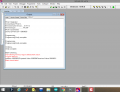
PICkit 3 detected
Connecting to PICkit 3...
Firmware Suite Version...... 01.47.12
Firmware type......................PIC18F
PICkit 3 Connected.
Device ID Revision = 00000005
5. Ticket on(turn on) power target circuit from PIC
6. Program & Verify
Programming...
Programming/Verify complete
Verifying...
Verify complete
7. Blank Checking...
The following memory regions failed blank check:
Program Memory
Address: 00000000 Expected Value: 000000ff Received Value: 00000016
Blank check failed(0000000 meaning pickit was not recognized and connect)
Maybe problem with mikroC pro. maybe i didnt configure pins like MCLR or Watchdog time etc. Maybe these 6 pins from pickit3 not connected correctly to pic18f45k22. or problem with compiler.
I would appreciate any help. Thanks in advance 
i really need help. I am new to PIC. So i have been using pic18f45k22 microcontroller. I created hex file in MikroC Pro. Than i loaded it to Proteus and its working fine.
Next, i wanted to load it into real pic.
I am using PICkit3 and MPLAB IDE V7.76. I connected pins from 1 till 6 to MCLR, Vdd, Vss, PGD, PGC and left 6th pin not connected as pic18f45k22 doesnt have PGM pin.
1. Opened the MPLAB
2. Selected device
3. Ticket on configuration bits
4. Selected programmer as pickit 3
PICkit 3 detected
Connecting to PICkit 3...
Firmware Suite Version...... 01.47.12
Firmware type......................PIC18F
PICkit 3 Connected.
Device ID Revision = 00000005
5. Ticket on(turn on) power target circuit from PIC
6. Program & Verify
Programming...
Programming/Verify complete
Verifying...
Verify complete
7. Blank Checking...
The following memory regions failed blank check:
Program Memory
Address: 00000000 Expected Value: 000000ff Received Value: 00000016
Blank check failed(0000000 meaning pickit was not recognized and connect)
Maybe problem with mikroC pro. maybe i didnt configure pins like MCLR or Watchdog time etc. Maybe these 6 pins from pickit3 not connected correctly to pic18f45k22. or problem with compiler.
C:
void main() {
     TRISD0_bit = 0;
     ANSELD=0;

     do{
     LATD = 0x00;
     Delay_ms(1000);
     LATD = 0xFF;
     Delay_ms(1000);
     }while(1);
}Attachments
-
 63.1 KB Views: 6
 -
 101.5 KB Views: 6
Last edited by a moderator: