MCP3201 12-bit ADC - SPI

Thread Starter

Pushkar1

Joined Apr 5, 2021
416
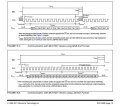
I need help to read MCP3201 12-bit ADC Datasheet. chip work on SPI. I am trying to understand how ADC read 12 bit data. As shown in figure 5.1 and 5.2 on page 19. I don't understand what data byte should be send to ADC to get 12 bit data from MCP3201. Look at attached datasheet for more detail
 

Attachments

Ian0

Joined Aug 7, 2020
13,131
You don't send any data to the MCP3201.
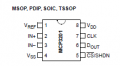
In fact, you can't send any data to the MCP3201 because it doesn't have a DATA IN pin.
The MCP3201 starts sending data on the second falling edge of CLK after CS has been asserted.
 

Thread Starter

Pushkar1

Joined Apr 5, 2021
416
hi,
Read section 6.1 of the datasheet it explains the READ operation.
E
section 6.1 say, Data stored into MCU receive register after transmission of first 8 bits and after transmission of second 8 bits

Does it means microcontroller send 16 clock's to read ADC data byte. When microcontroller send 16 clock pulses to ADC. The 16 bit ADC data will store into MCU receive register. first two clock pulses give two unknown bits, next six pulses gives, highest order five bits of the conversion. After the second eight clocks have been sent to the device, the MCU receive register will contain the lowest-order seven bits
 

ericgibbs

Joined Jan 29, 2010
21,439
hi P,
Perhaps a short piece of SPI Basic Code will help, added extra comments
E

Proc spi_rd_pt()
'assume 2 bytes of data, High byte and Low Byte, total 16 bits to make a WORD

ss = 0 ' CS select enable remote ADC peripheral
WaitUs 10
SSPBUF = mastout.HB ' assign a write to register, if the peripheral requires DATA else omit
While Not SSPSTAT.BF ' wait until Buffer Full flag, this sends out 8 clocks to get HB
Wend
comp.HB = SSPBUF ' Read and transfer the High byte to comp.HB

SSPBUF = mastout.LB '' repeat the above for the Low Byte, if the peripheral requires DATA else omit
While Not SSPSTAT.BF ' wait until Buffer Full flag, this sends out 8 clocks to get LB
Wend
comp.LB = SSPBUF 'Read and transfer the High byte to comp.LB

WaitUs 10
ss = 1 ' disable the CS to the ADC
SSPBUF = 0
''' the comp save to WORD buffer will contain the High byte & Low Byte of received ADC DATA
End Proc
 
Last edited:

Thread Starter

Pushkar1

Joined Apr 5, 2021
416
I am trying to understand how to read ADC data with the help of software SPI.

ADC Dout Pin connected to MCU PORT 1 PIN 1
ADC CLK Pin connected to MCU Clock Pin PORT 1 PIN 2
ADC CS - Pin connected to MCU PORT 1 PIN 3

I want to write a function that sends 8 clock pulses and returns 8 bit data.

C:
unsigned char SPI_Read (void)
{
   unsigned char receive;
  for ( int I = 0; I < 8; I++)
{
    CLK = High;
    waitUs (20);
   CLK = Low
    receive = save bit value read from ADC
   Get the next bit
}
}
I don't understand how to find in function if bit from ADC is High or Low.
 

Thread Starter

Pushkar1

Joined Apr 5, 2021
416
hi P,
Do you want to write a Software SPI READ program or use the internal Hardware SPI features of most MCU's.

The HW is much faster and easier to use than the SW option.
I want to write software SPI. Yes i agree with you that it is better to use hardware spi than software spi

The code looks quite complicated. i have declared 8 bit variable receiver in which i want to store 8 bit data. How to do it in function?
 

Irving

Joined Jan 30, 2016
5,109
The code is complicated because it needs to be...

Here is one version:
(NB you only need the delay routines if the instruction cycle time of your MCU to execute a digitalWrite is < 250nS approx. Arduino Uno R3 is 4uS!)

MCP3201 read routine:
uint16_t spi_MCP3201_transfer(void){
  /*
   * returns 12 bit data from device
   * assumes:
   * spi_CK = clock pin
   * spi_MI = master input pin
   * spi_CS = device select pin
   */

  noInterrupts();
  uint16_t retVal = 0;

  digitalWrite(spi_CK, LOW);
  digitalWrite(spi_CS, LOW); // select chip
  digitalWrite(spi_CK, HIGH); // 2 clocks for sample time
  //delayMicroseconds(1); // only needed for fast MCU
  digitalWrite(spi_CK, LOW);
  //delayMicroseconds(1);
  digitalWrite(spi_CK, HIGH);
  //delayMicroseconds(1);
  digitalWrite(spi_CK, LOW); // end sample
  //delayMicroseconds(1);
  digitalWrite(spi_CK, HIGH); // null bit
  //delayMicroseconds(1);
  digitalWrite(spi_CK, LOW);
  //delayMicroseconds(1);

  for(uint8_t i=0;i<12;i++) {
    digitalWrite(spi_CK, HIGH);
  //delayMicroseconds(1);
    retVal <<= 1;
    retVal |= (digitalRead(spi_MI) & 0x1);
    digitalWrite(spi_CK, LOW);
  //delayMicroseconds(1);
  }// for

  digitalWrite(spi_CS,HIGH); // deselect chip
  interrupts();
  return retVal;
}
 
Last edited:

Thread Starter

Pushkar1

Joined Apr 5, 2021
416
The code is complicated because it needs to be...
code is written for Arduino so it doesn't make much sense to me
What happens in following part of the code. How code test if MISO is high or low?
MCP3201 read routine:
  for(uint8_t i=0;i<12;i++) {
    digitalWrite(spi_CK, HIGH);
  //delayMicroseconds(1);
    retVal <<= 1;
    retVal |= (digitalRead(spi_MI) & 0x1);
   
}
I am trying to understand what are the conditions in the loop when MISO becomes high or it becomes low.
 

Irving

Joined Jan 30, 2016
5,109
You dont need to test if high or low.. thats the wrong way to do it and is inefficient. All you need to do is transfer the value of the input to the correct bit in the return value. That is done by 'AND'ing the input bit with 1 to ensure all other bits in the byte/word are 0 and 'OR'ing it with the return value which is left shifted on each iteration to move the bits up the word. This is a standard and fast technique for serial bit manipulation from an input and is not Arduino specific.

Edit, for clarification: the reason for the AND is that some microcontrollers return 0xFF rather than 0x01 for the 'HIGH' value. If you know for sure yours doesn't you can leave off the AND.

In fact none of this code is really Arduino specific; digitalRead(pin) and digitalWrite(pin, state) are pretty generic across all microcontroller programming environments and are fairly obvious in function, and the rest is fairly standard C. If you are expecting to get competant at embedded programming you need to get your head around this as 'Arduino-like' is pretty common as pseudo-code these days and is easy to understand.
 
Last edited:

Thread Starter

Pushkar1

Joined Apr 5, 2021
416
You dont need to test if high or low.. thats the wrong way to do it and is inefficient.
The code in link confuse me https://en.wikipedia.org/wiki/Bit_banging

C:
// transmit byte serially, MSB first
void send_8bit_serial_data(unsigned char data)
{
   int i;

   // select device (active low)
   output_low(SD_CS);

   // send bits 7..0
   for (i = 0; i < 8; i++)
   {
       // consider leftmost bit
       // set line high if bit is 1, low if bit is 0
       if (data & 0x80)
           output_high(SD_DI);
       else
           output_low(SD_DI);

       // pulse the clock state to indicate that bit value should be read
       output_low(SD_CLK);
       delay();
       output_high(SD_CLK);

       // shift byte left so next bit will be leftmost
       data <<= 1;
   }

   // deselect device
   output_high(SD_CS);
}
 

ericgibbs

Joined Jan 29, 2010
21,439
hi P,
You have already been told the MCP does NOT have a Din pin , so why do you insist in
querying this.?
void send_8bit_serial_data(unsigned char data)

Use the Code method that @Irving has posted, so that you understand the method

E
BTW: IMO the person who came up with the stupid term Bit Banging should be slapped.

It was originally known as Bit Switching , which is more meaningful than Banging
ESP_ 735 Sep. 05 10.39.png
 

Irving

Joined Jan 30, 2016
5,109
code is written for Arduino so it doesn't make much sense to me
A further reflection on your comment.
My students generally program in the Arduino IDE because its easy to use, even if they then go on to more complex environments. But often they come across code written for other microcontrollers and "I don't understand it" is a common refrain! I encourage them to recognise this is working code, even though it doesn't appear to match the 'pattern' they were expecting, and to try and identify the active lines (as you did). A few minutes spent with a pencil and paper drawing pictures of bits & bytes to work out what's actually happening pays dividends (sometimes you can't beat old tech!) and there's often a 'light-bulb' moment when understanding dawns.

The code in link confuse me
Well it would if you don't recognise the fairly fundamental difference between input and output!
 

Ian0

Joined Aug 7, 2020
13,131
BTW: IMO the person who came up with the stupid term Bit Banging should be slapped.
Agreed. It sounds either like a derisory comment from someone who couldn't work out how to do it, or patronising to engineers who use cheap microcontrollers which lack the peripheral that they are emulating in software.
I use it to do I2C on NXP's ARMs, because their hardware is byzantine. My Bit Switching code used fewer instructions, than the code require to use the built-in hardware.

If you're writing a software SPI for the Atmega (which I think it what is in an arduino) then the software version has the advantage that you can shift all twelve bits into two bytes, without having to load two 8-bit bytes from the SPI hardware and then having to stitch them together again.
 

Irving

Joined Jan 30, 2016
5,109
If you're writing a software SPI for the Atmega (which I think it what is in an arduino) then the software version has the advantage that you can shift all twelve bits into two bytes, without having to load two 8-bit bytes from the SPI hardware and then having to stitch them together again.
Exactly so, even if its not an Arduino. Unless there are many SPI peripherals attached in this case doing it in software is both easier and less memory intensive than loading the SPI library, doing 2 x 8 bit transfers and then de-mangling the result. And arguably more maintainable.

In fact, even if the SPI library was loaded and hardware SPI used, I'd probably still do it in software using the hardware pins, making sure they were left in the same state I found them in.
 

nsaspook

Joined Aug 27, 2009
16,321
Bit Banging is fine for trivial SPI tasks but actual hardware is needed for things that need high transfer rates with low CPU and I/O loads. With FIFO and DMA (8-bit chips like the PIC-Q43 series) you can transfer whole blocks of data in and out with a single interrupt in background. Most of the standard controller SPI libs are lowest common denominator so they seldom use most of the capabilities of the hardware even on 32-bit devices.
https://forum.allaboutcircuits.com/threads/pic32mk-mc-qei-example.150351/post-1564213
I can run this display with a 20MHz SPI clock with minimal CPU usage.
 

click_here

Joined Sep 22, 2020
548
"Bit banging" is a slang term - I always thought that it is meant that it is the "poor man's" way of doing it, rather than using dedicated hardware. i.e. The cheap and nasty way of doing it.

I have done a quick search and can't find anything on the history of the name "bit-banging" and why it is called that.

Does anyone have a reliable source for the name?

The code in link confuse me
I'm guessing that you mean the C language used rather than output signal itself.

The code has an 8 bit number, let's say we have the hex number 0x6A, which is 0b01101010 in binary.

The "for" loop goes around 8 times, once for each bit
Code:
for (i = 0; i < 8; i++)
If we want to send the msb first we can do a bitwise "and" with the binary number 0b10000000 and check to see if the answer is 0 (0b00000000).
Code:
if (data & 0x80)
...So
Code:
0b01101010 &
0b10000000 
=
0b00000000
Because the result is 0, the output is set low.

After toggling the clock pin we need to look at the next significant bit, so we do a bitwise shift to the left "1" times
Code:
data <<= 1;
// becomes
data = data << 1;

And
0b01101010 << 1
=
0b11010100
Now when the "for" loop starts again the msb of the data is the original 2sb.

It does that for all of the bits in the 8 bit number.


Working out what the outputs is going to be using pen and paper is great advice.

Debuggers are also good.

I also find that using a spreadsheet to work out algorithms is great, because each cell behaves like a single variable and using cell names (like $A2) is a great way to look at pointers.

Hope this helps :)
 
Top