MASTER and SLAVE PICs using SPI in Oshonsoft

Thread Starter

camerart

Joined Feb 25, 2013
3,842
Hi,
I'm being helped by Microchip at the moment, and found a few issues, some with the programs, posted earlier and some with my implementation.

Firstly, my implementation: In the programs, there is only 1x CS, but I left the Altimeter/barometer peripheral connected, which messed with the SPI, I also had a logic analyser connected. Once all of the other that the 4431 was removed, then it works, and has in many tests.

I'm looking into the program issues, which appear to be the order of lines, or CS lines, but it will take me a while to follow, the answers.
C
 

Thread Starter

camerart

Joined Feb 25, 2013
3,842
Which SPI device gives the wrong first digit?
Do you know, that the first byte from the slave ( MISO ) is what happened to be in the slaves SSPBUF, when the master sent the first byte.
Hi J,
The 1st MISO BYTE should READ ABCD. Sometimes it does, or it could repeatedly have the wrong 1st digit. The results right or wrong can repeat many times.
In this sequence it ran correctly, than I added another peripheral (CS HIGH) where it started making errors, then I removed it, then added it back on, you can see where it changes. Sometimes there is no affect when adding it, and it shows correct or error. Switch OFF.ON = Master Ready=1234

I had similar trouble from another peripheral months ago, which seemed to be solved by adding a buffer in the MISO line.

EDIT: Both error giving peripherals show low MISO output voltage, even when nothing is connected.
C
 

Attachments

Thread Starter

camerart

Joined Feb 25, 2013
3,842
Not clear whether your are referring to bits or bytes?

In either case, since SPI is always duplex, one partner can exchange rubbish and there is no effect, depending on the purpose of the exchange. For example, if the master sends an address to the slave from or to which it intends to read or write, respectively, the slave can return garbage. Maybe what you are seeing (i.e., an exchanged bit/byte) is just showing that your SPI is working. When you don't get that garbage, then maybe that indicates SPI is not working and your system fails?

If that sounds probable, I would step through the SPI code and see where it is hanging.
Hi J2,
As it's intermittent, would stepping through the CODE work?
C
 

Thread Starter

camerart

Joined Feb 25, 2013
3,842
Hi,
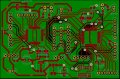
I've re-drawn the PCB ready for etching, so any program before here won't work. All must have PCB6 in the title for correct PIN connections.
C.
 

Attachments

Thread Starter

camerart

Joined Feb 25, 2013
3,842
Hi,
I've gone full circle and am back here again:rolleyes:
Will someone with an Oshonsoft simulator try the programs in #318 please?

I'm now using a different main PIC 18F46K20, but the same second PIC 18F4431, and the Oshonsfot has updated a few times.

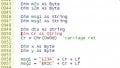
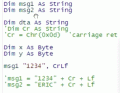
I am trying the 18F4620 one first, but I get problems with it not compiling around here:

I've tried changing STRING to BYTE, removing the DIM CRLF and using the Oshonsoft CRLF, but it always shows errors.
C.
 

Attachments

Last edited:

ericgibbs

Joined Jan 29, 2010
21,462
hi C,
Why do you need to retest the programs I posted in #318.?

I have not updated any of my Oshonsoft IDE's for a few years.

E
 

Thread Starter

camerart

Joined Feb 25, 2013
3,842
hi C,
Why do you need to retest the programs I posted in #318.?

I have not updated any of my Oshonsoft IDE's for a few years.

E
Hi E, how's things?
I'm adding the SPI to connect the 4431 again, as I have never got it to work as a SLAVE yet, other SPI peripherals are working fine.
First I tried transposing those programs in #318 into the present working programs.

It all got too complicated, so I thought I'd check the small #318 programs independently first, then update them as I go.

Maybe the programs will work as before with you un-updated OSH
C.
 

jjw

Joined Dec 24, 2013
823
Hi,
I've gone full circle and am back here again:rolleyes:
Will someone with an Oshonsoft simulator try the programs in #318 please?

I'm now using a different main PIC 18F46K20, but the same second PIC 18F4431, and the Oshonsfot has updated a few times.

I am trying the 18F4620 one first, but I get problems with it not compiling around here:

I've tried changing STRING to BYTE, removing the DIM CRLF and using the Oshonsoft CRLF, but it always shows errors.
C.
CR is a reserved string constant in Osh Basic.
You can't declare it with Dim CR as ...
just use msg1= "1234" + CR + LF
 

ericgibbs

Joined Jan 29, 2010
21,462
hi C,
This clip is from my original #318, no sign of a CrLf

Clip:
msg1 = "1234" + cr + Lf
msg2 = "ERIC" + cr + Lf
&
msg1 = "ABCD" + cr + Lf 'initial dummy msg


E
 

Thread Starter

camerart

Joined Feb 25, 2013
3,842
hi C,
This clip is from my original #318, no sign of a CrLf

Clip:
msg1 = "1234" + cr + Lf
msg2 = "ERIC" + cr + Lf
&
msg1 = "ABCD" + cr + Lf 'initial dummy msg


E
Hi J and E,
This is going back a while, but I'm sure we had conversations about reserved words, and it's possible that CrLF is one of my many attemps to get it to compile. e.g msg1 = "1234", crlf fails.

At the DIM stage it doesn't 'like' STRING, so I tried BYTE fails.
C.
 

ericgibbs

Joined Jan 29, 2010
21,462
hi,
You have changed it incorrectly
msg1 "1234",CrLf is incorrect Syntax
the original was:
msg1 = "ABCD" + cr + Lf 'initial dummy msg

E
EG 1319.gif
 

Thread Starter

camerart

Joined Feb 25, 2013
3,842
hi,
You have changed it incorrectly
msg1 "1234",CrLf is incorrect Syntax
the original was:
msg1 = "ABCD" + cr + Lf 'initial dummy msg

E
View attachment 254361
Hi E,
Yes, this
hi,
You have changed it incorrectly
msg1 "1234",CrLf is incorrect Syntax
the original was:
msg1 = "ABCD" + cr + Lf 'initial dummy msg

E
View attachment 254361
Hi E,
Yes, I corrected 'string' in #372 to show the correct line, with error.

As mentioned, I think originally I was asked to remove CR as it is a reserved word.
C.
 

jjw

Joined Dec 24, 2013
823
Hi E,
Yes, this

Hi E,
Yes, I corrected 'string' in #372 to show the correct line, with error.

As mentioned, I think originally I was asked to remove CR as it is a reserved word.
C.
If you mean #368, I meant that Cr is a reserved word for the carriage return and you should use it without declaring it with Dim ...

From the manual:
. There are four symbolic string constants available: Qt (or """") for the double quotation mark (ASCII code 34), CrLf for the carriage return - line feed sequence (ASCII codes 13-10), Cr for the carriage return (ASCII code 13) and Lf for the line feed character (ASCII code 10).
 
Last edited:

Thread Starter

camerart

Joined Feb 25, 2013
3,842
If you mean #368, I meant that Cr is a reserved word for the carriage return and you should use it without declaring it with Dim ...

From the manual:
. There are four symbolic string constants available: Qt (or """") for the double quotation mark (ASCII code 34), CrLf for the carriage return - line feed sequence (ASCII codes 13-10), Cr for the carriage return (ASCII code 13) and Lf for the line feed character (ASCII code 10).
Hi J,
Yes, I understand, but I did this earlier, and it failed.
I'll try again.
EDIT: Second try it did work, I must have made an error the first time.
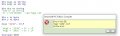
Next I got this error: 'm2s' But I changed the DIM BYTE to STRING and now it compiles.
C.
 

Attachments

Last edited:

Thread Starter

camerart

Joined Feb 25, 2013
3,842
Hi,
Above! The 18F46K20 program is/was working,and I could see serial output (No DATA yet) in the terminal.
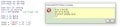
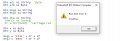
I switched to the 18F4431 PIC, then back to the 18F46K20 and I now get this every time, then OSH closes?
C
 

Attachments

Top