Looking for Guidance: ESP32 Ethernet Web Server to Control Optical Transceiver

Thread Starter

Aishwarya0210

Joined Jul 21, 2022
11
I'm working on a project where I need to remotely monitor and control a Femtobeam GT2422 optical transceiver using an ESP32 over Ethernet. The goal is to host a secure (HTTPS) web interface directly on the ESP32 that I can access remotely to toggle a relay (turning the transceiver on or off) and read values like power or optical loss, possibly via ADC or UART. I want to do this entirely over a wired Ethernet connection, not Wi-Fi, and the ESP32 will be deployed in a remote location connected to a local Ethernet hub. From about 5 km away, I'd like to access the ESP32 by entering its IP in a browser and using a custom UI hosted from its internal storage. I'm trying to decide between boards like the WT32-ETH01 or ESP32-POE and I'm looking for guidance or examples where Ethernet with ESPAsyncWebServer, HTTPS, SPIFFS/LittleFS, and relay control have been implemented together in a similar setup. Or should I just use a raspberry pi say 5 instead and how would the situation be in that case? Any input from those who have done similar work would be really appreciated.
 

Ya’akov

Joined Jan 27, 2019
10,226
Welcome to AAC.

My first impression is that an RPi 3B+ or 4 would be your best choice. You don't need the compute power of the 5, you will get native Ethernet, a real web server under a real OS, and the code savings based on the time you need to invest and the ease of revisions and updates will easily pay for the modest additional cost.

You can also get a DIN rail housing and power supply making it compatible with an industrial/scientific physical installation.
 

BobTPH

Joined Jun 5, 2013
11,482
I have implemented such an app using the ESP-01 board and PIC24 using the UART interface to the TCP/IP stack on the ESP. It needs about or 5 or 6 AT commands, which are text stings, to set up. If the ESP32 has this same interface internally, it should be pretty easy to set up. This is all on a WIFI network, but that should make no difference.

I can access the system from any device with a browser, so that was a big plus for me rather than needing a special app to talk to it. So I agree with your choice to use the http: method.
 

Futurist

Joined Apr 8, 2025
725
I'm curious why people run entire web servers on these devices. Wouldn't it make more sense to simply expose a basic REST service on the device and have a proper site hosted on a bigger machine with more resources? Then that hosted website could just contact (perhaps multiple) devices as and when needed, the devices could support some basic authentication but the user-interface to all that would be in the main web app.

The web app could be hosted in the cloud too, easy peasy.
 

Irving

Joined Jan 30, 2016
5,064
I'm curious why people run entire web servers on these devices. Wouldn't it make more sense to simply expose a basic REST service on the device and have a proper site hosted on a bigger machine with more resources? Then that hosted website could just contact (perhaps multiple) devices as and when needed, the devices could support some basic authentication but the user-interface to all that would be in the main web app.

The web app could be hosted in the cloud too, easy peasy.
Why make it more complex than it needs to be? These browser interfaces to what is primarily a IoT device consume but a tiny level of resource on the device. eg an ESP32, my default go-to device for IoT is now an S3-N16R8 ie 16Mbytes Flash and 8Mbytes RAM. The whole 20 screen user interface for one of my more complex projects requires less than 5% of the resources, has a secure login, config pages for around 50 parameters, a log viewer screen to search & view the log file (stored on a 2Gbyte SD card, which could also accommodate more web pages if needed) and requires no costly external hosting.
 

Futurist

Joined Apr 8, 2025
725
Why make it more complex than it needs to be? These browser interfaces to what is primarily a IoT device consume but a tiny level of resource on the device. eg an ESP32, my default go-to device for IoT is now an S3-N16R8 ie 16Mbytes Flash and 8Mbytes RAM. The whole 20 screen user interface for one of my more complex projects requires less than 5% of the resources, has a secure login, config pages for around 50 parameters, a log viewer screen to search & view the log file (stored on a 2Gbyte SD card, which could also accommodate more web pages if needed) and requires no costly external hosting.
Yes I think that makes total sense for a stand alone device like an internet gateway, that kind of thing. I was thinking more of where there are many devices. Having a centralized UI with uniform appearance that can be used to manage them all is where I was going with that.

How did you develop/test/build that complex 20 page website for the system you mentioned?

If you did have multiple devices then a hosted UI front end app is the only place you need to change if the UI changes, so really I was alluding that kind of setup.
 
Last edited:

BobTPH

Joined Jun 5, 2013
11,482
I'm curious why people run entire web servers on these devices
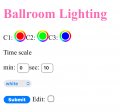
The “web server” I implemented on a PIC is maybe 100 lines of code. It waits for an Http connection, then handles a GET by spitting out html that is nothing but a string of text, and then handles a PUTs that the web page returns with data. Really, nothing could be simpler. And if you visited my house, you could operate the lights it controls using your phone, tablet, laptop, whatever, with no app installation required. Of course you would need the WIFI password, but seeing as the worst a hacker could do is activate some cool LED strips, that’s enough security for me.

Here is the web page it puts up. There is another page which allows to write a program to sequence the lighting. All the work is done by the browser.

IMG_0481.jpeg
 
Last edited:

Futurist

Joined Apr 8, 2025
725
The “web server” I implemented on a PIC is maybe 100 lines of code. It waits for an Http connection, then handles a GET by spitting out html that is nothing but a string of text, and then handles a PUTs that the web page returns with data. Really, nothing could be simpler. And if you visited my house, you could operate the lights it controls using your phone, tablet, laptop, whatever, with no app installation required. Of course you would need the WIFI password, but seeing as the worst a hacker could do is activate some cool LED strios, that’s enough security for me.
OK I see now, fair enough I thought people might be running richer web servers with authentication tokens back and forth and lots of CSS and stuff.
 

Futurist

Joined Apr 8, 2025
725
CSS is all in the browser, as far I know.
The site might not have any but the browser pulls everything (CSS, javascript, HTML etc) from the server's response (if the site has any).

You can tell easy enough by accessing your site from a desktop (say) and using the browser's dev tools, that shows every single thing the server sends back.
 

BobTPH

Joined Jun 5, 2013
11,482
The site might not have any but the browser pulls everything (CSS, javascript, HTML etc) from the server's response (if the site has any).

You can tell easy enough by accessing your site from a desktop (say) and using the browser's dev tools, that shows every single thing the server sends back.
But that just a text file. The browser does all the interpretation. For example, the three colored dots on my web page are color selector are html color selector primitives. When pressed in the browser you get a complicated color selection dialog. The server only sees the RGB values that it results in.
 

Futurist

Joined Apr 8, 2025
725
But that just a text file. The browser does all the interpretation. For example, the three colored dots on my web page are color selector are html color selector primitives. When pressed in the browser you get a complicated color selection dialog. The server only sees the RGB values that it results in.
Yes, your site has no fancy stuff, the browser sees only the HTML in the page that's returned to it and HTML has basic support for rendering colors and fonts without more sophisticated CSS or JS (these give more granular control over the visuals but again the browser does the work).
 

Futurist

Joined Apr 8, 2025
725
Why make it more complex than it needs to be? These browser interfaces to what is primarily a IoT device consume but a tiny level of resource on the device. eg an ESP32, my default go-to device for IoT is now an S3-N16R8 ie 16Mbytes Flash and 8Mbytes RAM. The whole 20 screen user interface for one of my more complex projects requires less than 5% of the resources, has a secure login, config pages for around 50 parameters, a log viewer screen to search & view the log file (stored on a 2Gbyte SD card, which could also accommodate more web pages if needed) and requires no costly external hosting.
I was playing around with a ESP32-C6 a few weeks ago and the device appeared to just die. I did nothing unpleasant to it, just running simple blinker examples and it seemed to lock up and nothing I did would bring it back.

Do you know of any tools to like explore this?

TWENTY MINUTES LATER....

Don't ask me how but I got it playing ball again, no idea.

I partially followed this:

https://visualgdb.com/tutorials/esp32/flashdiag/

And somehow unplugged it and restarted and it loaded the code and was debuggable!
 
Last edited:
Top