Long duration output after LED array from 4017

Thread Starter

Jerako92

Joined Oct 9, 2017
8
Ok guys and gals, I would greatly appreciate some help here. I'm a computer/network guy, but my son received a PoS in the mail for his Halloween costume that is just plain plastic. It's supposed to go with his Starlord costume. I find the item completely unacceptable! :) In any case, I also thought it was a good chance to learn some basics in electronics and have a project we could work on together. With that out of the way, I realized quickly that I had no idea what the heck I was doing! At this point, I have the standard 555ic connected to a 4017 counter (thanks to youtube) and it's pushing some 5mm LED lights in a sequence. My plan is to have the first 5 pins output to two separate LEDs for the left and right per pin to keep them in sync. I also added a potentiometer inline. It seems to be working fine and powered by a 9v battery. My goal is to have the last pin, or some other method, to power on some fat beam laser modules and a 10mm LED at the front of his blaster. No problem I'm assuming, just hook it up to the next pin with a resister since they operate at 3-5v. The problem is I would like to, if possible, increase the duration of the laser module to something more significant than the LEDs that are moving forward to look like the LEDs are powering it up and the laser module is emitting the power. (.05 sec,.05,.05,.05,.05,.1.0 seconds)
Since the input into the 4017 is controlled by the on/off of the 555ic chip (and assuming I won't be able to vary the output duration), I had also contemplated using another 555 and trigger both circuits at the same time (I'm guessing I need a diode at the end of both circuits if I went that route.) Additionally, I don't have a way of getting the timing correct. Any thoughts out there that could put me on the right track? Any help would be appreciated. I also thought that there may be some way to complete a second circuit with the output of the 6th pin from the original 4017 chip (but, I have no idea if that is possible).

Thank you for your valuable time.

Sincerely,
James B
 

AnalogKid

Joined Aug 1, 2013
12,045
Step 1: read post #2
Step 2: IF no schematic THEN repeat

Jumping from 1/20th sec to 1 sec will require a second 555 or some other timing circuit. However, if you meant to say 0.5, 0.5, 0.5, ... 1.0, that is doable by adding some diodes to the (ultra secret) circuit you already have. maybe.

Where are you located?

ak
 

ScottWang

Joined Aug 23, 2012
7,498
Yes, the schematic is needed, since there is no circuit, so I will guess that the last led or your laser as :
CD4017 → 1N4148 → capacitor(another pin to Gnd) → resistor → led → Gnd.
 

Thread Starter

Jerako92

Joined Oct 9, 2017
8
Lol (laughing at myself). Thank you guys very much. I'll get a schematic put together and then repost. I really appreciate the shot in the dark input though and I'll do some homework on the 1N4148 meanwhile. I'd put it together now, but without the breadboard in front of me it'd be hopeless! :) Like I said, definitely not my field of expertise.
 

Thread Starter

Jerako92

Joined Oct 9, 2017
8
Hi AnalogKid,
I'm in Southern California. I was thinking about the second 555 since I do want increase the timing value. Maybe I'm over-thinking this. If I use the output of the last load PIN from the initial 4017, I really don't have to worry about timing since I only want the entire circuit to complete one cycle per button push.(1/20th sec or so for each LED in series and then a .5-1.0 second laser module pulse.). Doesn't have to be anything specific, it just needs to look cool for the kid!)

I still have to do more homework but was researching the 1N4148 diode. I'll post the schematic asap.

Step 1: read post #2
Step 2: IF no schematic THEN repeat

Jumping from 1/20th sec to 1 sec will require a second 555 or some other timing circuit. However, if you meant to say 0.5, 0.5, 0.5, ... 1.0, that is doable by adding some diodes to the (ultra secret) circuit you already have. maybe.

Where are you located?
 

AnalogKid

Joined Aug 1, 2013
12,045
If the period of the clock into the 4017 is 50 ms, then it will step through 5 stages in 1/4 second. That's almost too fast to perceive the individual steps of the LEDs. Why so fast?

If you want a 50 ms blink but longer than that between steps, that's a different problem.

One thing the 4017 does well is step through one cycle and then stop. If you tie the '9' output to the clock enable pin, the 4017 will step through outputs 0-8 once and then park with all outputs off. If you have something else connected to the '9' output, it will stay on. Either way, a pushbutton and resistor tied to the Reset input restarts the cycle.

ak
 

Thread Starter

Jerako92

Joined Oct 9, 2017
8
Why so fast? Mostly because I don't know what I'm talking about.

I was thinking more of a 5 or 6 LED string where it takes 1 second to step through all of the LEDs. Not 1 second per LED. Then, run the laser somehow for somewhere between .5 and 1 second by itself since the laser beam 100mw (3-5v) will be visible during the on time. I do believe I can add another 555ic and change the duration through modifying the resistance (may be wrong terminology here. I apologize if that is the case) to it's output. My plan is to add a sound output module in parallel with the laser to create a blaster/laser sound when the laser is on for the 1 second interval. As long as I keep the duration the same as the laser "pulse", I'm assuming I can run them both off of the same (the second one) 555 output pin. I'll do some testing and sketching tonight.

As far as the blink and time between, it doesn't matter either. It's purely for aesthetics.

If the period of the clock into the 4017 is 50 ms, then it will step through 5 stages in 1/4 second. That's almost too fast to perceive the individual steps of the LEDs. Why so fast?

If you want a 50 ms blink but longer than that between steps, that's a different problem.

One thing the 4017 does well is step through one cycle and then stop. If you tie the '9' output to the clock enable pin, the 4017 will step through outputs 0-8 once and then park with all outputs off. If you have something else connected to the '9' output, it will stay on. Either way, a pushbutton and resistor tied to the Reset input restarts the cycle.

ak
 

AlbertHall

Joined Jun 4, 2014
12,619
That looks like it would work.
If you are going to make a PCB for it, then I would recommend 100nF close across the power pins of each IC and from each of the '555 pin 5 to ground just to be sure.
 

Thread Starter

Jerako92

Joined Oct 9, 2017
8
Hello again. I didn't have much time last night, but the LEDs are red 5mm. I'll have to get the packaging if additional specs are needed. Laser modules (2x) (which I was going to run in parallel so I figured if I can get one running, i'll do the same thing to the other) are 3.6-4.2v, 50mw/320mA and 130mA/130mw.

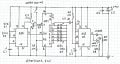
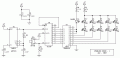
Here is what I have so far. I've scavenged it from a few youtube videos on LED chasers. It appears to be working correctly.

MyCircuit.PNG
 

AnalogKid

Joined Aug 1, 2013
12,045
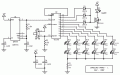
First pass at a minimal-parts solution. Depending on the laser part requirements, it might need a separate connection to the +9 V. Also, the 4017 can sink only around 4-8 mA, so the LEDs might be a bit dim. I'll post another version with individual LED drivers that will allow much brighter operation.

When you press and hold the reset button, the first LED pair comes on. Release Reset to start the cycle. 0.5 s for each LED pair, and 1.5 s for the laser. At the end of the cycle, all devices are dark. The 555 keeps running, but the CMOS version draws very little current.

EDIT: corrected schematic, wrong LED drive polarity.

ak
Starlord-1-c.gif
 

Attachments

Last edited:

dl324

Joined Mar 30, 2015
18,220
Here is what I have so far. I've scavenged it from a few youtube videos on LED chasers. It appears to be working correctly.
Your a newbie, so your poor schematic can be excused this time because you don't know enough to identify bad, or good, practices when you see them...

If you hadn't mentioned in earlier posts that you were considering using 555 and CD4017, your schematic would be meaningless without part numbers.

Whenever you have more than one component per type, you need to assign component designators; e.g. C1, C2.

I doubt that many people have memorized pinouts of all ICs they've ever used, so pins should have function (and pin number) labeled.

Schematics drawn using packages, instead of more useful functional blocks, are difficult to read. They can be used as an indication of routing congestion/difficulty, but typically obscure circuit functionality. With functional blocks inputs are on the left side and outputs on the right side; with exceptions of course.

If you use connection dots, you don't need to use "humps" to indicate non-connections; but you should use them correctly and consistently. Connection dots are only used when more than two wires touch.

Plan ahead. It is very unusual to require arrows to indicate component values. We allow space for them to be placed in an unambiguous place when doing component placement.

We try to make things flow from left to right and top to bottom. Learn from the examples you've been given.

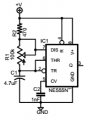
EDIT: The timer portion of your schematic redrawn.
upload_2017-10-10_8-4-14.png
I corrected the wrong connection on the two capacitors.
 
Last edited:

Bernard

Joined Aug 7, 2008
5,784
Looking at data sheet on 4017, it looks like there will always be one output hi, at reset it will be the 0 output. Maximum high output is rated @ about 1 mA but if a legal high is not required then outputs can be driven higher. At 9V , one red LED, output can reach 10 mA with 220 ohm R,
further increase does not change brightness. From faulty memory @ 12V supply, output could be pushed to 17 mA ?
If returning LED anodes to supply & sinking cathodes from outputs, then all LEDs will be ON with a circulating single off.
1/2 amp from lasers is too much for 555 & 9V battery; might need a FET driver, shorten laser to just a flash & upping 10 uF cap. to 1000 uF ?
 

Thread Starter

Jerako92

Joined Oct 9, 2017
8
I appreciate the feedback Dennis and completely agree with the newbie label. Heck, I'm not even sure I'm to that point yet. Any advice on a started book and maybe some simple software that would let me diagram things a bit better? Obviously you guys have you stuff together.

James

Your a newbie, so your poor schematic can be excused this time because you don't know enough to identify bad, or good, practices when you see them...

If you hadn't mentioned in earlier posts that you were considering using 555 and CD4017, your schematic would be meaningless without part numbers.

Whenever you have more than one component per type, you need to assign component designators; e.g. C1, C2.

I doubt that many people have memorized pinouts of all ICs they've ever used, so pins should have function (and pin number) labeled.

Schematics drawn using packages, instead of more useful functional blocks, are difficult to read. They can be used as an indication of routing congestion/difficulty, but typically obscure circuit functionality. With functional blocks inputs are on the left side and outputs on the right side; with exceptions of course.

If you use connection dots, you don't need to use "humps" to indicate non-connections; but you should use them correctly and consistently. Connection dots are only used when more than two wires touch.

Plan ahead. It is very unusual to require arrows to indicate component values. We allow space for them to be placed in an unambiguous place when doing component placement.

We try to make things flow from left to right and top to bottom. Learn from the examples you've been given.

EDIT: The timer portion of your schematic redrawn.
View attachment 136961
I corrected the wrong connection on the two capacitors.
 
Top