I'm using the MCU as a clock/calendar itself. That frequency generates an interrupt exactly every two seconds when using an external oscillator and setting Timer1 as the system clock source. The MCU counts the total seconds elapsed since 01/01/1970 (Android compatible) to determine the actual date/time. Writing the code to translate said total seconds to a formatted date/time string accounting for leap years, etc. was hard, hard work. The code also translates from the formatted date/time string back into total seconds.
I'm trying to draw the minimum amount of power possible, to maximize battery life. That's one of the reasons why I decided not to use an external clock/calendar chip.
The application itself does not need more speed than that for it to work reliably.
I'm using the MCU as a clock/calendar itself. That frequency generates an interrupt exactly every two seconds when using an external oscillator and setting Timer1 as the system clock source. The MCU counts the total seconds elapsed since 01/01/1970 (Android compatible) to determine the actual date/time. Writing the code to translate said total seconds to a formatted date/time string accounting for leap years, etc. was hard, hard work. The code also translates from the formatted date/time string back into total seconds.
I'm trying to draw the minimum amount of power possible, to maximize battery life. That's one of the reasons why I decided not to use an external clock/calendar chip.
The application itself does not need more speed than that for it to work reliably.
If it were my project, I'd use the 32khz crystal to drive the time keeping.
I'd run the core via one of the internal oscillators, probably 4 or 8 Mhz.
And I'd always be in sleep except when something needs to be done.
The high speed oscillator will allow you to do far more things faster and with less latency. Overall, you will draw no more -- and probably less -- power than you do in your current configuration (especially since you expect to idle the processor 10ms at a time).
Interesting proposal ... I could very easily make the changes you're referring to since they don't need any adjustments in the hardware.
I'm already using an external oscillator for this purpose. I'm not using a crystal because that would require using two pins instead of just one. Also, the external oscillator I'm using is an itsy bit more efficient than the MCU's internal oscillator. And from what I've already tested in the past, putting the MCU into sleep mode is practically the same (power-wise) as running it using its internal oscillator at 31 kHz LF. But I'm gonna do some more testing and get back to you.
I have also usually used the internal OSC and used a 32.768 Khz XTAL for TIM 1 T1OSC, using timer1 as a 15 bit one sec timer when it rolls over (pre-set 16th bit)..
I have also usually used the internal OSC and used a 32.768 Khz XTAL for TIM 1 T!OSC, using timer1 as a 15 bit one sec timer when it rolls over (pre-set 16th bit)..
I already tried doing that, to get a one second interrupt instead of two seconds. But after performing some thorough testing, I found that the timekeeping accuracy was affected. Using said technique made the clock lose about 4 seconds per day.
Definitely ... but I tested it many times and tried different techniques. I found that the only way to keep accuracy was not to interfere with the Timer1 counter ... perhaps the trick is to adjust said counter in synch with something else? ... Unfortunately, I didn't have the time to explore all the possibilities.
Quick question. Can anyone here post a snippet of code showing how to properly use the callw instruction?
I've already searched for it several times, but all the results showed the definition of the instruction, and none of them provided a practical example.
Quick question regarding MPLAB X IDE v5.35 assembler.
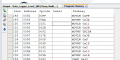
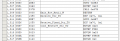
After building the project, it is quite useful for me to inspect the way the code was generated. For this purpose, the Program Memory tab comes in handy. And it shows the code something like this:
Question, is there a way to add a "Label" at the source file that would be shown on the column to the left of the related instruction after build? As it can be seen, the "Label" column is totally blank. So the Labels defined in the source .asm files have nothing to do with the Labels that could be shown in the Program Memory tab.
I suspect the Label field is for debug build when you can edit these fields in this program memory table. But i have never noticed any text appeared in this column.
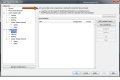
The symbol table (and the labels) should be loaded automatically for debug builds. To include labels for 'production' builds i.e. using Clean and Build Main Project, you need to tell it to load symbols in Project Properties under 'Loading' for the active configuration.
Hope that helps.
J
The symbol table (and the labels) should be loaded automatically for debug builds. To include labels for 'production' builds i.e. using Clean and Build Main Project, you need to tell it to load symbols in Project Properties under 'Loading' for the active configuration. View attachment 301603
Hope that helps.
J
I've hit a bump (not a wall, though) in my understanding ... I have now found a case in which I have to work with negative numbers. Joey once told me to "deal with it", and that's exactly what I've been trying to do. But my head's been spinning around the subject of multiplication.
Subtracting a large number from a small one is easy enough. The result will be given in 2's complement by my PC16 MCU.
i.e. if I were to subtract 0x15 from 0x0A, the result is F5, which in binary is 1110101. The signed 2's complement of this number, in decimal notation, is -11
Adding and subtracting using this method is straightforward and uncomplicated. Even dividing by two by shifting to the right is also easy, all one has to do is keep the original value of the leftmost bit to preserve the number's sign.
But for instance, how does one multiply a negative number by a positive one? I know that the result will be negative, but when I try to use @Papabravo 's algorithm things don't seem to work.
I've hit a bump (not a wall, though) in my understanding ... I have now found a case in which I have to work with negative numbers. Joey once told me to "deal with it", and that's exactly what I've been trying to do. But my head's been spinning around the subject of multiplication.
Subtracting a large number from a small one is easy enough. The result will be given in 2's complement by my PC16 MCU.
i.e. if I were to subtract 0x15 from 0x0A, the result is F5, which in binary is 1110101. The signed 2's complement of this number, in decimal notation, is -11
Adding and subtracting using this method is straightforward and uncomplicated. Even dividing by two by shifting to the right is also easy, all one has to do is keep the original value of the leftmost bit to preserve the number's sign.
But for instance, how does one multiply a negative number by a positive one? I know that the result will be negative, but when I try to use @Papabravo 's algorithm things don't seem to work.
Generally: save the sign of both numbers, convert each to positive (if negative), multiply or divide, then keep or change sign based upon the original signs.
Generally: save the sign of both numbers, convert each to positive (if negative), multiply or divide, then keep or change sign based upon the original signs.
Many thanks, Joey. I was thinking along the same line ... it's just that I was wondering if there was a simpler and more straightforward way ... you've confirmed there's not, so deal with it I now will.
Many thanks, Joey. I was thinking along the same line ... it's just that I was wondering if there was a simpler and more straightforward way ... you've confirmed there's not, so deal with it I now will.

 Facebook
 Google
 GitHub
 Linkedin