I'm digging this CNC thing

Status
Not open for further replies.

Thread Starter

spinnaker

Joined Oct 29, 2009
7,830
I think I am staritng to get the hang of the design and the CAM part.

So I am trying to perfect my design of my POV hard drive clock. I was having an issue with the disk being a bit too close to the LEDs. I tried a couple of things. I first sanded the back of the PCB. That did not help much. I then heated the Lexan disk and bent it outwards. That solved the problem but I was not satisfied with the technique.

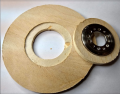
I then came up with the idea of designing a "riser" to elevate the disk a bit. The prototype in MDF is shown below.

The riser fits around the spindle. The plate you see fits inside the riser and screws down to the harddrive motor. The riser fits inside the recessed part of the disk. The hole it the disk is large enough to get access to the metal plate and screws.

The plate fits inside the riser pretty much perfectly. But when I fit the riser inside the plate I get a bit of play. Probably far less than a millimeter but it is there. Probably not much to worry about since it will be epoxied anyway.

But my question is why the play? The OD of the riser is identical to the ID of the recessed area on the disk. Is it because I am using MDF? Or slop on my machine? Or did I miss something in the design? Should I have made the recessed area a bit smaller? If so by how much? Is there a rule of thumb?


BTW I have some of the pieces assembled in the wrong order. For one everything is upside down. But this just seemed to be the best way to show how things fit together.


upload_2019-2-3_22-21-41.png


upload_2019-2-3_22-12-0.png

upload_2019-2-3_22-12-58.png
 

AlbertHall

Joined Jun 4, 2014
12,625
If there is any runout on your spindle (and there will be some) then the mill will remove more material than planned.
A 3mm mill should make a 3mm slot but if it wobbles because of runout (or other wobbles in the mechanics) then the slot will be wider than 3mm.
 

jpanhalt

Joined Jan 18, 2008
11,087
The material you show looks more like plywood than MDF to me. MDF and tempered fiberboard/hardboard (dark brown smooth stuff, https://www.amazon.com/Jack-Richeso...ocphy=9015557&hvtargid=pla-351029357723&psc=1 ) are more homogeneous with less grain.

Maybe the grain is a factor? Cherry is sometimes used as a pattern because it is hard, and although it has a grain, the effect on machining is less.

Also, Delrin is easy to machine and holds dimensions pretty well.
 

Thread Starter

spinnaker

Joined Oct 29, 2009
7,830
Is your machine cutting accurately?
Did you use the correct tool offset in the CAM program?
The very nature of that material does not guarantee tight machining tolerances.
Max.

That is what I wonder. It is a cheap machine. It is really sold as an engraver and not as a CNC machine.

What do you mean by tool offset? Width of the tool?
 

Thread Starter

spinnaker

Joined Oct 29, 2009
7,830
The material you show looks more like plywood than MDF to me. MDF and tempered fiberboard/hardboard (dark brown smooth stuff, https://www.amazon.com/Jack-Richeso...ocphy=9015557&hvtargid=pla-351029357723&psc=1 ) are more homogeneous with less grain.

Maybe the grain is a factor? Cherry is sometimes used as a pattern because it is hard, and although it has a grain, the effect on machining is less.

Also, Delrin is easy to machine and holds dimensions pretty well.

Yeah got my materiel names mixed up. :) MDF is what I use for the spoils board. I think this stuff is under layment. Yeah more of a pylwood.

So when I switch to lexan I might get a tighter fit? I have some thinner stuff that is scrape. I will see if I can do another prototype with that. I would liekly need to cut at a more shallow depth.
 

jpanhalt

Joined Jan 18, 2008
11,087
Lexan (polycarbonate) will definitely hold dimensions better, but it is harder to machine. Does it need to be transparent? Acrylic (Plexiglas) is cheaper. Neither is as easy as ABS, PVC, or Delrin to machine.

As for the accuracy or lack thereof, a your CNC machine may be a large contributor, but a little adhesive should take care of that. I mentioned the grain of the wood as that can really push a non-rigid cutter off path. Whereas, materials of similar hardness but no grain do not do that.
 

MaxHeadRoom

Joined Jul 18, 2013
30,658
That is what I wonder. It is a cheap machine. It is really sold as an engraver and not as a CNC machine.

What do you mean by tool offset? Width of the tool?
Probably a CNC engraver!
The tool # dia is usually entered in your CAM program so that the correct offset is added etc to your tool path.
A nice material to machine for this application is Paxolin, it has been around for many years and was originally used as an electrical insulation material.
Made from Phenolic impressed paper.
Max.
 

Thread Starter

spinnaker

Joined Oct 29, 2009
7,830
Lexan (polycarbonate) will definitely hold dimensions better, but it is harder to machine. Does it need to be transparent? Acrylic (Plexiglas) is cheaper. Neither is as easy as ABS, PVC, or Delrin to machine.

As for the accuracy or lack thereof, a your CNC machine may be a large contributor, but a little adhesive should take care of that. I mentioned the grain of the wood as that can really push a non-rigid cutter off path. Whereas, materials of similar hardness but no grain do not do that.

I have to check if it is Lexan or plexi. But yeah it pretty much needs to be transparent. A translucent white might work. What ever I have mills fairly well. I have some troubles with it melting an sticking to the bit. I was able to engrave numbers fairly well but I am probably going to print the numbers out and adhere them to the disk.

Here is a disk where I milled numbers. I first painted the whole thing black, then milled the mirrored numbers in back of the disk. But that has become an expensive way to go. I have changed spacing and number size several times now. I have created a lot of scrape disks.

The new thought is to just print the numbers disk out and tape it to the plastic disk. Once I get the format down, I could wither paste or redo the whole thing with milled numbers.


shortbus

Joined Sep 30, 2009
10,050
Max says it all in post #2. You can't just assume that using a certain size cutter will cut the size you want to end up with, even in CNC. You can't just start off with one cut, you need to offset and take a cut, then measure, then offset the amount you need to make the correct size.

A small machine like you have it is also not rigid enough to take a large cut. You need to step over/ off set and sneak up on your final cut.
 

Thread Starter

spinnaker

Joined Oct 29, 2009
7,830
Max says it all in post #2. You can't just assume that using a certain size cutter will cut the size you want to end up with, even in CNC. You can't just start off with one cut, you need to offset and take a cut, then measure, then offset the amount you need to make the correct size.

A small machine like you have it is also not rigid enough to take a large cut. You need to step over/ off set and sneak up on your final cut.
I set the step amount very small. It is almost like sanding instead of milling. ;) I will have to do some measring. Maybe mill a pocket then measure it?
.
 

MaxHeadRoom

Joined Jul 18, 2013
30,658
No idea. I am using EstlCam. It has tons of settings but don't see one for compensation.
That is usually the idea behind using a CAM program it takes a CAD drawing and after specifying tool data etc, it spits out the CNC (G-code), language.
The object of CAD/CAM is to eliminate the 'trouble' of writing the program out in G code, which is the language that the typical CNC machine uses.
Normally you would pre-specify the tool(s) dia's, lengths etc. then all you would do in the CAM program is specify the tool #, and it would add the tool compensation/offset automatically, also in the CAD program it would indicate a tool change, if required, either carry out it automatically (tool changer) or wait for a manual change..
(One way).
I just looked at your CAM manual and the first thing that comes up is tool offset!
Max.
 

Thread Starter

spinnaker

Joined Oct 29, 2009
7,830
That is usually the idea behind using a CAM program it takes a CAD drawing and after specifying tool data etc, it spits out the CNC (G-code), language.
The object of CAD/CAM is to eliminate the 'trouble' of writing the program out in G code, which is the language that the typical CNC machine uses.
Normally you would pre-specify the tool(s) dia's, lengths etc. then all you would do in the CAM program is specify the tool #, and it would add the tool compensation/offset automatically, also in the CAD program it would indicate a tool change, if required, either carry out it automatically (tool changer) or wait for a manual change..
(One way).
I just looked at your CAM manual and the first thing that comes up is tool offset!
Max.

Yes but they don't explain it very well. I thought ist was just for chamfering and rounding (whatever they are ;) )

upload_2019-2-4_15-51-54.png
 

MaxHeadRoom

Joined Jul 18, 2013
30,658
Normally you would set up a tool table as they show and specify each tool with a number and then enter the Dia, Length, etc and when specifying a tool path, you enter the tool number, the CAM program will then offset the tool path automatically.
Does the CAM program require entering a machine type?
If not aimed at a particular machine, sometimes you need to enter a machine make or version, the CAM program will use something called a post-processor to convert your CAM program to whatever type of machine you have.
For example, a large number of 3rd party machines will use the same common format as say, Fanuc or Mitsubishi for e.g.
The problem comes when software that runs the machine is slightly odd-ball, then in that case a post-processor has to be written for that particular unique machine.
If the CAM program comes with the machine, then no problem.
Max.
 

Thread Starter

spinnaker

Joined Oct 29, 2009
7,830
It does have a tool table.

upload_2019-2-4_16-36-2.png

It has CNC Controller settings but I assmed that was for EstlCAM to control the machine.

upload_2019-2-4_16-38-23.png
 

MaxHeadRoom

Joined Jul 18, 2013
30,658
So the CAM program also controls the machine?
If so then it is a CAM/CNC program in one.
What does the Controller hardware drop down show?
Max.
 
Status
Not open for further replies.
Top