Identify a diode of motherboard

Thread Starter

awanchu

Joined Apr 3, 2018
5
Hello everybody,

I have a motherboard on a laptop that does not turn on and I think the problem is in the diode of the image.
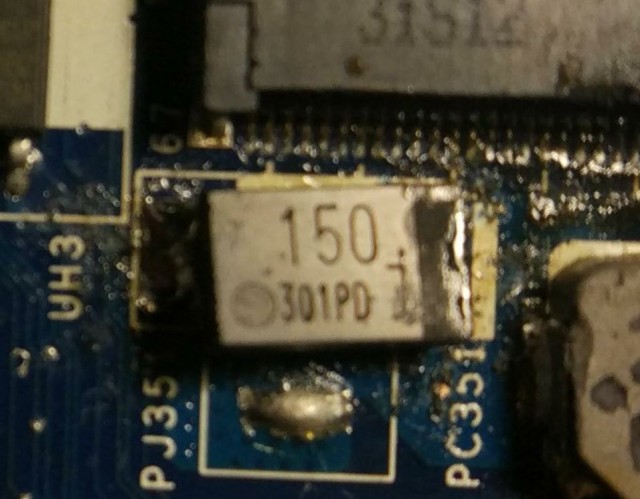


My problem is that I do not have the schematic of the motherboard and I can not identify the diode. Can somebody help me?

Thank you very much for your time
 

Thread Starter

awanchu

Joined Apr 3, 2018
5
Why do you think that the diode is the problem? Certainly it is installed crooked. You could try resoldering it.
The diode is broken at the base. Seeing the solder this motherboard has already been repaired and who welded it again was not very careful.

What other problem do you think you can have?
 

MisterBill2

Joined Jan 23, 2018
27,361
If the diode is broken off then it is not doing whatever it is supposed to be doing. So the very first thing will be to re-solder the diode back correctly. But if it has already been "worked on" by somebody with rather poor soldering ability then there are probably similar faults elsewhere. AND, given that all I have seen is the one small area around that diode, I can offer no other comments about the rest of the motherboard.
 

Thread Starter

awanchu

Joined Apr 3, 2018
5
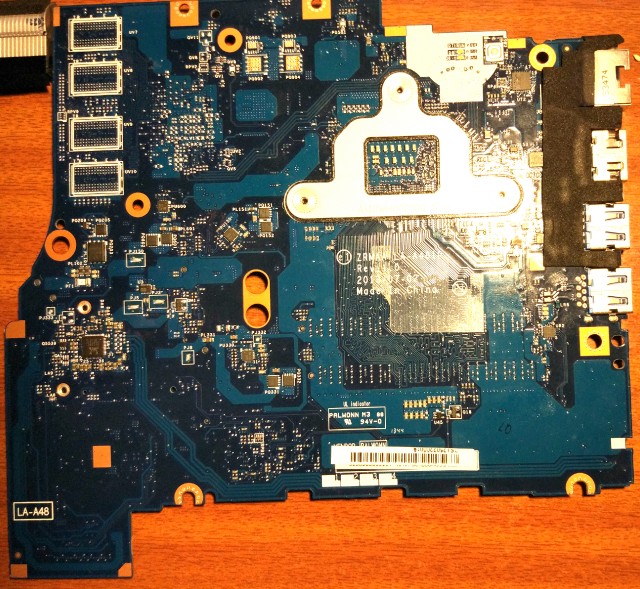
This is de motherboard


Regardless of the possible failure, could you tell me how to identify the diode?


Thanks for all.
 

MisterBill2

Joined Jan 23, 2018
27,361
This is de motherboard


Regardless of the possible failure, could you tell me how to identify the diode?


Thanks for all.
Ate you certain that the device is a diode? It could also be a capacitor or even a resistor. I see that most of the components have a descriptive legend near them, and wonder if this device has one. If you have access to an ohm meter you could check it to see if it is a resistor or a diode or something else.
This looks like the motherboard from a notebook computer, and yet I see no power connector, so how are you attempting to apply power to the board? And how are you going to re-assemble the computer? That device may possibly be a fuse, in this case, a 150 Ma fuse. But with whatever information I have it is hard to even have an idea about that part.
 

Thread Starter

awanchu

Joined Apr 3, 2018
5
Hello,

I have assumed that it is a diode but as you indicate, I do not know 100% since I do not have the schematic of the motherboard (The laptop is a Toshiba Satellite U50t-A-10F). As for the reference that appears next to the component is PC351.

The power through the black connector that can be seen in the first image next to the wifi module.
 

MisterBill2

Joined Jan 23, 2018
27,361
I see .150 and 301PD on the component, and in front of the 301PD is what I think is a manufacturers logo. If you are able to identify the manufacturer from the logo then you may be able to eventually locate the component and find a replacement.
But is it really broken? Or is it just not soldered properly? It is quite possible to resolder surface mount parts if one knows how and is both patient and cautious, One thing, PC351 would not be a reference for a diode, normally.
 

Dodgydave

Joined Jun 22, 2012
11,395
Hello,

I have assumed that it is a diode but as you indicate, I do not know 100% since I do not have the schematic of the motherboard (The laptop is a Toshiba Satellite U50t-A-10F). As for the reference that appears next to the component is PC351.

The power through the black connector that can be seen in the first image next to the wifi module.
It's an Electrolytic Capacitor , if you look at the pcb legends they're prefixed 'P', the inductors are PL, the diodes are PD, and capacitors PC,
 

MisterBill2

Joined Jan 23, 2018
27,361
There you have it from DD! I would offer a caution which is that based on the lack of any apparent anti-static precautions the mother board may have a number of IC parts damaged by static during handling, and since those parts are probably not easily available, and certainly not cheap, it is fairly unlikely that the computer will ever function again. Also, if it has been worked on by somebody who is either unable or unwilling to solder any better than what I see with that part, it is even less likely to ever work again. And, it is a serious challenge to re-assemble a notebook computer even if you have the detailed instructions in hand.
 

Thread Starter

awanchu

Joined Apr 3, 2018
5
Thanks for everything.

I will try to get the capacitor, clean the motherboard and test the laptop. I will tell you the results obtained.
 
Top