I think the latest forced Android update silently re-enabled geotagging.

Thread Starter

strantor

Joined Oct 3, 2010
6,875
I standardized on Android phones a long time ago because I liked being in control of my own phone. Things changed. Now my phone regularly updates itself without my permission. It will pop up and tell me there is a new update and ask if i would like to install it "now," to imply I have a choice, but the only real choice I have is WHEN it gets updated. If I ignore the nagging reminders long enough, it just makes an executive decision while I sleep. I wake up and icons look different, thinks are just "off" and I have to readjust. It irks me on principle, but until now I haven't really had a concrete complaint.

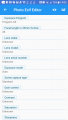
I turned off geotagging a long time ago, when I first learned what it was. First thing I do when I get a new phone is turn it off. I downloaded an app recently called "Photo Exif Editor" because I was interested in some metadata of my pictures. I found that all my recent pictures have geotags. WTF? I went back through my history looking for the first pic which had a geotags. It was 11may17. I checked my phone software status and the Latest update rev is 9may17. There were some pics taken on the 9th and the 10th which did not have geotags, but that could have been during a two day "grace period" granted by my benevolent phone before it forced the update on me. I don't know if the date is when it was released or when it was actually installed.

Or there's a slim chance that somehow in my pocket, unlocked and randomly butt-typing, somehow geotagging got re-enabled.

For my sanity's sake would you guys do me a favor and check your phone? If you have an update around the same time, and if your geotagging was turned off, see if it's still turned off.

P.s. I have a Samsung galaxy s6 active from AT&T.

Thanks
 

wayneh

Joined Sep 9, 2010
18,104
My iPhone tags my photos, which I like a lot. I used it recently to record where I found morel mushrooms - just take a picture and you've got a record. By default, any photo you share gets the location stripped out.

Is your question specifically about tagging photos, or other uses of location data? iOS will not give location info to any app without explicit user authorization. I'm not certain this applies to supplied apps such as Photos, but it certainly applies to 3rd party apps. I just added a geofencing function to an app I'm working on and the developer - me - has to code in the request and anticipate the user's choices.
 

Thread Starter

strantor

Joined Oct 3, 2010
6,875
Ok so I've tested from this forum and from Facebook. Once I upload and then re-download, you are correct, location data is stripped out (along with other metadata). But I have downloaded other pictures from the net and they contained metadata including location. Once I downloaded a picture to upload to Facebook as an example of something, and Facebook automatically placed me in a location I've never been to. So I'm going to remain somewhat paranoid about it, if maybe just a little bit relieved
 

Thread Starter

strantor

Joined Oct 3, 2010
6,875
Is your question specifically about tagging photos, or other uses of location data? iOS will not give location info to any app without explicit user authorization. I'm not certain this applies to supplied apps such as Photos, but it certainly applies to 3rd party apps. I just added a geofencing function to an app I'm working on and the developer - me - has to code in the request and anticipate the user's choices.
I'm talking android but I imagine the rules are basically the same. My question is just about geotagging being spontaneously turned on after the most recent forced update. I hadn't even given any thought to other uses of location data, but now that I am, I will have to go find where I left my tin foil hat.
 

wayneh

Joined Sep 9, 2010
18,104
I know very little on this except that when I update my app as I work on it, the preferences and settings are maintained. So if it was authorized to access location data from the system, that would continue after an update. There's no way that I, as a developer, can spoof the authentication process and get location access without the user's input. Maybe a top notch hacker could do that, but not a generic developer.

If I throw the app away entirely and then reload it, then of course all the old settings are gone. That's true of other apps as well and it's a common method for fixing a broken app, one that's stuck because of a bad preference file. Some apps will also have a user account online and that's a great way to recover most of the user's settings even if the app gets broken. Still no way I can imagine to bypass the user's authentication to allow location access.

I know this doesn't help you much, except maybe to narrow in on who the 'guilty' party is. If Android is anything like iOS for security, only the OS provider could have that ability. It's actually a fairly serious breach that you may have uncovered. Is there chatter about it out there?
 

tcmtech

Joined Nov 4, 2013
2,867
When I worked the oil fields the company I was with used android phones exclusively despite they were junk and everyone knew it.

Unless a person went in and shut down the dozens of useless and unwanted background apps they came with or automatically defaulted to having on and running every time they updated (weekly to monthly) they had horrible battery life issue. 4 - 6 hours was normal and with everything but the bare minimums off they would barely make it a 12 - 14 hour shift and not even that if we were on a site with poor service where they automatically defaulted to running at 100% transmitter power to try and stay connected to either cell or on site WiFi even when not being used.

Now my Sonim military spec personal cell phone in the exact same working environments and use typically made it a week or more on a charge plus unlike the crap android models we got could actually stand up to the expected hard service life working conditions as well and never defaulted to some useless crap settings when it did rarely update. :cool:
 

shortbus

Joined Sep 30, 2009
10,050
Isn't all of this the price paid for using a cell for other than a cell? I have a cell phone that is Android based. I have never been "updated" or even asked by it to 'up date'. That is because the wifi or blue tooth is not turned on, or at least I think that's why. The only thing I use it for is calls. When I need a computer I use a computer.
 

#12

Joined Nov 30, 2010
18,224
Isn't all of this the price paid for using a cell for other than a cell?
If I wanted my government to know where I was, within 3 feet, 24/7, could I get an app for that?
If I don't install that app, can I have a phone without it?
Which part of, "I'm at Starbucks" did I sign up to tell the government?

ps, does not apply to me. I have a stupid phone and I turn it off before I leave my house.
 

atferrari

Joined Jan 6, 2004
5,011
In 3 years bought and used 2 tablets and 1 phone, all Samsung. In all I experienced unexpected/undesired enabling of the location capability.

No matter which applications request it, I dutifully refuse to enable auto location.

In the beginning I believed it was my mistake but now I know that for unknown reason/s is it enabled without my consent but not following any pattern I could discern.

I could not identify other than Google Maps as a consistent offender.

I always know it is running because of the small icon on the top-left corner.
 

shortbus

Joined Sep 30, 2009
10,050
If I wanted my government to know where I was, within 3 feet, 24/7, could I get an app for that?
If I don't install that app, can I have a phone without it?
Which part of, "I'm at Starbucks" did I sign up to tell the government?

ps, does not apply to me. I have a stupid phone and I turn it off before I leave my house.
Not sure but you may have misunderstood me. This all started with strantor saying his phone was "bugging" him. The phones, or at least mine, didn't come with all of these different 'apps' installed. The individual owner has to turn them on or download them, by doing that you don't know what "extras" are also in those apps. You can't opt out, from what my sons and grandkids told me of the extras that come with the apps. The extras are what they add to the apps to make them "free". They gather data all of the time and download every time you go near a wifi source, where you want them to or not. Even if the wifi is shut off, the one for the data is still operating reporting where you have been and what you looked at online. The app writers use that to show ad's next time you use the phone as a computer. That's how 'free' app makers make money, so they're not really 'free'. That's the way it was explained to me. You're not really paranoid if some one is watching you.
 

#12

Joined Nov 30, 2010
18,224
Not sure but you may have misunderstood me.
I misunderstood most of this Thread. I am so far behind that I didn't know apps that people install were requesting geo-tracking and then telling everybody who would listen instead of direct communication between the phone and the NSA.

I'm still not sure there isn't a direct connection from every "smart" phone to our government, at some level.
 

wayneh

Joined Sep 9, 2010
18,104
I misunderstood most of this Thread. I am so far behind that I didn't know apps that people install were requesting geo-tracking and then telling everybody who would listen instead of direct communication between the phone and the NSA.

I'm still not sure there isn't a direct connection from every "smart" phone to our government, at some level.
To some degree you have to just assume there is, since there could be. Just as you have to assume every hunter is loaded, you have to assume the government might be watching you. We are protected only by our obscurity and the boring nature of our lives.
 

nsaspook

Joined Aug 27, 2009
16,321
I misunderstood most of this Thread. I am so far behind that I didn't know apps that people install were requesting geo-tracking and then telling everybody who would listen instead of direct communication between the phone and the NSA.

I'm still not sure there isn't a direct connection from every "smart" phone to our government, at some level.
All your data naughty bits get dumped into the big computer to be diced and sliced into the #12 bin that nobody looks at.
 

Thread Starter

strantor

Joined Oct 3, 2010
6,875
I misunderstood most of this Thread. I am so far behind that I didn't know apps that people install were requesting geo-tracking and then telling everybody who would listen instead of direct communication between the phone and the NSA.

I'm still not sure there isn't a direct connection from every "smart" phone to our government, at some level.
I'm not talking about apps that you download and install. I'm talking about the native camera app in the phone that you bought. It embeds metadata (like type of camera used, aperture, Zoom, focal length, Etc) into every picture that you take including geotag (Unless you specifically turn that off). It is enabled by default.

Your camera OS only shows you a couple pieces of metadata. If you want to see all of the metadata including geotag you have to download another app to view that. I used one called photo exif editor. That is how I found out that my camera was geotagging my pictures and my OS was not telling me about it.
 

Thread Starter

strantor

Joined Oct 3, 2010
6,875
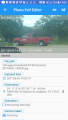
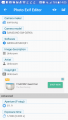
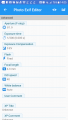
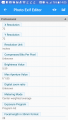
Here is an example picture I just took sitting in the parking lot of a hardware store. Look at all the metadata embedded in it (including location, i re-enabled for example)
Screenshot_20170603-140449.png Screenshot_20170603-140501.png Screenshot_20170603-140510.png Screenshot_20170603-140525.png Screenshot_20170603-140531.png
 

wayneh

Joined Sep 9, 2010
18,104
Your camera OS only shows you a couple pieces of metadata.
Many photo apps won't show it all to you either. For instance Photos on the Mac (which replaced iPhoto) will show a stick pin on a map where the photo was taken, but it must draw a fence around it of some diameter, so it can group all shots taken in an area into one stick pin instead of having a separate pin for each picture. I couldn't get detailed geolocation from it. A simple "get info" in the Finder shows it though, and there are other ways to get the EXIF data.
 

tcmtech

Joined Nov 4, 2013
2,867
I'm not talking about apps that you download and install. I'm talking about the native camera app in the phone that you bought. It embeds metadata (like type of camera used, aperture, Zoom, focal length, Etc) into every picture that you take including geotag (Unless you specifically turn that off). It is enabled by default.

Your camera OS only shows you a couple pieces of metadata. If you want to see all of the metadata including geotag you have to download another app to view that. I used one called photo exif editor. That is how I found out that my camera was geotagging my pictures and my OS was not telling me about it.
That's why I only take pictures with a normal digital camera and even when doing that the time and date settings on the camera are never set correctly any way which means any picture I take likely doesn't have any related time stamping data that would match anything anywhere in reality.:p
 
Top