Start by looking at the solder connections along the trace that goes to the bad segment. Be sure that the solder is shiny and have flowed to a smooth connection.
It is even possible that you completely missed soldering one of the pins. The first computer I had was built from a kit. The memory boards had 8 kilobytes per board. That was 64 memory IC's with 16 pins per IC.
When I plugged in one of the boards it did not work. The assembly instructions recommended that the first step was to look for an unsoldered pin on one of the corner pins of the IC's. Lo and behold that is exactly what I found.
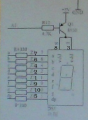
I am confused as to which pin is which.
I presume there is a standard numbering system for these tubes.
If I look at one of these (from the front), does the numbering go?
1 2 3 4 5
10 9 8 7 6
Start by looking at the solder connections along the trace that goes to the bad segment. Be sure that the solder is shiny and have flowed to a smooth connection.
This is a multiplexed display system, so no segment has straight DC on it. Measuring a segment with a DC meter should show some percentage of the system power voltage. Measure a few to get a sense of the range of normal values (probably less than 1.25 V), then measure the bad segment.
There is no single standard pinout for these displays. You can try Googling for "7 segment display pinout". There seem to be a half dozen different pinouts...
Another option is to use the diode check on a DMM. Put the positive lead on one of the common anodes on a display that's working and the other pins one at a time until the g segment lights. Then look at that pin on the display that isn't working.
You could also use your DMM to test the g segment on the display that isn't working. It's possible that it was damaged during soldering.
I was hoping that the displays were in sockets. Since that is not the case things are going to be a bit more difficult.
You can continuity test from the bad segment to the same segment of each of the other displays. If you are not sure the pin for the bad segment you can do a reality check by doing the same continuity test between known good segments.
I see three possibilities at this point.
1. If the bad segment happens to be at the end of the trace it could be a cracked trace.
2. You have a bad solder joint for that bad segment.
3. The display has a bad segment.
It is very likely that you are going to have to remove the display -- either to replace it or to check the traces underneath it. This does not sound like much fun. The biggest damage is that you might damage the traces while removing the display.
I sort of understand what you're saying, but at my current level of expertise , I don't know how to put that into practice, i.e. I just don't know where to put meter leads?
Another option is to use the diode check on a DMM. Put the positive lead on one of the common anodes on a display that's working and the other pins one at a time until the g segment lights. Then look at that pin on the display that isn't working.
I don't unfortunately know which pin those what on my little setup.
Are pins 3 and 8, the common anodes? - Just a wild guess from looking at the schematic.
I think I can work out that pin G equals pin 10 (is that correct?) From the schematic
Yes. You can confirm by using the ohm setting on your DMM to check continuity between the pins. If you have 5 pins on each side, 3 and 8 will be the center pins on each side.
It goes without saying that power needs to be off.
I think I can work out that pin G equals pin 10 (is that correct?) From the schematic
Put the positive lead on one of the anode pins and, with the meter on diode check, put the negative lead on the other pins one at a time until you've verified that all of the diodes are good. You should be able to see each segment turn on. As you're doing that, you can draw the pinout for the displays for future reference.
To reiterate, circuit power needs to be off whenever you're measuring resistance or performing a diode check.
Yes. You can confirm by using the ohm setting on your DMM to check continuity between the pins. If you have 5 pins on each side, 3 and 8 will be the center pins on each side.
It goes without saying that power needs to be off.
Put the positive lead on one of the anode pins and, with the meter on diode check, put the negative lead on the other pins one at a time until you've verified that all of the diodes are good. You should be able to see each segment turn on. As you're doing that, you can draw the pinout for the displays for future reference.
To reiterate, circuit power needs to be off whenever you're measuring resistance or performing a diode check.

 Facebook
 Google
 GitHub
 Linkedin