Facebook
 Google
 GitHub
 Linkedin

Hi,
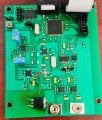
I’m working with a custom PCB that uses an ATXMEGA128A1U microcontroller. I don't have access to the designer. From examining the board, I noticed the following connections:
1. Port E of the microcontroller, which has USART capability, is connected to the right-side pins (see image)
2. PDA of the microcontroller is connected to a 74HC245D IC and then to the left-side pins.
This board is supposed to send signals to a PC, and I want to enable this functionality.
Can I directly use the USART from Port E to send data to the PC?
If yes, what kind of connection (UART, USB, or other) do I need, and is additional hardware (e.g., USB-to-UART adapter) required?
Is it possible to access or read the program inside the microcontroller? If so, how?
Any guidance on setting this up or accessing the microcontroller program would be greatly appreciated!
I’m working with a custom PCB that uses an ATXMEGA128A1U microcontroller. I don't have access to the designer. From examining the board, I noticed the following connections:
1. Port E of the microcontroller, which has USART capability, is connected to the right-side pins (see image)
2. PDA of the microcontroller is connected to a 74HC245D IC and then to the left-side pins.
This board is supposed to send signals to a PC, and I want to enable this functionality.
Can I directly use the USART from Port E to send data to the PC?
If yes, what kind of connection (UART, USB, or other) do I need, and is additional hardware (e.g., USB-to-UART adapter) required?
Is it possible to access or read the program inside the microcontroller? If so, how?
Any guidance on setting this up or accessing the microcontroller program would be greatly appreciated!
Attachments
-
 2 MB Views: 34