Help with writing first Arduino program

Thread Starter

navyguy

Joined Sep 27, 2019
108
Yes, it’s definitely doable. You need to know the position over time... or simply, determine by experiment how fast you want the mouth to use. And, what the servo positions are...

Let’s say the variable servoMouthClosed is one position. servoMouthOpen is the other.

You’d write a loop to
  1. close the mouth,
  2. delay a bit (determine how much a “bit” is by experimentation),
  3. then open the mouth.
Repeat as often as you want...
Great. Thanks so much. Of course I’ll want to vary the opening and closing the mouth as if he’s talking. I’ll be experimenting with that
 

djsfantasi

Joined Apr 11, 2010
9,237
Great. Thanks so much. Of course I’ll want to vary the opening and closing the mouth as if he’s talking. I’ll be experimenting with that
Here is a project that I made to analyze a sound track and produce a parameter that’s used in the servo control to match the mouth movement to the sound track.

Project: Converting Audio to 0-4VDC Signal for Animatronics

If you have any questions about it, ask me here.
 

Thread Starter

navyguy

Joined Sep 27, 2019
108

Attachments

danadak

Joined Mar 10, 2018
4,057
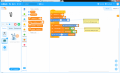
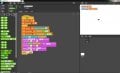
There is a graphical programming language, several variations,
that can bridge a GUI approach to programming and C/Arduino.

upload_2019-10-4_20-8-49.png

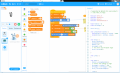
You drag and drop "blocks" into code window, and tool generates
Arduino code. That can be seen in right hand window as -

upload_2019-10-4_20-11-51.png

The above example measures a V on a pin and converts that to
servo angle, and sets the servo to that angle.

mBlock, Snap4Arduino (you can connect board to PC and speak
measurements and angles and whatever done by board), scratch
for Arduino, Ardublock, all graphical languages with different/same
capabilities.

Its a way of doing stuff and being able to look at generated code.
6'th graders are using these tools to program robots.

Regards, Dana.
 
Last edited:

djsfantasi

Joined Apr 11, 2010
9,237
There is a graphical programming language, several variations,
that can bridge a GUI approach to programming and C/Arduino.

You drag and drop "blocks" into code window, and tool generates
Arduino code. Than can be seen in right hand window -

The above example measures a V on a pin and converts that to
servo angle, and sets the servo to that angle.

mBlock, Snap4Arduino (you can connect board to PC and speak
measurements and angles and whatever done by board), scratch
for Arduino, Ardublock, all graphical languages with different/same
capabilities.

Its a way of doing stuff and being able to look at generated code.
6'th graders are using these tools to program robots.
And we aren’t sixth graders. Danadak always brings this up whenever a programming question arises. I’m glad that he finds it useful.

<rant>

IMHO, if you can use any of these graphical programming tools, you already understand enough that you can code your solution directly. Otherwise, these tools are but a crutch cobbled together of sticks and string.

Have some confidence in your abilities. For most people, graphical programming languages are a hindrance, not a help. Recognizing that I may be repeating myself, if you know enough to use these tools, you can save some time, write better code and get a solution much easier if you avoided the additional steps and learning curve of these graphical solutions.

I have looked at the tools recommended by danadak. I’ve formed my own opinion.

I have nothing against danadak; I want people to learn how to code, when they already have the skills necessary

</rant>
 

Thread Starter

navyguy

Joined Sep 27, 2019
108
Well I’m really and honestly humbled by all the knowledge shown here on my posting. More like in awe.
Compared to you guys, my brain power might be enough to toast some bread.................lightly
 

Thread Starter

navyguy

Joined Sep 27, 2019
108
I’m just a retired navy guy from the well known naval construction battalion. Other wise know as the fighting Seabees. I can fire everything from an M-16 to an M-60 but I have an obsession for the stuff you guys seem to do with absolute ease. I’m envious of you all.
 

Thread Starter

navyguy

Joined Sep 27, 2019
108
Here is same program to convert a V to a servo angle and set the servo to
that angle.

Difference is the board is tethered to PC and the program will speak out the
angle each time it is calculated.

See attached.

Snap4Arduino is IDE. Freeware.

That’s outstanding. Great info.
Thanks so much !!
I got my Saturday’s work cut out for me. It will be a fine, fine navy day.

Regards, Dana.
 

danadak

Joined Mar 10, 2018
4,057
What did you do in Navy ?

I was fortunate to be a RO on SSN-583, 1967 - 70. Did my six, got out,
and went to school. Navy gave me a break I needed and a whole
lot of training, 3 years of the six in Navy schools.

Regards, Dana.
 

Thread Starter

navyguy

Joined Sep 27, 2019
108
What did you do in Navy ?

I was fortunate to be a RO on SSN-583, 1967 - 70. Did my six, got out,
and went to school. Navy gave me a break I needed and a whole
lot of training, 3 years of the six in Navy schools.

Regards, Dana.
Thank you Dana for your service. My rate was UT. (Utilitiesman) First Class. Never served on a ship. Just a Seabee stationed at Port Hueneme, CA. Just retired a year ago after 22 years.
 

Thread Starter

navyguy

Joined Sep 27, 2019
108
Here is same program to convert a V to a servo angle and set the servo to
that angle.

Difference is the board is tethered to PC and the program will speak out the
angle each time it is calculated.

See attached.

Snap4Arduino is IDE. Freeware.

Thanks Dana!


Regards, Dana.
 
Top