Help with Radio Shack Lab

Thread Starter

Nazgul666

Joined Jan 24, 2015
4
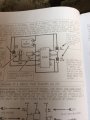
So I read through a lot of the tutorials on this site after I happened upon it. It really inspired me! I bought the Radio Shack Electronic Learning Lab and completed the first project. It worked fine. However, I really want to understand the schematic. It confuses me because it looks like it has 3 power sources.

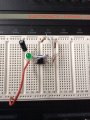
The other issue is, I don't understand how what I built on the breadboard corresponds to the wiring diagram, specifically the function of the jumper wires. Is anyone familiar with that particular project?

Thanks,

Mike
 

spinnaker

Joined Oct 29, 2009
7,830
It might help if you posted the schematic. Even if someone here has that lab, chances are they have not looked at it in years.
 

#12

Joined Nov 30, 2010
18,224
2 answers with one sentence: The board has labels for other voltages but they are not connected to anything unless you use a wire to connect them.
 

Thread Starter

Nazgul666

Joined Jan 24, 2015
4
2 answers with one sentence: The board has labels for other voltages but they are not connected to anything unless you use a wire to connect them.

Cool, thanks. Bear with me as I go step by step.. So does the current start at the 4v section on top, and then that white jumper brings it down?
 

MrChips

Joined Oct 2, 2009
34,807
It says so in the manual "Note that the 6-volt battery is replaced by symbols."

This means that every point in the circuit diagram that is labelled +6V is connected to the same +6V terminal on the battery or power supply.

On your kit, V4 is also labelled 6 Volts. Anything that is plugged into one of those 5 holes in a row is connected to the +6V terminal on your internal power supply.
 

ian field

Joined Oct 27, 2012
6,536
Cool, thanks. Bear with me as I go step by step.. So does the current start at the 4v section on top, and then that white jumper brings it down?
That page of a book that was posted shows a very slapdash way of drawing a schematic - it makes it harder to follow what each component does.

Take a sheet of paper and draw the battery negative across the bottom and the battery positive along the top. Draw the chip between those 2 lines and set about filling in the components from the original drawing - that's a pretty good practical exercise for starters.

It might be worth doing a search for schematics in general and browsing the results just to familiarise with how most people draw them.
 

Thread Starter

Nazgul666

Joined Jan 24, 2015
4
Guys, thanks. That makes sense that everything plugged in to that that top voltage section gets power. And I guess those cris crossed jumpers over the 555 chip somehow connects those sections across the rail. I guess I was looking for a point by point mapping of the current flow like the simple series circuits in the tutorials. Bit I think with these breadboards it's a little different. Maybe not as linear.
 

MrChips

Joined Oct 2, 2009
34,807
What you see on your breadboard is one white wire connecting pin-8 of the 555 chip to +6V.

Then you need another white wire to connect pin-4 of the chip to the same +6V.
You can do that by connecting to V4 or you can do that by connecting to pin-8. Same difference. The choice is yours.
 
Top