hardware Interrupt programming

Thread Starter

Parth786

Joined Jun 19, 2017
642
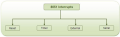
Interrupts are features of 8051 that cause 8051 stop work on one process and start work on another. interrupts are signal that tells the controller to stop running the current task so that a new one can be started. For example, hardware interrupts are generated when a switch is pressed or when the key is pressed . Software interrupts are generated by a program
upload_2017-7-1_18-1-8.png

assume there are Switch, 8051 and buzzer. if there is interrupt occur than the buzzer should be ON. I want to use hardware interrupt.
There are two external interrupts EX0 and EX1 to serve external devices. In AT89c51 P3.2 (INT0) and P3.3 (INT1) pins are available for external interrupts 0 and 1 respectively. An external interrupt notifies the microcontroller that an external device needs its service.
EA = 1; if EA = 1 means Enable Global Interrupt
EA = 0; If EA disable Global Interrupt
IT0 = 1; Edge triggered interrupt mode
EX0 = 1; Enable external interrupt
EX0 = 0; Disable external interrupt
switch =1 logic high switch ON
switch =0 logic off switch OFF
Buzzer = 1 ring the buzzer
buzzer =0 stop buzzer
I want set interrupt by programming, if the interrupt occur buzzer will ring bell. how to set interrupt in program?
 

JohnInTX

Joined Jun 26, 2012
4,787
how to set interrupt in program?

Software interrupts in the 8051 can be generated by simply setting one of the interrupt request bits. If you are not using the external interrupt pins you can use IE0 or IE1. The vector, priority and enable settings are the same as if you were using the pin itself.

The attached MCS-51 Family User's Manual has info the the Intel chips. Chapter 8 covers interrupts in detail. You should check the manual for your 8051 variant and also read up on how to code interrupts in your compiler manual.

Good luck.
 

Attachments

Thread Starter

Parth786

Joined Jun 19, 2017
642
Software interrupts in the 8051 can be generated by simply setting one of the interrupt request bits. If you are not using the external interrupt pins you can use IE0 or IE1. The vector, priority and enable settings are the same as if you were using the pin itself

Good luck.
I have written this program, I want set hardware interrupt. I compiled this code with no error. There is something wrong in my program that's why its not working. I think I am not writing correct code for buzzer. I don't understand where it should be use in main function or inside while brackets
Code:
#include <REG51.H>
sbit buzzer = P1^0;
unsigned char ex0_isr_counter = 0;

void ex0_isr (void) interrupt 0
{
    ex0_isr_counter++;   // Increment the count
}

void main (void)
{

    IT0 = 1;   // Configure for falling edge on /INT0 (P3.2)
    EX0 = 1;   // Enable EX0 Interrupt
    EA = 1;    // Enable Global Interrupt Flag
  
while (1)
  {
     buzzer=1;
  }
}
 
Last edited:

JohnInTX

Joined Jun 26, 2012
4,787
Trace your code through the 'while' loop with your finger. Stop at where the buzzer turns on. Do you see any place where the buzzer turns off or any use of the value of ex0_isr_counter? I don't either. It is hard to know what you are trying to do because you have not clearly stated your goals.

It is essential to first sketch the solution to the problem on paper, trace it through with your finger and see if it makes sense. A good tool to use a flowchart. Once you get to the point that your flowchart makes sense, you can proceed to code each step in the flowchart. Going straight to code before you 1)understand the problem and 2)have a solution on paper usually fails because you don't understand what you are trying to do. The process is called desk-checking and is an important part of learning to program.

Understand the problem.
Solve the problem using a step-by-step process and document the solution.
Code the solution.
Debug the code.

There are no shortcuts to the process.


So to continue, sit down and do that, write the code after it works on paper then proceed with debugging it. Post the flowchart. Besides helping you organize your thoughts, it is a great communication tool. We can work the detail problems from there.
 

Thread Starter

Parth786

Joined Jun 19, 2017
642
So to continue, sit down and do that, write the code after it works on paper then proceed with debugging it. Post the flowchart. Besides helping you organize your thoughts, it is a great communication tool. We can work the detail problems from there.
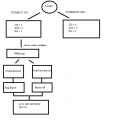
as per my knowledge, I made this flow chart. I think my program should be follow this conditions. what do you think? If it make any sense?
upload_2017-7-2_0-43-58.png
 

atferrari

Joined Jan 6, 2004
5,011
A good tool to use a flowchart. Once you get to the point that your flowchart makes sense, you can proceed to code each step in the flowchart.
+1 John

Once I became used to flowcharts, I realized that writing the corresponding code (Assembly) becomes basically a clerical job.

At the debugging stage I know that what I am doing is correcting a flawed flowchart.
 

JohnInTX

Joined Jun 26, 2012
4,787
@Parth786 That is an excellent effort!
It was worth doing because looking at the flow, it looks like you don't exactly understand how an interrupt routine relates to main code - you wouldn't put a while loop an interrupt routine for example.

Since I told you how valuable flow charting is, I did one to illustrate for you how the interrupt code relates to the main code and used it to toggle the LED on each push of the button. That may not be what you want to do in the end but for now it is important to understand the interrupt-to-main code relationship. Note that the interrupt and main routines are completely separate and communicate via the BUTTON_FLAG.

Read it through, convince yourself that it works then try to code it or modify it to suit your needs.

Enjoy.
 

Attachments

Thread Starter

Parth786

Joined Jun 19, 2017
642
@Parth786 That is an excellent effort!
It was worth doing because looking at the flow, it looks like you don't exactly understand how an interrupt routine relates to main code - you wouldn't put a while loop an interrupt routine for example.

Read it through, convince yourself that it works then try to code it or modify it to suit your needs.

Enjoy.
I have compiled this code and test it but its not giving me result that I want to see. I think there may be some problem in my hardware design. let me know if there is any error in program?
Code:
#include <REG51.H>
sbit buzzer = P1^0; // buzzer connection
sbit sw = P3^2;  // Switch connecttion

void ex0_isr (void) interrupt 0
{
  if(sw==1)
    {
       buzzer = 1;
    }
    else
    {
        buzzer = 0;
    }
}

void main (void)
{
    IT0 = 1;   // Configure for falling edge on /INT0 (P3.2)
    EX0 = 1;   // Enable EX0 Interrupt
    EA = 1;    // Enable Global Interrupt Flag
  
while (1)
  {
  }
}
 

JohnInTX

Joined Jun 26, 2012
4,787
That is different than either of the two flowcharts shown above (yours or mine). You have to pick an approach and stick with it. It seems that you are just throwing code around hoping to get lucky. That won't work.

But as long as the code is there.. the reason it is not working is clear. You have the interrupt configured for a falling edge. That means that the interrupt code will only be entered once per push as a result of the button input 'sw' going from 1 to 0. With that in mind, trace the interrupt code. Is 'sw' ever a '1' when the interrupt is triggered?

Can you now see why my flowchart shows the button acting as a toggle i.e. push-ON, push-OFF?
 
Last edited:

Thread Starter

Parth786

Joined Jun 19, 2017
642
That is different than either of the two flowcharts shown above (yours or mine). You have to pick an approach and stick with it. It seems that you are just throwing code around hoping to get lucky. That won't work.

But as long as the code is there.. the reason it is not working is clear. You have the interrupt configured for a falling edge. That means that the interrupt code will only be entered once per push as a result of the button input 'sw' going from 1 to 0. With that in mind, trace the interrupt code. Is 'sw' ever a '1' when the interrupt is triggered?

Can you now see why my flowchart shows the button acting as a toggle i.e. push-ON, push-OFF?
yes there is two condition. if interrupt configured for a falling edge that means interrupt will generate only on push-OFF condition and if interrupt configured for a raising edge that means interrupt will generate only on push-ON condition
I am little bit confused because my poor understanding. so I am explaining about hardware interrupt and what I am trying to do
  • IT0=1 mean interrupt configured for a falling edge
  • IT0=0 mean interrupt configured for a raising edge
  • Sw=ON means going from 1 to 0
  • Sw = OFF means going from 0 to 1
condition 1 : if interrupt configured for a falling edge that means interrupt code will be executed when switch going from 1 to 0
condition 2 : if interrupt configured for a raising edge that means interrupt code will be executed when switch going from 0 to 1
Now I am trying to set hardware interrupt for LED so initially switch is off when switch pressed (interrupt occur) than LED should be turn ON. for this condition I think I have to configure interrupt for a raising edge means IT0=0 , Is it correct ?
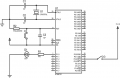
Here is design,
I will test my code on this design. Do I need to connect pull up/pull down resistor at the end of switch ?
upload_2017-7-2_10-3-20.png
 

JohnInTX

Joined Jun 26, 2012
4,787
OK. Hardware first.
If you put a voltmeter on P3.2 and push the switch you will find that you don't get a change in logic levels. That is because the port has internal pull UPs so when the switch is open, the logic value of the pin is '1'. As wired, pressing the switch just connects it to Vdd - another logic '1' so it isn't doing anything. Since the port has a pullup already, all you need to do is connect the switch to GND (Vss) so that you pull the pin low when the button is pressed. Note that you have to write a '1' to the port pin to make it an input.

Your LED won't work as shown. P1 will not source enough current to drive an LED. One characteristic of 8051 class chips is very weak IO drive (not like PICs). This one only drives 60 microamps at 2.4V. Not much. Move the LED to P0. Each of those pins is open-drain and will sink 3.2ma, still louzy but enough to turn on the LED. Note that open-drain means that the pin switches to GND when it turns on. That means you have to turn the LED so that the cathode connects to the port and connect the resistor to Vdd. Then when the port goes low, it completes the circuit to GND. This configuration is called low-side switching and is very common in uC applications. It also means that you have to write a '0' to turn the LED on and a '1' to turn it off.

Software:
The reason my flow chart implements the button as a toggle ( push-on, push-off) is what you are finding out. Pressing the button makes a low-going edge and releasing it makes a high-going edge. But as configured, the interrupt only detects low-going edges. There are two ways to manage this problem 1)use it as push-on/push again for off or 2) once you detect the low going edge and turn the LED on, reconfigure the interrupt to look for a rising edge to turn it OFF.

Skipping ahead:
You are going to find out a couple of things here. 1)Using the interrupt like this is OK for playing around but not a good approach for real-world applications and 2)more importantly, you are going to find that none of it works because you have not debounced the button i.e. pressing a mechanical button generates not one but many close and open cycles. That will play havoc with your overall concept. Search here and Google for 'debounce circuit' for hardware solutions.

I don't like the edge-edge approach. A better way would be to use a periodic timer interrupt to sample the switch, count up when it is closed and down when it is open. When the count goes to some value (a number of milliseconds) the interrupt code knows that the switch has stopped its bouncing and you can turn on the LED.

Welcome to embedded systems design.
 
Top