Gigabyte GA-M68MT-S2 dead board

Thread Starter

lawrence101

Joined Oct 23, 2017
53
Not sure where to post this but anyway as in the title i have a GA-M68MT-S2 computer motherboard that appears to be pretty much dead. There is no video output, no keyboard or mouse response , board has a buzzer no led indicator on it but the front led(s) light up when i press the start button and it sounds like it recognizes the CD rom drive and the cooling fans start up right away.
Ive tried resetting it and using a hard start ( i.e holding down the power button) and ive tried removing and re-installing the cmos battery ( tho i have not tested the battery itself yet ).
Or is this thing hopelessly broken ? Im not a computer tecky.
 
Last edited:
geekoftheweek

Joined Oct 6, 2013
1,429
Unfortunately the cooling fans are directly connected to the power supply or to a main power rail on the motherboard so they are generally not a sign of anything either good or bad other than they are getting power. If the CPU fan is connected to a CPU fan connector and working that may be a sign that at least something is happening, but that also depends on if the fan is capable of speed control or is just a constant on type fan. The CDROM does an initial self test and homing on start up so that really is not a sign of anything either good or bad also.

Does it beep at all? The fact that it does turn on is some indication that things are still working to some extent.

Edit: After some looking around to make sure I remember things correctly I may be wrong on the CDROM self test. The BIOS should do some testing as part of the POST process and it will be towards the end of the testing according to what I have found.
 
Last edited:

Thread Starter

lawrence101

Joined Oct 23, 2017
53
Unfortunately the cooling fans are directly connected to the power supply or to a main power rail on the motherboard so they are generally not a sign of anything either good or bad other than they are getting power. If the CPU fan is connected to a CPU fan connector and working that may be a sign that at least something is happening, but that also depends on if the fan is capable of speed control or is just a constant on type fan. The CDROM does an initial self test and homing on start up so that really is not a sign of anything either good or bad also.

Does it beep at all? The fact that it does turn on is some indication that things are still working to some extent.

Edit: After some looking around to make sure I remember things correctly I may be wrong on the CDROM self test. The BIOS should do some testing as part of the POST process and it will be towards the end of the testing according to what I have found.
Thank you GOTW for replying,
Yes , there is a recurring single click sound every 5 seconds or so, yes the fan has speed control not sure which one , there are two, i'm assuming the smaller fan mounted on top of the CPU heat sink has speed control via a temperature sensor somewhere ?
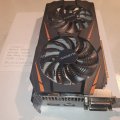
Also the 2 fans on the video graphics card ( a GeForce GTX1060 ) do not come on at all but i did not have the monitor plugged into it , have it plugged into the VGA video output on the motherboard.
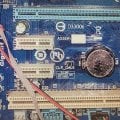
Ive read somewhere that the issue could be a corrupted or damaged BIOS IC , this motherboard has two 8 pin BIOS IC's labelled B BIOS and M BIOS not sure what that means. Also there are two isolated pins near the battery labelled CLR_CMOS , Short to clear CMOS / Open Normal , again i'm not sure what that means ?
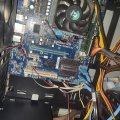
Ive attached some pics of the motherboard
 

Attachments

Last edited:

geekoftheweek

Joined Oct 6, 2013
1,429
The fans on the video card should be controlled by the card itself so I wouldn't expect them to do anything unless you are working the card good.

The pins labelled CLR_CMOS are used to reset the CMOS data to factory settings. You connect the two pins together to reset the CMOS. Normally you can't do anything in the settings that won't make it at least display the BIOS screen on boot so clearing it shouldn't make a difference.

I did at one time have a Gigabyte board with dual BIOS ICs. I believe the M BIOS is the main and B BIOS would be backup. It should automatically switch to the backup if the main fails if I remember correctly (it's been like 20 years since I built that one so I may be a little off on that). It's also very well possible I'm wrong altogether. I found the manual for the board, but it doesn't seem to list any specifics about the BIOS other than describing the various options.

If you have a multimeter I would check voltages at the power connectors to make sure the power supply is still putting out the correct voltage. That would be the only thing I could think of that may possibly be replaceable to make it work again. It should at least beep a code of some variety if the BIOS is making it through POST (power on self test).

Other than that remove the CPU, ram, and video card and see if anything happens. I'm going to guess that it won't change anything, but if there is an issue that is locking down a buss then the BIOS won't be able to do anything and the clicking may be a recurring system reset. I'll admit that is a wild guess based on absolutely nothing.
 

Thread Starter

lawrence101

Joined Oct 23, 2017
53
Tested the outputs from the power supply , all the voltages appear to be there, +5v, +12 v , -12 v and +3.3v , tested the battery and its only reading 2.5 volts , it should 3volts . Will a dead battery prevent POST tho ?
 

geekoftheweek

Joined Oct 6, 2013
1,429
I was kind of wondering about the battery, but thought it really shouldn't cause a problem. I really don't know what to think on that one. It's cheap enough to just give it a try and see.

I am about at my limit though and don't really have any more ideas to offer. I was kind of hoping for a power supply failure, but it looks like all is good there.
 

Thread Starter

lawrence101

Joined Oct 23, 2017
53
I was kind of wondering about the battery, but thought it really shouldn't cause a problem. I really don't know what to think on that one. It's cheap enough to just give it a try and see.

I am about at my limit though and don't really have any more ideas to offer. I was kind of hoping for a power supply failure, but it looks like all is good there.
Nevermind gotw i think the board is gone Kaputnik , while taking more random voltages the whole thing just shut down completely , no fans , no front LEDs , pushing the power button made no difference it would not turn back on.
Disconnected everything and removed the power supply from the case , plugged the power chord back into it turned it on , the cooling fan in the supply came on right away, took some voltage readings on the output cables and everything is fine all the correct voltages are there.
From my on-line search of similar problems , my conclusion is that the motherboard is shot, one or more of the board components have failed ( opened or shorted ) . Noticed too ( earlier) that there were strange unexpected voltage readings on some IC's near the output jacks ( im thinking these are the driver ICs for the video, USB, audio, etc ?), which may explain why none of these are working.
Will salvage whats' still good and trash the motherboard and case , keeping the GTX1060 video/graphics card, memory sticks, fans , CPU heatsink and of course the power supply.
Thanks anyway for your suggestions, appreciated.
 
Last edited:
Top