Drawing lines from centre of circle to its boundary

Thread Starter

zulfi100

Joined Jun 7, 2012
656
Hi,
I want to draw lines from centre of circle to its boundary. First I want to draw lines on one half of the circle. I am using Ellipse function for drawing circle in VC++ which draws a square of diagonal (x1, y1) and (x2, y2).
Rich (BB code):
#define RADEG             57.29577951

#define Cos(a)            (cos((a)/RADEG))
#define Sin(a)             (sin((a)/RADEG))


int x1, y1, x2, y2, i, r, old_xc,old_yc, x,y;
int xc, yc;
x1=170;
y1=300;
x2=70;
y2=400;
pDC->Ellipse(x1,y1,x2,y2);
r= (y2-y1)/2;
old_xc=xc=x2+r;
old_yc=yc=y1+r;

int Angle=360;


x1 = (r) * Cos(Angle) ;
y1 = (r) * Sin(Angle) ;
for(i=0; i<50; ++i) {
x2 = (xc) + ((x1 * Cos(Angle)  - y1 * Sin(Angle)));
y2 = (yc) + ((x1 * Sin(Angle)  + y1 * Cos(Angle)));
pDC->MoveTo(old_xc, old_yc);
pDC->LineTo(x2,y2);
x1=x2;
y1=y2;
}
Some body plz guide me with this problem.

Zulfi.
 

WBahn

Joined Mar 31, 2012
33,218
This isn't making much sense.

You want to draw on a circle, but are using an Ellipse function that draws a square.

Huh?????

Could you provide a sketch, even in Paint, to give us a hint as to what you have and are trying to accomplish?
 

Thread Starter

zulfi100

Joined Jun 7, 2012
656
Hi,
You want to draw on a circle, but are using an Ellipse function that draws a square.
Actually there is no "circle" command in Visual C (VC).Turbo C has. So VC uses "Ellipse" function having four points (x1, y1, x2, y2) where (y1+x2= x1+y2) for circle. This results in a square formed with 2 coordinates and circle lies within the square (Note square is not visible). This is the explantion of Ellipse function if you are not familiar with VC.

My objective is to draw lines from centre of circle to boundary of a circle same thing as the CDC::pie function does but i dont want to use this function because i want to understand the underlying technology.
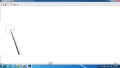
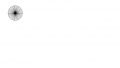
Right now i am using the equations of rotation transformation but its not producing lines within the circle. Lines are crossing the boundary of circle. Also there are only few lines. First of all i want to fill only half circle with lines that's why my loop counter variable is set to 50.

I have attached the output of my program. Sombody plz guide me.

Zulfi.
 

Attachments

MrChips

Joined Oct 2, 2009
35,193
Your code seems very complicated. Why not something such as:

Rich (BB code):
xc = 120;
yc = 350;
r = 50;
n = 50;
pi = 3.14159;

for ( i = 0; i < n; i++)
{
  angle = i * 2 * pi /n;
  x = xc + r*cos(angle);
  y = yc + r*sin(angle);
  MoveTo( xc, yc);
  LineTo( x, y);
}
 

Thread Starter

zulfi100

Joined Jun 7, 2012
656
Hi,
Thanks for your work. I have attached the output. You can see the output that still there is some space between lines. I want to end up this space so that we can observe Moire Effect.

Zulfi.
 

Attachments

Top