Dell Laptop question

Thread Starter

MaxHeadRoom

Joined Jul 18, 2013
30,557
Any users of a Dell Inspiron laptop?
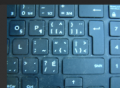
I just inherited one, and some of the KB keys has 3 and up to 5 different symbols. on them
How are these selectively used in use ?
Not really obvious!
 

MrChips

Joined Oct 2, 2009
34,626
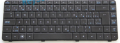
It is possible that you have a multilingual keyboard, for example, suitable for French language users.
You can customize your Windows desktop to allow you to select different keyboards.

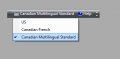
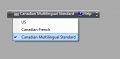
I have this floating menu on my desktop. I switch to Canadian Multilingual Standard keyboard when I need to type in French.

CMS floater.jpg
 

MrChips

Joined Oct 2, 2009
34,626
It looks like Canadian bilingual keyboard to me. It has the same key locations when I switch to Canadian Multilingual Standard keyboard.
Also if you select Canadian French, use right-alt + key to get blue characters.
For example, right-alt 1 gives ±
right-alt m gives µ

1725204606056.png
 

Thread Starter

MaxHeadRoom

Joined Jul 18, 2013
30,557
Not bilingual.
I just need to access ALL the characters on each key that has five, for example.
To the right of the P & L keys!
 

MrChips

Joined Oct 2, 2009
34,626
I can show you what works for me.

With default US keyboard, key and shift+key gives characters shown in white, [ ] { }

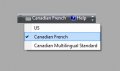
Canadian French selection.jpg

If you select Canadian French,
right-alt+key gives the blue characters, [ ] ~ { }
[ followed by a e i o u gives accented characters â ê î ô û
] followed by c gives accented character ç

right-alt 0 is ¼
right-alt - is ½
right-alt = is ¾


With CMS keyboard

CMS floater.jpg
/ is é
shift / is É
' is è
shift ' is È
\ is à
shift \ is À
] is ç
shift ] is Ç

[ followed by a e i o u gives accented characters â ê î ô û
 

MrChips

Joined Oct 2, 2009
34,626
Note that this is not a keyboard issue. The PC receives the same keycode. It is the keyboard driver conversion from keycode to character that does the translation.
 
Top