Data gateway system Schematic: Looking for Expert Opinions

Thread Starter

tanh

Joined Nov 2, 2024
6
Hi everyone,

I've been working on a new project and I've finished the schematic design. I'm looking for some feedback on the design before I move on to the PCB layout. I am Computer Engineer so that iam quite newbie in schematic design field so

I'm open to any and all feedback!
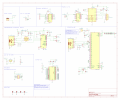
datalogger_schematic_v1-1.pngdatalogger_schematic_v1-1.png
 

Attachments

MrChips

Joined Oct 2, 2009
34,628
Here are my comments.

1) There are two schools of thoughts here. You can draw the schematics with all components connected or you can draw each module as you have done here. I prefer to see everything connected. There is a compromise when the system is very complex. In your case, this is a simple system and I would have drawn them connected.

2) GND symbols should always point downwards.

3) U1 TLV1117LV-3.3 shows C1 and C3 as 22 μF. I would expect the output side to have 100 nF and 10 μF in parallel. Any power rail capacitor above 1 μF will usually be low voltage electrolytic capacitors. Check the manufacturer's recommendations.

4) There should be 100 nF ceramic disc capacitor across the power rails at every IC.

5) You have PWR_FLAG at +5V, +5VP and GND. This is confusing. Remove PWR_FLAG.

6) At the Power Supply +5V input, there should be an electrolytic capacitor, 100 - 470 μF / 16V.

7) C24 at U5 NRST is not necessary. Check the data sheet if there is internal pullup.

8) RESET1 at ESP32 might be unnecessary. You could leave the footprint for the pushbutton. By the same token, look into if you need a RESET at U5 NRST (I have never needed one).

9) SW2 at U5 BOOT0 might be unnecessary. Check datasheet for default state. I have never needed to change default condition.

10) R10, R11 at RXD and TXD are not necessary.

11) RTS and DTR are hardly used any more.

12) Do you really need RS232 interface? This is hardly used.

13) Not sure what you are doing with U3, pin-16, Vpp. I would have to check CP2104 datasheet.

14) I have never used U2 USBLC6-2P6 at USB connection.
 

MisterBill2

Joined Jan 23, 2018
27,164
Without an actual circuit actually displaying the connections it becomes rather a lot of challenge to follow the signal path. And following the signal path is the means toward discovering errors.
Certainly showing the details of the connections is OK for use by an auto-router program designing a PCB. It may even be the preferred format for error checking procedures.
For a human following a data path to understand a system function, that data path should be at least visible, and hopefully obvious. This would be similar to a roadmap used for travel planning, as the purposes are similar.
 
Last edited:

MisterBill2

Joined Jan 23, 2018
27,164
Quite probably, simulating the whole system circuit will require much more capability than the Spice simulator folks using this site have available. Logic simulators are rather different.
 

Thread Starter

tanh

Joined Nov 2, 2024
6
Here are my comments.

1) There are two schools of thoughts here. You can draw the schematics with all components connected or you can draw each module as you have done here. I prefer to see everything connected. There is a compromise when the system is very complex. In your case, this is a simple system and I would have drawn them connected.

2) GND symbols should always point downwards.

3) U1 TLV1117LV-3.3 shows C1 and C3 as 22 μF. I would expect the output side to have 100 nF and 10 μF in parallel. Any power rail capacitor above 1 μF will usually be low voltage electrolytic capacitors. Check the manufacturer's recommendations.

4) There should be 100 nF ceramic disc capacitor across the power rails at every IC.

5) You have PWR_FLAG at +5V, +5VP and GND. This is confusing. Remove PWR_FLAG.

6) At the Power Supply +5V input, there should be an electrolytic capacitor, 100 - 470 μF / 16V.

7) C24 at U5 NRST is not necessary. Check the data sheet if there is internal pullup.

8) RESET1 at ESP32 might be unnecessary. You could leave the footprint for the pushbutton. By the same token, look into if you need a RESET at U5 NRST (I have never needed one).

9) SW2 at U5 BOOT0 might be unnecessary. Check datasheet for default state. I have never needed to change default condition.

10) R10, R11 at RXD and TXD are not necessary.

11) RTS and DTR are hardly used any more.

12) Do you really need RS232 interface? This is hardly used.

13) Not sure what you are doing with U3, pin-16, Vpp. I would have to check CP2104 datasheet.

14) I have never used U2 USBLC6-2P6 at USB connection.
3) manufacturer's recommendations 1uF so should i change to 1uF?
4) Thanks for this advice, this mind help alots
5) because without it Kicad return input power pin not driven by any out put driven pins and i saw the fix in put the flag there
7) Its no internal pullup so i should pullup this right?
12) Yes because i want to recieve data in long distance
10) I saw online they teach that this 2 pins is for debug signal. For serial0
11) I thought it is necessary for load the code by usb. Is it?

thanks for all of your feedbacks. I help a lots
 

MisterBill2

Joined Jan 23, 2018
27,164
Clearly M.C. put a great deal of effort into the examination of the system, and provided a lot of very worthwhile comments. I added to my comments on post #3.
Now I am suggesting that a block diagram linking the individual blocks shown could be a good addition, and serve to verify that nothing has been left out. We often used block diagrams in design team meetings to plot out a new machine, very early in the creation process. These were usually very informal meetings, sometimes the sales person was even invited to participate if some requirements were not explained clearly enough in the sales letter. Revisions on the sketch pad are always cheaper than reworking an assembled system.
 

Thread Starter

tanh

Joined Nov 2, 2024
6
Clearly M.C. put a great deal of effort into the examination of the system, and provided a lot of very worthwhile comments. I added to my comments on post #3.
Now I am suggesting that a block diagram linking the individual blocks shown could be a good addition, and serve to verify that nothing has been left out. We often used block diagrams in design team meetings to plot out a new machine, very early in the creation process. These were usually very informal meetings, sometimes the sales person was even invited to participate if some requirements were not explained clearly enough in the sales letter. Revisions on the sketch pad are always cheaper than reworking an assembled system.
thanks for your advise
 

MrChips

Joined Oct 2, 2009
34,628
MisterBill has made some good advice that unfortunately is too often ignored.

If you are creating a device to be sold, you need to have sales and marketing at the table at an early stage, along with the engineering and manufacturing team. At this point, a block diagram needs to be prepared and presented.

I would go even further. If the end user has to interact with the device, a first step would be to write the User Manual. By doing so, it allows the design team to lay down the operational specifications ahead of any and all engineering design effort.

In any serious product design and development, market research is imperative. A mock up is produced and advertising material created. You may have noticed that with crowd funding projects, engineering design and manufacturing have not begun until the market has been established, subscribed to, and fully financed. That is evidence of a successful marketing strategy.
 

Thread Starter

tanh

Joined Nov 2, 2024
6
Hi everyone,

I've been working on a new project and I've finished the schematic design. I'm looking for some feedback on the design before I move on to the PCB layout. I am Computer Engineer so that iam quite newbie in schematic design field so

I'm open to any and all feedback!
View attachment 334917View attachment 334917
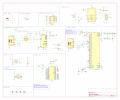
Here's an updated version of the schematic.
I'm open to any and all feedbacks to improve this
 

Attachments

Thread Starter

tanh

Joined Nov 2, 2024
6
MisterBill has made some good advice that unfortunately is too often ignored.

If you are creating a device to be sold, you need to have sales and marketing at the table at an early stage, along with the engineering and manufacturing team. At this point, a block diagram needs to be prepared and presented.

I would go even further. If the end user has to interact with the device, a first step would be to write the User Manual. By doing so, it allows the design team to lay down the operational specifications ahead of any and all engineering design effort.

In any serious product design and development, market research is imperative. A mock up is produced and advertising material created. You may have noticed that with crowd funding projects, engineering design and manufacturing have not begun until the market has been established, subscribed to, and fully financed. That is evidence of a successful marketing strategy.
thanks for sharing this
 

Thread Starter

tanh

Joined Nov 2, 2024
6
Hello everyone,

I've recently completed the schematic design for a new project, incorporating several suggestions from this community. As I'm relatively new to schematic design, I'm looking for additional feedback on both the design and its practical application.

I welcome any and all suggestions!

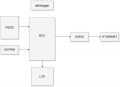
Blockdiagram_datalogger.drawio.pngdatalogger_schematic_V2-1.pngBlockdiagram_datalogger.drawio.png
 

Attachments

Top