connection issues with pickit 2 and MPLAB X IDE

Thread Starter

hunterage2000

Joined May 2, 2010
487
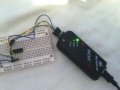
I am new to pic and having trouble getting pickit 2 programmer v2.4 to recognize a link to a p16f690 through a pickit 2 and ICSP. I have wired VPP, VDD, VSS, PGD and PGC from pickit 2 to the pic on a breadboard (attachment 1).

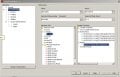
If I try to put the program straight to the chip via "make and program device" I get this error msg (attachment 2).

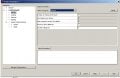
If I "debug program" I get this error msg (attachment 3).

Can anyone help?
 

Attachments

Thread Starter

hunterage2000

Joined May 2, 2010
487
its not a project just config bits and the initializing of portb like this.

Rich (BB code):
#include "p16F690.inc"


 __CONFIG _FOSC_EC & _WDTE_ON & _PWRTE_OFF & _MCLRE_ON & _CP_OFF & _CPD_OFF & _BOREN_ON & _IESO_ON & _FCMEN_ON

status equ 03
portb equ 06
trisb equ 86

RES_VECT  CODE    0x0000            
                 
GOTO START

MAIN_PROG CODE                   

START
BCF STATUS,RP0 ;Bank 0
BCF STATUS,RP1 ;
CLRF PORTB ;Init PORTB
BSF STATUS,RP0 ;Bank 1
MOVLW 0xFF ;Set RB<7:4> as inputs
MOVWF TRISB ;
BCF STATUS,RP0 ;Bank 0
    GOTO $                          ; loop forever

    END
 

t06afre

Joined May 11, 2009
5,934
yes it is somethings with your settings I think. I have used Pickit and your chip many times with MPLAB(X). Is it any reason like using Linux/mac as OS that keep you from using MPLAB and not MPLABX. The Pickit2 can debug your chip. But not without a hardware part named debug header. And this you do not have. I think your problems are related to problems around this
 

MaxHeadRoom

Joined Jul 18, 2013
30,806
If you did not build a project, have you selected the proper PIC in configure and if not supplying 5v from the board, then select supply power from Pickit2.
Also when programming, do you use the Program>Program device from the pull down menu?
OK I see you are using MPLAB X.
Max.
 

ErnieM

Joined Apr 24, 2011
8,415
The PICkit 2 has a nice feature in that you can use the PICkit to troubleshoot the connections.

Open the standalone app and click Troubleshoot under Tools and follow along.

My personal favorite is to swap the clock & data lines. I'm about 50-50 in getting it correct the first time (even on a PCB once).
 

t06afre

Joined May 11, 2009
5,934
Here is a MPLABX project running from folder c:\test\test.x I tested it with a PICKIT2 and a 16f690 chip. And at least on my computet it works. The code can be compiled and the chip programmed. A thing to notice. You can not have the PICKIT2 selected as tool in MPLAB and run the PICKIT2 programmer app at the same time. Before you in the menue select Debug->Disconnect From Debug Tool. Then you can start the PICKIT2 app and use it for programming.
See if this help you in any way
 

Attachments

ErnieM

Joined Apr 24, 2011
8,415
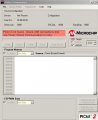
I've only seen the PICkit 2 Programmer say that when I have not plugged the programmer itself in yet.

It's not a PIC problem, it is a PICkit problem. Unless your USB port or cable are broken then I am sorry to say your PICkit has gone off and joined the choir invisible.


Thread Starter

hunterage2000

Joined May 2, 2010
487
ok t06afre I have used your test folder and it has programmed the chip with portb,6 set as 1 so nice one for that. What I dont understand is we used the same code and config setup but when I run mine it says "the programmer could not be started".

Can you go through what configurations you made?
 
Top