Code on other microcontroller not working

Thread Starter

Drk_alien

Joined Feb 28, 2013
14
Hello guys,i am new so, can anyone tell me where i have wrong?.I have a keyboard (PS2) connected to an 16f877a and nokia 3310 display.This circuit is working, when i type a letter is displayed on the display.The problem is when i change the microcontroller to 18f4550, it doesn't happend anything.
To make the code more simple i made some changes.

This is the code:
// LCD module connections
sbit sce at RB7_bit;
sbit res at RB6_bit;
sbit dc1 at RB5_bit;
sbit sdin at RB4_bit;
sbit sclk at RB3_bit;

sbit sce_Direction at TRISB7_bit;
sbit res_Direction at TRISB6_bit;
sbit dc1_Direction at TRISB5_bit;
sbit sdin_Direction at TRISB4_bit;
sbit sclk_Direction at TRISB3_bit;

// End LCD module connections
void clockdata(char bits_in)
{
int bitcnt;
for (bitcnt=8; bitcnt>0; bitcnt--)
{
sclk = 0; //Set Clock Idle level LOW.
if ((bits_in&0x80)==0x80) {sdin=1;} // PCD8544 clocks in theMSb first.
else {sdin=0;}
sclk = 1; //Data is clocked on the rising edge of SCK.
bits_in=bits_in<<1; // Logicalshift data by 1 bit left.
}
}
void writecom(char command_in)
{
dc1 = 0; // Select Command register.
sce = 0; // Select Chip.
clockdata(command_in); // Clock in command bits.
sce = 1; // Deselect Chip.
}
void LCD_set_XY(unsigned char X, unsigned char Y)
{
writecom(0x40|(Y&0x07)); // Y axis
writecom(0x80|(X&0x7f)); // X axis
}


void writedata(unsigned char data_in)
{
dc1 = 1; // Select Data register.
sce = 0; // Select Chip.
clockdata(data_in); // Clock in data bits.
sce = 1; // Deselect Chip.
}


void clearram(void)
{
int ddram;
LCD_set_XY(0,0);

// Cursor Home.
for (ddram=504;ddram>0;ddram--) {writedata(0x00);} // 6*84 = 504 DDRAMaddresses.
}

void LCD_innit()
{
res = 1; // Set _RES HIGH.
sce = 1; // Disable Chip.
res = 0; // Reset the LCD.
Delay_ms(100); // Wait 100ms.
res = 1; // Awake LCD from RESET state.

writecom(0x21); // Activate Chip and H=1.
writecom(0xC2); // Set LCD Voltage to about 7V.
writecom(0x13); // Adjust voltage bias.
writecom(0x20); // Horizontal addressing and H=0.
writecom(0x09); // Activate all segments.
clearram(); // Erase all pixel on the DDRAM.
writecom(0x08); // Blank the Display.
writecom(0x0C); // Display Normal.
LCD_set_XY(0,0); // Cursor Home.

}


void main() {
char *string = "a";
TRISB = 0; // Init PS/2 Keyboard
// gnd = 0;
// vol = 1;
LCD_innit();
LCD_set_XY(0,0);

writedata(0xaf);

}
I'm using pickit 2 clone, and microC pro for pic from MicroElectronika to write the code and compile.

This code works on pic16f877a with 10 mhz oscilator
I have no ideea what i should change to make this work on pif18f4550 (10 mhz) or pic18f2520(16 mhz).

ps: the project is recompiled with this new settings the new microcontroller and new oscilator.
I will be happy if anyone have an ideea...many Thanks
 
Last edited:

Thread Starter

Drk_alien

Joined Feb 28, 2013
14
Now the code is a little bit smaller ...
My bit configuration for pic16f877a is 2F4A (i have no ideea what that means)
For 18f2520 is 0700 1f1f 8300 0085 C00F E00F 400F ( no ideea either )

I use picKit 2 software v2.61

Not all bits can be changed , only few. What should be the new configuration?...
 

tshuck

Joined Oct 18, 2012
3,534
Now the code is a little bit smaller ...
My bit configuration for pic16f877a is 2F4A (i have no ideea what that means)
For 18f2520 is 0700 1f1f 8300 0085 C00F E00F 400F ( no ideea either )

I use picKit 2 software v2.61

Not all bits can be changed , only few. What should be the new configuration?...
Compare your configuration bits and their meanings for the 16F877A from page 146 here, to the configuration bits for the 18F2520 on page 251 here, you'll notice there are many more configuration words in the 18F2520...
 

takao21203

Joined Apr 28, 2012
3,702
The new MPLABX is much better, you can change the configuration bits in the IDE, there is a textual explanation for each line.

Then you have a button to generate code to copy&paste it into a specially designed file: configuration_bits.c

If your code still does not work then it is not watertight for use on different controllers, you have to take it apart, and put it back together step by step, adding means of testing if each step is doing what it should.
 

Thread Starter

Drk_alien

Joined Feb 28, 2013
14
I didn't understood much thing from those pages.
And i didn't manage to change configuration bits from picKit2 software. When i'm loading the hex the bits are changing back.

Doh.....it's frustrating.
 

Thread Starter

Drk_alien

Joined Feb 28, 2013
14
I want to use a more powerful microcontroller becouse i need to create a text file on 16mb SD card and i need mmc libraries....and so on.
I'm stuck with my project ...haha.
 

tshuck

Joined Oct 18, 2012
3,534
I didn't understood much thing from those pages.
And i didn't manage to change configuration bits from picKit2 software. When i'm loading the hex the bits are changing back.

Doh.....it's frustrating.
Those pages describe the way the microcontroller will operate. They control everything from the clock source to the watchdog timer to code-protection. I would suggest becoming familiar with those terms and reading through the Configuration Bits section in the datasheet. From there, you should be able to understand what each bit in the configuration word(s) does.
 

thatoneguy

Joined Feb 19, 2009
6,359
I don't know what your writecom() function does.

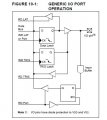
Something that may be breaking your program is that in the PIC16 series, outputs are changed by writing to the Ports directly. On the PIC18 series, you need to write the new outputs into the Latches (LATA, LATB, etc), rather than Port.
 

tshuck

Joined Oct 18, 2012
3,534
I don't know what your writecom() function does.

Something that may be breaking your program is that in the PIC16 series, outputs are changed by writing to the Ports directly. On the PIC18 series, you need to write the new outputs into the Latches (LATA, LATB, etc), rather than Port.
I remember always writing to the PORT register when starting with the 18F. Found this from the datasheet:
Reading the PORTA register reads the status of the
pins, whereas writing to it, will write to the port latch.
So that shouldn't present a problem...
 

takao21203

Joined Apr 28, 2012
3,702
Yes this might be one of the issues, I remember I had to change code here too.

There is no such rule: Always write to PORT, or always write to LATCH.

You have to understand how LATCH and PORT actually work (with different tristate), especially when they are read back and modified by some operations.

Normally, reading is done from the PORT, and writing is done to the LATCH. That is what works best in my experience.
 

Attachments

Thread Starter

Drk_alien

Joined Feb 28, 2013
14
Yep...this was the solution ...using of Latches

regarding to my code...
i had to use this configuration ( LATB7_bit; instead of RB7_bit;)
sbit sce at LATB7_bit;
sbit res at LATB6_bit;
sbit dc1 at LATB5_bit;
sbit sdin at LATB4_bit;
sbit sclk at LATB3_bit;
Thanks a lot...any little idea does great things.

ps: i'm not that good at electronics , i am php programmer but that's one of my passions.
If i will have more time i will study more this domain, but until then...i'm on track.
 

thatoneguy

Joined Feb 19, 2009
6,359
I'd suggest trying to read the datasheet and understanding a bit of it, I know they are long and about as fun ot read as a.. datasheet. However, Microchip Data Sheets cover every aspect of the controller, so they tend to be long, but also answer every question.

If you look at the pinned "Resources for PIC Programmers" which I believe is in the Embedded Systems subforum here, you'll find a link that is an "app note" for migrating designs from mid-range PICs to the PIC18 series, in addition to the latches and config word, some other things changed as well.

The more you work with it, the more sense the datasheet will make, and vice-versa. The datasheet is a lifesaver, especially when you plan to use a hardware peripheral, such as the MMC, or USB onboard.
 

Thread Starter

Drk_alien

Joined Feb 28, 2013
14
I will do so.Thank you very much.;) Great forum, fast answers.
I think i will stay around for a long time.

For sure i will need more help in future.:p
 
Top