CH340C not detected on PC ..#2

Why does the title include "Arduino"? It appears to be a USB to serial module, and nothing to do with Arduino.
There is a tutorial on how to install CH340 drivers here
Perhaps it would be worth following that and then reporting back here with info on at what point it fails.
 
It would help some of us a lot if the TS would provide some description of what that thing that the link is about! I seldom follow links because mostly they are not secure. And often they start sending me advertising that I do not want to get.

What I mean by that is that instead of a link, tell us what the device is called, and what it is supposed to do. And possibly what you have already tried.
I am totally unable to read what is inside other people's minds, unless they tell me.
 
provide some description of what that thing that the link is
I'm not the TS, but I did look at the link earlier today. The page is in German. Earlier today Google translate was working on the page, now it says there's an error translating page.
tell us what the device is called, and what it is supposed to do
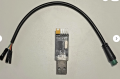
The page description is "Julet M7 5-Pin (Male) Connector Plug Cable Adapter for E-Bike & E-Scooter", but I think that's irrelevant to the USB issue.
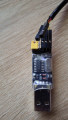
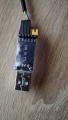
The magnified image of the module is too high zoom to include the whole module, so I chose to not include the whole of the USB plug:
1786203038986.png
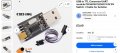
To me it looks like a standard USB to TTL level "RS232" converter. There is no marking on the chip visible in the photo, but the TS said "its the last option" [in the buying options menu] which is:
1786203403809.png
So I think the issue is finding and installing the correct driver for that chip, rather than it being some other issue with the wiring from the pin header to the Julet M7 5-Pin (Male) Connector, which is shown in the TS' opening post.
 

Thread Starter

dimitrissss

Joined Aug 7, 2026
8
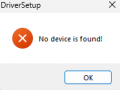
its an adapter so people can connect e scooters on computers so they can modify or make changes and all i want to do is add cruise control and 1kmh start i dont want to make it illegal i tried to download the drivers from sparkfun https://learn.sparkfun.com/tutorials/how-to-install-ch340-drivers/all and it says no device found and when i put it in my computer the device manager makes no changes and i cant find it anywhere but the led light on it still works
 

sagor

Joined Mar 10, 2019
1,053
Is it possible the device is actually defective? Do any of the LEDs on the adapter light up?

I also notice in the other pictures (Ebay, etc.), the USB device is jumpered for 3.3V, your picture shows 5V. That would not affect detection on the PC, but could harm whatever you are plugging the TTL signals into. Verify the TTL level (voltages) your device you are connecting to...
 
Last edited:

Thread Starter

dimitrissss

Joined Aug 7, 2026
8
Is it possible the device is actually defective? Do any of the LEDs on the adapter light up?

I also notice in the other pictures (Ebay, etc.), the USB device is jumpered for 3.3V, your picture shows 5V. That would not affect detection on the PC, but could harm whatever you are plugging the TTL signals into. Verify the TTL level (voltages) your device you are connecting to...
I tried to search how to do the second one but i cant understand it
 

sagor

Joined Mar 10, 2019
1,053
Try removing the jumper from Vcc altogether. Usually the USB adapter will provide both 3.3V and 5V from the USB port power, but many do not have a jumper to Vcc. That is a bit confusing. One would assume that jumper is to set the TTL (RX and TX) output/input levels.

Maybe remove and reinstall the driver as per instructions here:
https://www.phippselectronics.com/s...vmWIjZEOX72zVYSSjJ5jAC9rXmJtkWUwYbUMXLIsEGBYW
 
Last edited:

sagor

Joined Mar 10, 2019
1,053
I would try ericgibbs link. I recall now that for a certain Arduino project with a CH340, the latest drivers did not work properly, but the older versions (2019) did. Eric's link points to the 2019 version.
Unfortunately, Windows Update kept trying to update the 2019 version. There was a "patch" somewhere to prevent that (registry?). I don't recall the details....

EDIT: Found it. Seems there are fake CH340 chips out there and the latest drivers do not work with the fakes. (memories of FTDI???)
Here is a link to explain it, and possible patches:
https://github.com/SHWotever/FakeCH340DriverFixer
 
Last edited:
Top